
Quick Answer: Value Assessment for Beginner and Intermediate Drummers
The Alesis Nitro Max offers a compelling entry point for beginners and a highly functional practice tool for intermediate players, primarily due to its quiet mesh heads and modern sound module. It balances realistic physical feedback with digital learning tools, making it a strong candidate for home practice in space-constrained environments like Singapore apartments.
While beginners will appreciate the intuitive learning features and compact footprint, intermediate players should carefully evaluate the physical pad sizes and dynamic triggering limits. If you require advanced expressive techniques or extensive kit expansion, you may eventually outgrow this setup. However, for consistent, quiet practice on a budget, its core specifications deliver excellent foundational value.
Decoding Pad Configuration and Playing Feel
Mesh heads are highly favored for electronic drums because they mimic the tension and rebound of acoustic drumheads. They also significantly reduce the physical “clack” noise of sticks hitting rubber, which is crucial for keeping peace with neighbors during late-night practice sessions.
Products mentioned in this guide
![Alesis Nitro Max Kit Foldable Electronic Drum Set With Dual Zone Mesh Head Snare Toms Cymbals Kick Pedal Module Drumsticks [LIMITED STOCK]](https://img.lazcdn.com/g/p/b547a4b2e62e79fe5eee647b3c9dfb29.png_400x400q80.png_.webp)
![Alesis Nitro Pro 8-Piece Electronic Drums Kit for Beginners to Advanced Players with Bluetooth [LIMITED STOCK]](https://img.lazcdn.com/g/p/fba2c7c3ade9763f9c88e42370eb61a5.png_400x400q80.png_.webp)
![Alesis Nitro Pro XL 10 Pieces for Beginner to Advanced Players with Bluetooth & Mesh Heads [PREORDER]](https://img.lazcdn.com/g/p/8eaf6f1da9970dead672a06d8d6705c1.png_400x400q80.png_.webp)
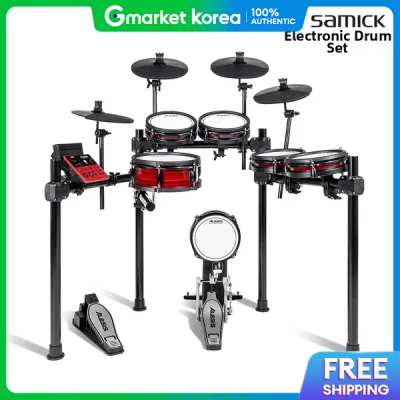
![Alesis Nitro Ultimate 9-piece Electronic Drums Nitro Series Dual Zone Pads and Cymbals [LIMITED STOCK]](https://img.lazcdn.com/g/p/a81ec77eaabd4b1f2eebd961254acd96.jpg_400x400q80.jpg_.webp)
Prices are valid at publication and may change. Please refer to the product page for the latest price.

When evaluating this kit, check the physical dimensions of the snare and tom pads in the manufacturer specifications. A larger dual-zone snare pad allows for more natural stick placement and easier transitions between the center and the rim. Smaller tom pads require higher precision, which can help build accuracy but might feel restrictive if you are accustomed to the wide layout of an acoustic setup.
Verify whether the snare pad supports dual-zone triggering, which allows you to play a standard snare sound and a rimshot. For the cymbals, check the specifications to see if the crash and ride pads feature a choke function, allowing you to stop the sound instantly by grabbing the edge of the cymbal.
Evaluating the Sound Module and Connectivity
The drum module serves as the brain of the kit. Review the manufacturer’s specifications regarding the number of built-in drum kits and individual instrument sounds. Ensure the library covers your preferred musical genres, whether you need classic rock kits, electronic beats, or jazz percussion.
Check the rear panel of the module for essential ports. A USB-MIDI port is vital if you plan to connect the kit to a computer to trigger external drum libraries or record into a digital audio workstation. Look for dedicated stereo outputs to connect to an amplifier, a headphone jack for silent practice, and Bluetooth capability to stream backing tracks from your mobile device.
For structured practice, verify the inclusion of built-in coaching functions. A robust metronome, tempo adjustments, and pre-recorded play-along tracks are excellent tools for developing timing and rhythm. Some packages also include trial subscriptions to interactive learning applications, which you should verify before purchasing.
Assessing Hardware Stability and Pedal Responsiveness
A sturdy rack is essential to prevent the pads from shifting or sagging during intense play. Inspect the material of the rack tubes and the design of the clamps. A four-post rack generally offers better stability than a two-post design, and adjustable clamps allow you to customize the height and angle of each pad to match your physical posture.
Unlike entry-level kits that use simple foot controller pedals for the bass drum, a dedicated kick drum tower with a physical pad provides a much more realistic feel. Verify if the kick pad is wide enough to accommodate a double bass drum pedal if your playing style requires it, as some compact pads only support single pedals.
Check the specifications of the included hi-hat controller and kick pedal. Look for adjustable spring tension and robust construction. A responsive hi-hat pedal should accurately translate your foot movements from fully open to tightly closed, allowing for expressive foot splashes and transitions.
Progression Check: Matching Specs to Your Skill Level
For those starting out, the compact footprint, intuitive module interface, and built-in learning tools are major advantages. The kit provides everything needed to learn basic rudiments and coordination without overwhelming technical complexity.
If you are an intermediate player, you must look closely at the kit’s technical limits. Check if the module supports expansion slots to add an extra cymbal or tom pad later. Verify the level of velocity sensitivity and whether the module supports advanced articulation, as a lack of subtle dynamic response can hinder expressive playing.
Before making a final decision, compare the specifications of the Nitro Max against higher-tier models using these criteria:
- Pad Sizes: Are the snare and toms large enough for your reach and technique?
- Module Expandability: Can you import your own samples via USB, or are you limited to the factory sounds?
- Cymbal Zones: Does the ride cymbal support multi-zone triggering, or is it a single-zone pad?
- Hardware Durability: Is the rack robust enough for heavy daily use, or will you need to upgrade to a heavy-duty stand system?
Frequently Asked Questions (FAQ)
Do I need an external amplifier or headphones to use the Alesis Nitro Max?
Yes, electronic drum kits do not produce acoustic sound on their own. To hear your playing, you must connect either a pair of headphones or an external speaker to the module’s audio outputs. For silent practice, check the module’s headphone jack size to ensure your headphones are compatible. If you want to play out loud, you will need a dedicated electronic drum amplifier connected via the main outputs.
Can I use the Alesis Nitro Max with drum software on my computer?
Yes, you can use the module as a MIDI controller. Verify in the product manual that the module features a USB-MIDI port, which allows you to connect directly to your computer using a standard USB cable. Once connected, you can trigger virtual drum instruments inside your digital audio workstation. To minimize audio delay when playing, check your computer’s audio driver settings and adjust the buffer size to a lower setting.
How much space does the Alesis Nitro Max require in a typical room?
While the exact footprint depends on how widely you angle the rack arms, a typical setup requires an area of approximately 1.2 meters by 1.0 meter. When planning your practice space, remember to account for the physical space needed for your drum throne, the outward swing of your drumsticks, and comfortable leg room for operating the pedals. Check the manufacturer’s official dimensions for the fully assembled rack to ensure a proper fit.

Community discussion
Share your experience or ask a question. Comments are reviewed before publication.