
Choosing your first electronic drum kit often comes down to balancing realistic playability, space constraints, and budget. The Alesis Nitro Mesh and Alesis Turbo Mesh are two of the most prominent entry-level options on the market, both designed to solve the classic drummer’s dilemma: how to practice effectively without disturbing family members or neighbors. While they look similar at a glance, they cater to slightly different priorities. The core difference lies in how they handle the kick drum mechanism and the depth of their sound modules. If you want a traditional physical kick pedal feel and room to expand your setup, the Nitro Mesh is the stronger candidate. If you are constrained by floor space, worried about low-frequency vibrations traveling through apartment floors, or simply want the most straightforward, budget-friendly entry point, the Turbo Mesh is highly compelling.
Comparing Module Features and Sound Libraries
The sound module, often called the “brain” of an electronic drum kit, dictates not only how realistic your drums sound but also how engaging your practice sessions will be. When comparing these two modules, the Nitro module offers a significantly larger sound library and more customization options. It features hundreds of individual drum, percussion, and cymbal sounds organized into dozens of ready-to-play kits, alongside empty slots where you can build and save your own custom configurations. This flexibility is invaluable if you enjoy playing across diverse genres, from jazz to heavy metal, and want to tailor your snare or kick sounds to match.
In contrast, the Turbo module is designed for simplicity and ease of use. It contains a more streamlined selection of sounds and preset kits, focusing on the essential acoustic and electronic drum sounds most beginners need to get started. While it lacks the deep editing capabilities of the Nitro, its straightforward interface is exceptionally user-friendly. You do not have to navigate complex menus to find a clean kit or adjust basic settings, making it an excellent option for younger players or those who prefer a plug-and-play experience without technical distractions.
Products mentioned in this guide
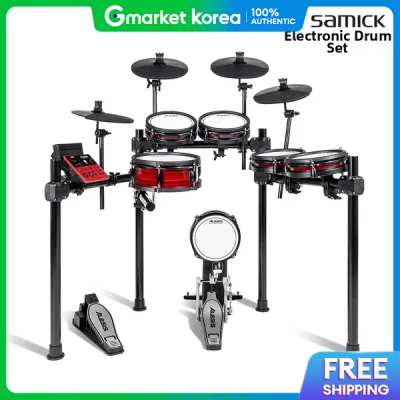
![Alesis Nitro Pro 8-Piece Electronic Drums Kit for Beginners to Advanced Players with Bluetooth [LIMITED STOCK]](https://img.lazcdn.com/g/p/fba2c7c3ade9763f9c88e42370eb61a5.png_400x400q80.png_.webp)
![Alesis Nitro Pro XL 10 Pieces for Beginner to Advanced Players with Bluetooth & Mesh Heads [PREORDER]](https://img.lazcdn.com/g/p/8eaf6f1da9970dead672a06d8d6705c1.png_400x400q80.png_.webp)
Prices are valid at publication and may change. Please refer to the product page for the latest price.
Beyond the sound libraries, the built-in learning tools are crucial for skill development. Both modules include a metronome, play-along tracks, and coaching functions to help you build timing and stamina. However, the Nitro module provides a larger selection of play-along songs and a built-in sequencer that allows you to record your own performances and listen back to identify areas for improvement. When shopping, it is wise to check the physical layout of each module’s buttons and the readability of their displays. The Nitro features a backlit LCD screen that makes navigation straightforward in low-light rooms, while the Turbo relies on a simpler LED display that prioritizes quick, tactile button presses for essential functions.
Evaluating Pad Configuration and Hardware Stability
The physical layout and the feel of the pads directly impact how much you will enjoy practicing and how easily your skills will transfer to an acoustic drum kit. Both the Nitro Mesh and Turbo Mesh feature mesh drum heads on the snare and toms. Mesh heads are widely preferred over traditional rubber pads because they offer a more realistic rebound, can be tension-adjusted with a standard drum key, and generate significantly less acoustic noise when struck. However, a key difference lies in the snare pad functionality. The Nitro Mesh includes a dual-zone snare pad, meaning it can trigger different sounds when you strike the center of the head versus the rim (allowing for rimshots). The Turbo Mesh snare is single-zone, triggering the same sound regardless of where you strike it.

The most critical physical distinction between these two kits is the kick drum mechanism. The Nitro Mesh features a dedicated kick drum tower with a physical bass drum pad and a standard kick pedal. This setup mimics the exact physical response, rebound, and ankle technique required to play an acoustic bass drum. The trade-off is that physical beaters striking a pad create low-frequency vibrations that can easily travel through floors—a major consideration if you live in a high-rise apartment or HDB flat where floor vibration is a concern. The Turbo Mesh addresses this noise concern by using a beaterless foot controller pedal. This electronic switch pedal is much quieter and has a smaller footprint, but it does not replicate the physical feel of a real bass drum pedal, which may require some adjustment when transitioning to an acoustic kit.
The physical racks that support these pads also differ slightly in robust construction and adjustability. Both kits use lightweight aluminum racks, but the Nitro rack is slightly larger and offers more flexibility in terms of height adjustment and pad placement. If you are a taller player, you may find the Nitro rack easier to adjust to a comfortable playing height. Before purchasing, measure your intended practice area. The Turbo Mesh, with its beaterless pedal and slightly more compact rack design, is easier to tuck into a tight corner or fold away when not in use, making it highly suitable for smaller bedrooms or shared living spaces.
Checking Connectivity and Expansion Options
As your drumming skills progress, you may want to connect your kit to external devices or expand the physical setup. Both modules offer standard 3.5mm headphone jacks for silent practice and auxiliary inputs, allowing you to plug in a smartphone or tablet to play along with your favorite songs from streaming services. For connecting to external speakers or amplifiers, both kits feature stereo line outputs, though the Nitro module utilizes standard 1/4-inch jacks that are highly compatible with professional audio gear, while you should verify the specific cable requirements for the Turbo module’s outputs.
For digital integration, both kits feature a USB-MIDI port. This allows you to connect the drum kit directly to a computer, laptop, or tablet. Once connected, you can use the kit as a MIDI controller for digital audio workstations (DAWs) or educational software. This is a fantastic feature for recording your own drum tracks or using interactive learning platforms that provide real-time feedback on your playing accuracy.
Where the Nitro Mesh clearly pulls ahead is in its hardware expansion capabilities. The Nitro module features dedicated input jacks on the rear panel that allow you to add an extra tom pad and an additional crash cymbal pad (often sold as an expansion pack). This means your kit can grow alongside your playing ability. The Turbo module, on the other hand, does not have these extra inputs, meaning you are limited to the standard five-piece pad configuration (snare, three toms, kick) and three cymbals. If you anticipate wanting a double-crash setup or a fourth tom in the future, the Nitro is the logical choice.
Decision Framework: Which Kit Matches Your Goals?
To make the right choice, evaluate your living situation, your long-term musical goals, and your budget.
Choose the Turbo Mesh if:
- You are a complete beginner or purchasing a kit for a younger student, and you want a straightforward, highly accessible entry point.
- You live in a multi-story apartment building or HDB flat where floor vibrations from a physical kick pedal could cause noise complaints from neighbors downstairs.
- You have limited floor space and need a compact kit that is easy to set up, move, or store away.
- You prefer a simple, distraction-free interface that lets you turn on the module and start playing immediately.
Choose the Nitro Mesh if:
- You want a realistic drumming experience that closely mimics the feel of an acoustic kit, particularly the physical rebound of a real bass drum pedal.
- You plan to record music, use advanced module features, or want a wider variety of drum sounds and custom kit options.
- You want a kit that can grow with you, allowing you to add more pads and cymbals as your playing style evolves.
- You are a taller player who requires a slightly more adjustable and robust rack system.
Before making your final decision, verify the exact dimensions of your practice space and check local music retailers for current package deals, which often include essential accessories like a drum throne, headphones, or drumsticks. If floor vibration is a concern for either kit, consider budgeting for a high-density noise-dampening mat to place underneath the rack and pedals.
Frequently Asked Questions (FAQ)
Do I need to buy a separate amplifier for these kits?
No, you do not need an amplifier to use these electronic drum kits. Both the Nitro Mesh and Turbo Mesh are designed primarily for silent practice using standard headphones. To get started, you simply need a pair of headphones with a compatible 3.5mm jack. If you wish to perform for others or play out loud, you can connect the module’s audio outputs to a dedicated drum amplifier, a keyboard amplifier, or a portable PA system. Standard guitar amplifiers are not recommended, as they are not designed to handle the deep low-end frequencies of a bass drum or the crisp high-end of cymbals, which can result in poor sound quality or potential damage to the speaker.
Can I use these kits with drum learning apps or DAWs?
Yes, both kits are fully compatible with popular drum learning applications and digital audio workstations (DAWs) via their built-in USB-MIDI ports. By connecting a standard USB cable from the drum module to your computer, tablet, or smartphone, you can trigger virtual drum instruments or interact with educational software that tracks your hits and timing. Before purchasing any external connection cables or adapters (such as a USB-to-Lightning or USB-to-USB-C adapter for mobile devices), always verify the specific system and hardware requirements of the software or app you plan to use to ensure seamless compatibility.

Community discussion
Share your experience or ask a question. Comments are reviewed before publication.