
Integrating a hardware drum machine into an electronic music production studio or a live DJ booth offers a tactile, immediate way to craft rhythms and drive energy. Unlike software plugins, physical drum machines provide dedicated knobs, pads, and buttons that allow for spontaneous improvisation and precise sound sculpting. To find the ideal unit, you must evaluate how a machine generates its sounds, how its sequencer behaves under pressure, and how easily it synchronizes with external DJ decks, mixers, or digital audio workstations (DAWs). Balancing these technical requirements ensures your hardware remains a reliable creative tool rather than a source of technical friction during a performance or recording session.
Core Features to Evaluate for Electronic Beats and Live Mixing
Analog synthesis uses physical circuitry to generate waveforms, offering warm, punchy, and highly malleable kicks, snares, and hi-hats. This method is highly valued in electronic music for its organic unpredictability and classic tonal characteristics. Digital sampling, on the other hand, relies on pre-recorded audio files, allowing you to load realistic acoustic drums, vocal chops, or synthesized hits. This provides unmatched versatility, though it limits real-time synthesis manipulation to parameters like pitch, decay, and digital filtering. Hybrid engines combine both worlds, utilizing analog circuits for core low-end elements like kick drums while using digital samples for complex high-frequency sounds like cymbals.
The sequencer is the brain of the drum machine, determining how patterns are constructed and manipulated. Traditional step sequencing allows you to program beats on a grid, which is ideal for the precise, repetitive structures of techno, house, and trance. Real-time recording captures the natural human variation of your performance, which is essential for genres like hip-hop or downtempo. Advanced sequencers offer polyrhythmic capabilities, allowing different drum tracks to run at different step lengths (such as a five-step hi-hat pattern over a sixteen-step kick pattern) to create evolving, non-repetitive rhythms. Additionally, probability-based triggering introduces controlled randomness, letting you set the likelihood of a step playing to keep a loop feeling dynamic over long periods.
Products mentioned in this guide
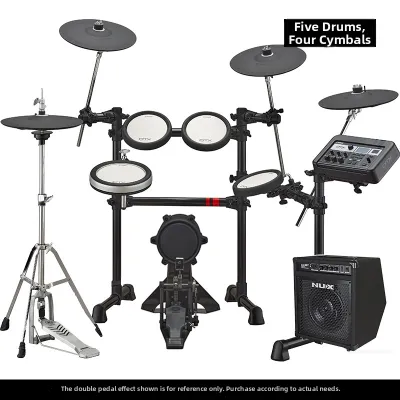
![Yamaha DTX6K3-X Electronic Drums Digital Drum DTX6KX DTX 6K3 X DTX 6K3X DTX6 [LIMITED STOCK]](https://img.lazcdn.com/g/p/eff698a0eedd30e663d759209d4fad53.jpg_400x400q80.jpg_.webp)
Prices are valid at publication and may change. Please refer to the product page for the latest price.
For live DJ mixing and performance, onboard effects are crucial for building tension and executing smooth transitions. High-quality delays and reverbs allow you to wash out a beat before a drop, while built-in filters can sweep away low frequencies to make room for an incoming track from a DJ deck. Performance macros—which map multiple parameters to a single knob or touch strip—enable dramatic, instantaneous sound changes with minimal effort. When evaluating a drum machine, check how easily these effects can be toggled, automated, or bypassed in real time, as menu-diving during a live set can disrupt your performance flow.
Matching Drum Machine Categories to Your Workflow
Selecting the right drum machine depends heavily on where and how you plan to use it. Hardware designs generally fall into three distinct categories, each optimized for specific environments, from isolated studio sound design to high-pressure club environments.

Studio-Centric Production Machines
Studio-centric drum machines prioritize deep sound design, complex arrangement capabilities, and pristine audio quality over immediate, simplified performance controls. These units often feature extensive parameter editing menus, allowing you to sculpt every micro-detail of a drum sound, from the transient click of a kick to the complex frequency modulation of a snare. Because they are designed for a controlled studio environment, they frequently include multi-track sequencing with high-resolution audio outputs, enabling you to route individual drum voices to external mixing consoles or audio interfaces for precise processing. While their deep menu structures and complex workflows can feel overwhelming in a live setting, they offer unparalleled creative depth for producers who prefer to build intricate, polished tracks over long studio sessions.
Performance and Live DJ Grooveboxes
Performance-focused drum machines and live grooveboxes are engineered for immediate, tactile interaction in high-energy environments like DJ booths and live hardware sets. These units feature rugged chassis designs built to withstand the rigors of travel and club use, alongside highly responsive, velocity-sensitive pads for expressive finger drumming. Instead of deep menus, they emphasize dedicated physical controls—such as individual volume faders, mute/solo buttons, and dedicated filter knobs for each track—allowing you to make instant adjustments on the fly. Features like seamless pattern chaining, instant project loading, and temporary parameter locks (which let you wild out on effects and instantly revert to the original sound) are essential for maintaining the momentum of a live mix without missing a beat.
Hybrid and DAW-Integrated Units
Hybrid drum machines and DAW-integrated controllers bridge the gap between physical hardware control and the limitless processing power of computer software. These units function primarily as tactile controllers for dedicated software running on a laptop, offering the physical feel of pads and encoders while leveraging your computer’s CPU for sound generation and effects processing. They typically feature integrated USB audio and MIDI interfaces, allowing for a streamlined single-cable setup that handles both control data and multi-channel audio routing. For producers and DJs who frequently transition between a home studio and mobile setups, hybrid units offer the ultimate flexibility, combining the portability of a controller with the deep editing, massive sample libraries, and automation capabilities of modern music software.
Essential Connectivity and Sync Checks for DJ Hardware Integration
Before integrating a drum machine into your setup, you must carefully evaluate its physical connectivity to ensure it can interface correctly with your existing gear. One of the most critical factors is the audio output configuration. Basic drum machines often feature only a single stereo main output, which mixes all drum sounds internally before sending them to your mixer or interface. While this is sufficient for simple setups, it limits your ability to process individual sounds externally. Higher-end units provide individual physical outputs for separate drum voices, such as dedicated jacks for the kick, snare, and hi-hats. This allows you to route the kick drum to its own channel on a DJ mixer to apply dedicated EQ and compression, while keeping the rest of the drum kit on a separate channel for independent control.
Maintaining perfect synchronization between your drum machine and external DJ gear is essential to prevent beat drift during a live set. Traditional MIDI DIN clock connections remain the industry standard for hardware-to-hardware sync, offering stable, low-latency timing over dedicated five-pin cables. USB MIDI is highly convenient for connecting to laptops and software-based DJ controllers, though it can sometimes introduce slight latency depending on your computer’s buffer settings and operating system. Some manufacturers also utilize proprietary analog sync standards (such as five-volt pulse triggers), which are common on modern analog synthesizers and pocket-sized drum machines. When planning your setup, verify that your DJ mixer, media players, or software can output a compatible master clock signal that your drum machine can reliably follow as a slave device.
Integrating a drum machine into a standard DJ mixer requires careful attention to signal levels and gain staging. Drum machines output line-level signals, meaning they must be connected to the line or auxiliary inputs of your mixer, never to the phono inputs designed for turntables, which can cause severe distortion and potential hardware damage. Because hardware drum machines often have high dynamic ranges, you must carefully adjust the input gain (or trim) on your mixer channel to ensure the signal is strong enough to match your playing tracks without clipping. Additionally, consider your channel allocation: dedicating a full channel of your DJ mixer to the drum machine allows you to use the mixer’s built-in EQs, filters, and channel faders to blend the hardware beats seamlessly with your digital tracks during transitions.
Frequently Asked Questions (FAQ)
Can I plug a drum machine directly into a standard DJ mixer?
Yes, you can connect a drum machine directly to a standard DJ mixer, provided you use the correct inputs and cables. You must connect the drum machine’s audio outputs to a line-level input (often labeled as Line, Aux, or CD) on the mixer using appropriate cables, typically dual quarter-inch TS jacks to dual RCA connectors. Never plug a drum machine into a Phono input, as these channels feature pre-amplifiers designed specifically for the weak signals of vinyl turntables and will cause extreme, unpleasantly distorted audio. Once connected, practice proper gain staging by setting the drum machine’s master volume to a healthy level (usually around 70% to 80%) and adjusting the mixer’s channel gain knob until the signal peaks match the level of your other playing music tracks without entering the red clipping zone.
Do I need an external audio interface to record my drum machine?
Whether you need an external audio interface depends entirely on the specific capabilities of your drum machine. Many modern digital and hybrid drum machines feature built-in USB audio interfaces, allowing them to transmit multi-channel digital audio directly to your computer over a single USB cable without any additional hardware. However, if your drum machine only features traditional analog outputs (such as quarter-inch jacks) and lacks a built-in USB audio interface, you will need a standalone external audio interface to convert those analog signals into digital data for your DAW. When choosing an interface for this purpose, ensure it has enough physical inputs to accommodate either the stereo main outputs or the individual voice outputs of your drum machine, allowing you to record separate tracks simultaneously for cleaner mixing.
Community discussion
Share your experience or ask a question. Comments are reviewed before publication.