
Selecting your first keyboard stand is just as important as choosing the instrument itself. A high-quality stand does more than simply hold your keyboard off the floor; it ensures the safety of your investment, prevents physical strain during long practice sessions, and directly influences how often you sit down to play. For beginners, navigating the variety of options can be overwhelming. The ideal choice depends on your keyboard’s size and weight, your available floor space, and whether you plan to practice seated or standing.
To make an informed decision, you must compare the three primary designs available: X-frame, Z-frame, and table-style stands. Each configuration offers distinct advantages and trade-offs regarding stability, legroom, portability, and cost. By understanding these structural differences, you can select a support system that fits your home environment and supports proper playing technique from day one.
How to Evaluate Keyboard Stands: Core Criteria for Beginners
Before purchasing a keyboard stand, you must evaluate several foundational criteria to ensure the support system matches your specific instrument and practice environment. A mismatch can lead to a frustrating playing experience or, worse, a damaged instrument.
Products mentioned in this guide
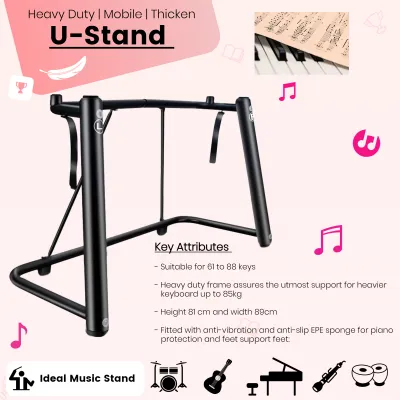
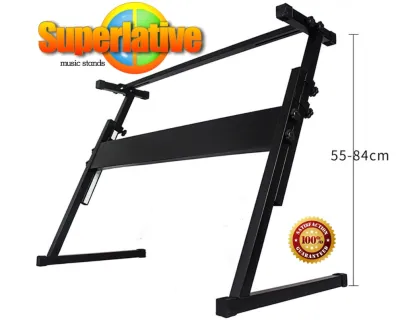
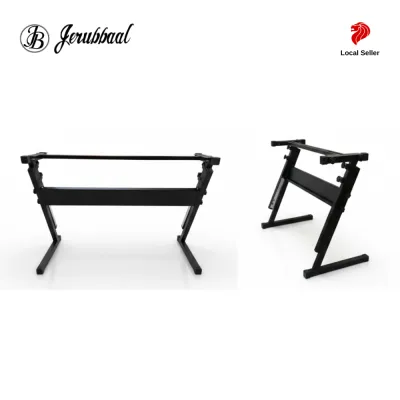
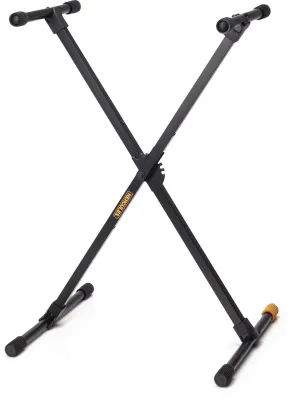
Prices are valid at publication and may change. Please refer to the product page for the latest price.
- Stability and Wobble Resistance: When you play piano, your hands transfer energy to the keys, which in turn transfers to the stand. If a stand is unstable, it will sway or wobble side to side. This movement is highly distracting and can cause the instrument to slide. A wider base footprint generally offers better ground contact and reduces the risk of the stand tipping over during dynamic playing.
- Weight Capacity vs. Keyboard Type: Keyboard instruments vary drastically in weight. A lightweight 61-key synthesizer or arranger keyboard might weigh only 4 to 6 kilograms, whereas an 88-key digital piano with fully weighted hammer-action keys can easily exceed 15 to 25 kilograms. Always check your keyboard's exact specifications in its user manual and verify that the stand's manufacturer-rated weight limit comfortably exceeds that number.
- Legroom and Pedal Clearance: If you plan to practice while seated, your knees and legs need comfortable clearance under the keyboard. A lack of legroom forces you to sit too far back, leading to poor posture and back strain. Furthermore, if you use a sustain pedal or a complete three-pedal board, the stand's base must accommodate these accessories without blocking your feet.
- Height Adjustability and Ergonomics: Proper playing posture requires your elbows to rest at approximately a 90-degree angle when your hands are on the keys, with your wrists remaining neutral. If a stand cannot be adjusted to the correct height relative to your bench, you risk developing repetitive strain injuries. Adjustable stands are also essential if multiple family members of different heights share the instrument.
- Portability and Storage: Consider where you will practice. In space-conscious living environments, such as typical apartments in Singapore, you may need a stand that folds flat so you can store it in a wardrobe or under a bed when not in use. Conversely, if you have a dedicated music corner, a heavier, semi-permanent stand is often more suitable.
X-Frame Stands: Pros, Cons, and Best Use Cases
The X-frame stand is the most common and recognizable support system on the market. Its design features two metal tubes that cross in the center to form an “X” shape, held together by a central bolt. The height is adjusted using a spring-loaded pull-pin or a tooth-and-groove clutch mechanism located at the intersection, which widens or narrows the frame.

The primary advantages of X-frame stands are their affordability and convenience. They are highly budget-friendly, with entry-level models often costing under S$50. They are lightweight, require virtually no initial assembly, and fold completely flat in seconds, making them incredibly easy to transport to music lessons or store away in tight spaces.
However, the scissor-like design introduces significant physical limitations. The most notable drawback is the lack of legroom. Because the metal bars cross directly in the center, they block the space where your knees and shins naturally go when seated. This forces many players to sit at an awkward angle or hunch over the keys. Additionally, as you raise an X-stand to accommodate a standing player, the top support arms move closer together, narrowing the support base and making the setup less stable.
When shopping, you will encounter single-X and double-X variations. Single-X stands utilize a single bar on each side and are best reserved for ultra-lightweight keyboards. Double-X stands feature an additional set of intersecting bars, which significantly increases structural rigidity, reduces lateral wobble, and raises the overall weight capacity.
Ideal Beginner Profile: The X-frame stand is best suited for students using lightweight 61-key or 76-key portable keyboards, players on a strict budget, or those who must pack up and store their equipment after every practice session.
Z-Frame Stands: Pros, Cons, and Best Use Cases
Z-frame stands are named after their Z-shaped side profiles. They consist of a wide, flat bottom base bar, an angled upright pillar, and a top support arm. These components are connected by heavy-duty crossbars that run parallel to the keyboard, creating a highly rigid, rectangular structural frame.
The standout benefit of a Z-frame stand is its exceptional stability. Because the weight of the keyboard is distributed directly down through the solid side pillars, these stands experience virtually zero side-to-side sway, even during enthusiastic, heavy-handed playing. More importantly, the Z-shape leaves the entire space directly beneath the keyboard completely open. This provides unrestricted legroom, allowing you to sit with perfect ergonomic posture and position your sustain pedal exactly where you want it.
These structural benefits do come with a few trade-offs. Z-frame stands are heavier and bulkier than X-frames, and they require a more involved initial assembly process that usually involves securing several bolts with an Allen key. While most Z-stands allow you to adjust both the height and the width to fit different keyboard sizes, they do not fold down flat instantly. Disassembling them for travel takes time and effort.
In terms of cost, Z-frame stands occupy a mid-tier price bracket, typically ranging from S$60 to S$120. While more expensive than basic X-stands, the investment yields a massive upgrade in terms of playing comfort and structural safety.
Ideal Beginner Profile: A Z-frame stand is highly recommended for beginners who are investing in a heavy 88-key weighted digital piano, players who practice seated for long periods, and anyone prioritizing correct posture and pedal technique over portability.
Table-Style Stands: Pros, Cons, and Best Use Cases
Table-style stands, sometimes referred to as platform or four-legged stands, resemble a simple, heavy-duty desk frame. They feature four independent, vertically adjustable legs located at the outer corners, connected by a robust perimeter frame. Many models also feature a rear crossbar or bracing system to maximize structural rigidity.
This four-legged architecture offers the absolute highest level of stability available in a portable design. With the instrument’s weight distributed evenly across four distinct contact points on the floor, table-style stands are virtually immune to wobbling, shaking, or tipping. They provide completely unobstructed space underneath, offering maximum legroom and ample space for large multi-pedal boards, power supplies, and headphone cables. Additionally, their clean, minimalist lines offer a professional, furniture-like look that integrates beautifully into home living rooms.
On the downside, table-style stands are generally the most expensive option, often priced above S$120. They are heavy and have a large physical footprint, requiring a dedicated, permanent space in your home. While many models feature legs that fold inward for occasional transport, they remain bulky and awkward to carry compared to a slim, folded X-stand.
Ideal Beginner Profile: Table-style stands are perfect for beginners who want a permanent, stationary practice setup in their home, those using premium, heavy 88-key digital pianos, and classical piano students who require a rock-solid platform and space for a formal three-pedal assembly.
Side-by-Side Comparison: X vs. Z vs. Table Stands
To help you visualize how these three styles compare across key performance areas, refer to the comparison matrix below.
| Stand Type | Stability Level | Legroom | Portability | Ideal Keyboard Type | Setup Effort |
|---|---|---|---|---|---|
| Single-X Stand | Low to Moderate | Poor | Excellent | 61-key to 76-key lightweight keyboards | Instant (No assembly) |
| Double-X Stand | Moderate | Poor | Very Good | Lightweight 88-key digital pianos | Instant (No assembly) |
| Z-Frame Stand | High | Excellent | Moderate | Heavy 88-key weighted digital pianos | Moderate (Requires tools) |
| Table-Style Stand | Very High | Excellent | Low to Moderate | Premium 88-key digital pianos & synths | Moderate (Initial assembly) |
It is important to remember that the “best” stand is entirely subjective. A lightweight, 5-kilogram keyboard does not require a heavy, expensive table stand, whereas placing a heavy, 20-kilogram digital piano on a flimsy single-X stand is a safety hazard. Always prioritize matching your stand’s weight capacity to your instrument’s physical specifications.
Safe Setup and Ergonomic Adjustments for Your First Stand
Once you have selected and purchased your keyboard stand, taking the time to set it up correctly is vital for protecting your equipment and ensuring your physical comfort.
Pre-Assembly and Floor Checks
Before placing your keyboard onto the stand, inspect all rubber end caps, feet, and non-slip grips. These rubber components serve a dual purpose: they prevent the metal frame from scratching your hardwood, laminate, or tiled floors, and they grip the bottom of your keyboard to prevent it from sliding off. If your floor is slightly uneven, many Z-frame and table-style stands feature adjustable leveling feet that can be screwed in or out to eliminate any rocking.
Verifying the Locking Mechanisms
Always test the locking mechanisms before loading the stand with your instrument. For X-stands, ensure the central spring-loaded pin has fully clicked into its designated slot and the safety knob is tightened. For Z-stands and table-style stands, double-check that all hand knobs, bolts, and collar clamps are securely tightened. Gently press down on the empty stand with your body weight to verify that it will not slip or collapse under pressure.
Cable Management and Safety
To prevent accidents, route all power adapters, headphone cords, and pedal cables away from the stand’s legs and your foot placement area. Loose, dangling cables are a major tripping hazard. If a cable is caught by a passing foot or pet, it can easily pull the entire stand and keyboard over. Use simple velcro straps or cable ties to secure the cords neatly along the metal frame of the stand.
Ergonomic Calibration
Sit on your piano bench or chair with your feet flat on the floor. Have someone help you adjust the height of the stand so that when your fingers rest on the keys, your forearms are parallel to the floor and your elbows form a comfortable 90-degree angle. Your shoulders should remain relaxed, and your wrists should be straight and neutral. Avoid adjusting the stand too high, which forces you to raise your shoulders, or too low, which leads to slouching and back pain.
Frequently Asked Questions (FAQ)
Can I use an X-stand for an 88-key weighted keyboard?
While it is physically possible to place an 88-key weighted keyboard on an X-stand, it is generally not recommended, especially for single-X variants. Weighted keyboards require a firm, stable base because the hammer-action keys encourage more forceful, dynamic playing. The lateral forces generated during fast or loud passages will cause a standard X-stand to wobble significantly, which ruins your playing feel and risks tipping the instrument over. If you must use an X-stand for an 88-key keyboard, ensure it is a heavy-duty, double-braced double-X model with a rated weight capacity that comfortably exceeds your keyboard’s weight.
Do I need a double-X stand instead of a single-X stand?
If you have decided on an X-frame design, choosing a double-X stand is almost always worth the slight increase in price. A single-X stand uses only one bar on each side, making it highly susceptible to side-to-side swaying. A double-X stand adds a second set of crossing metal bars, creating a much stiffer frame that handles weight and lateral movement far better. If your keyboard weighs more than 8 kilograms, or if you plan to play with a dynamic, expressive touch, a double-X stand is essential for safety and stability.
How do I determine the correct height for my keyboard stand?
To find the correct ergonomic height, you must adjust your stand and your bench in tandem. First, sit on your bench with your feet flat on the floor. Your thighs should be roughly parallel to the ground. Next, adjust the height of your keyboard stand so that when you place your hands on the keys, your forearms are parallel to the floor, forming a 90-degree angle at your elbows. Your wrists should remain neutral, not bent excessively upward or downward. If your stand only has fixed height notches (common on X-stands), select the notch that gets you closest to this position, and then fine-tune your posture by slightly adjusting the height of your bench.
Community discussion
Share your experience or ask a question. Comments are reviewed before publication.