
Selecting the right NUX drum tool for electronic music production and DJ mixing requires balancing live tactile performance with studio-based sequencing capabilities. For producers and DJs who need to trigger custom samples, loops, and effects on stage, a compact, multi-pad digital percussion instrument is the most efficient choice. Conversely, for those who want to record expressive, physical drum performances directly into a Digital Audio Workstation (DAW), a full electronic drum kit featuring mesh heads offers superior feedback and realistic playability. Understanding how these different hardware configurations interface with your software is key to building a reliable, low-latency setup.
In compact home studios and vibrant nightlife venues, space and noise management are major factors. A compact NUX drum setup can serve as a space-saving MIDI controller that integrates seamlessly into a DJ booth or a bedroom production desk. By choosing a model with the right combination of physical pads, MIDI connectivity, and onboard sample management, you can bridge the gap between traditional percussion and modern electronic music workflows.
What to Look for in a Drum Pad for Electronic Music and DJing
When evaluating a NUX drum pad or electronic kit for electronic music and DJing, connectivity is the first critical dimension to examine. Traditional MIDI setups rely on standard 5-pin DIN ports to connect directly to hardware synthesizers, samplers, and drum machines without a computer. However, modern computer-based workflows require a robust USB-MIDI connection to send trigger data directly to your DAW or DJ software. Some advanced units also feature USB-audio capabilities, allowing the drum module to function as a dedicated audio interface, which simplifies your cabling setup by routing both audio and MIDI through a single USB cable.
Products mentioned in this guide
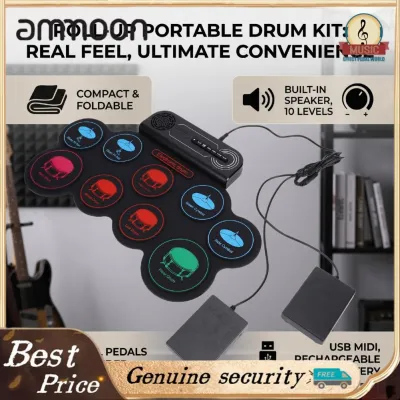
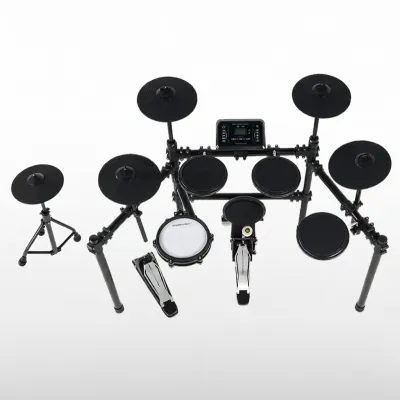
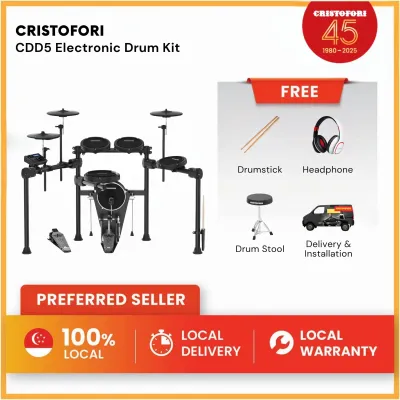
Prices are valid at publication and may change. Please refer to the product page for the latest price.
Velocity sensitivity and aftertouch are equally vital for capturing the dynamics of electronic genres. Electronic music often demands highly consistent, high-velocity hits for kick drums and claps, but expressive genres like future bass, ambient, or organic house require subtle variations in velocity to sound natural. Ensure the pads you choose offer adjustable velocity curves, allowing you to customize how the hardware responds to your playing style. While aftertouch is less common on traditional drum pads, high sensitivity to continuous pressure can be mapped to modulate filters or effects in real-time, adding a unique performance element to your sets.
The choice of pad material significantly influences both playability and acoustic noise levels. Rubber pads are highly durable, provide a firm rebound, and are ideal for fast, precise finger drumming or stick work on compact multi-pads. However, they produce a distinct acoustic impact noise that can carry through walls. Mesh heads, on the other hand, offer a highly realistic acoustic feel with adjustable tension and are exceptionally quiet. This makes mesh-head electronic kits the preferred option for late-night production sessions in high-density housing, such as Singapore’s HDB apartments, where minimizing ambient noise is essential.
Finally, evaluate the sample-loading capabilities and DAW integration of the hardware. For live DJ transitions, you need a device that can store and recall custom WAV samples, loops, and backing tracks directly from internal memory or an external SD card. If the hardware lacks built-in sample storage, it must offer seamless integration with production software, allowing you to map the pads to trigger software samplers with minimal setup time.
How NUX Drum Pads and Electronic Kits Fit into Beat Production
NUX offers two primary categories of electronic percussion gear: standalone digital percussion pads and full-sized electronic drum kits. Each serves a distinct purpose within a music production or DJ workflow, and selecting the right form factor depends on whether your priority is live performance integration or studio-based beat creation.

NUX Digital Percussion Pads and Sample Modules
Standalone multi-pad units, such as the NUX DP-2000, are designed with live performance and DJ integration in mind. These compact devices feature multiple velocity-sensitive pads arranged in a single, portable chassis that can easily sit on a stand next to your DJ decks or on a studio desk. They are exceptionally useful for triggering one-shot samples, vocal drops, transition FX, and continuous loops during a live set, allowing DJs to add a layer of live percussion to their mixing.
Before purchasing, it is crucial to verify the exact sample-import capabilities of the specific NUX drum pad model. Some modules support direct user-sample import via a USB flash drive or a micro SD card, but they often require specific file formats, such as 16-bit or 24-bit WAV files at 44.1 kHz. Utilizing the manufacturer’s dedicated librarian software on your computer is usually the most reliable way to organize, edit, and transfer your custom sample libraries to the hardware.
Another major advantage of these standalone pads is their built-in audio outputs. By routing the physical stereo outputs of the NUX drum module directly into an available channel on your DJ mixer, you can control the volume, EQ, and onboard effects of your drum triggers using the mixer’s channel strip. This hardware-centric routing eliminates the need to run a laptop or an external audio interface on stage, reducing the risk of software latency or connection issues during a live performance.
NUX Electronic Drum Kits with Mesh Heads
For producers who prefer a traditional drumming layout, full-sized electronic kits like the NUX DM-210 or DM-8 offer a highly expressive tool for beat production. These kits feature multi-zone mesh-head snare and tom pads, realistic cymbal pads with choke functions, and dedicated kick pads. This physical layout allows you to record complex, humanized drum patterns that are difficult to program manually using a mouse or a grid controller.
The drum module, or “brain,” of a NUX electronic kit plays a pivotal role in processing your physical hits into digital data. When connected to a computer, the module sends MIDI data over USB, allowing you to trigger high-end software drum libraries, synthesizers, or sampler instruments within your DAW. Some advanced NUX modules also support multi-channel audio output over USB, enabling you to record individual drum elements (such as the kick, snare, and hi-hat) onto separate tracks in your DAW simultaneously for precise mixing and processing.
When integrating a full electronic kit into a home studio, you must carefully consider the physical footprint and ergonomic setup. In space-constrained environments, look for kits with compact, foldable rack systems that can be easily tucked away when not in use. Additionally, ensure the kit can be positioned comfortably alongside your production desk, allowing you to reach both the drum pads and your computer keyboard or mouse without straining.
How to Integrate NUX Pads into Your DAW and DJ Workflow
Integrating your NUX hardware into your software environment requires proper configuration of MIDI mappings, audio drivers, and trigger settings. Taking the time to optimize these parameters ensures a responsive, reliable setup that behaves predictably in both the studio and live venues.
MIDI Mapping for DAWs and DJ Software
To use your NUX drum pad as a controller, you must map its physical pads to the corresponding virtual instruments in your DAW. In Ableton Live, you can easily drag a Drum Rack onto a MIDI track and use the software’s MIDI Map mode to assign each NUX pad to a specific sample slot. In FL Studio, you can route the incoming MIDI notes from the NUX module to trigger channels in the Step Sequencer or pads within the FPC sampler plugin, allowing you to program electronic beats with natural physical dynamics.
For DJs, mapping a NUX drum pad to software like Serato DJ Pro, Rekordbox, or Traktor Pro opens up extensive creative possibilities. You can assign individual pads to trigger hot cues, activate saved loops, or toggle performance effects (such as beat slicers or delays) on the active deck. This allows you to perform live remixes and mashups on the fly, blending the rhythmic precision of a drum pad with your traditional mixing workflow.
Because manual MIDI mapping can be time-consuming, it is highly recommended to save your custom mappings as templates or presets within both your hardware module and your software. Once you have configured the MIDI note numbers on your NUX module to align with your favorite DAW drum racks or DJ software layouts, saving these settings ensures you can plug in and start performing instantly without needing to remap your controls before every session.
Optimizing Latency, Velocity Curves, and Trigger Sensitivity
Achieving a tight, responsive feel when finger drumming or stick playing depends heavily on minimizing audio and MIDI latency. In your DAW’s audio settings, ensure you are using a dedicated, high-performance audio driver, such as an ASIO driver on Windows or CoreAudio on macOS. Lower your audio interface’s buffer size to 64 or 128 samples; this reduces the round-trip latency to under 10 milliseconds, ensuring that the sound plays almost instantly when you strike a pad.
Adjusting the velocity curves on your NUX drum module or within your DAW is also essential for tailoring the hardware’s response to your genre. For electronic music genres like house, techno, or trap, you often want a highly consistent, high-velocity output for kick drums and claps, which can be achieved by choosing a “hard” or “fixed” velocity curve. For more dynamic genres like future garage or lo-fi hip-hop, a “linear” or “soft” curve allows for subtle variations in volume and tone based on how hard you strike the pad.
Finally, fine-tune the trigger settings on the NUX module to eliminate performance errors. Adjust the sensitivity and threshold values so that light taps register consistently without requiring excessive force. Crucially, configure the crosstalk (xtalk) rejection and re-trigger cancel parameters; this prevents vibrations from one pad from accidentally triggering adjacent pads or causing double-triggering during rapid drum rolls.
Limitations to Consider Before Buying a NUX Pad for DJing
While NUX drum pads and electronic kits are excellent tools for rhythmic performance and MIDI triggering, they have distinct limitations compared to dedicated MIDI grid controllers. Traditional drum pads lack the extensive RGB visual feedback and dedicated step-sequencing grids found on controllers like the Novation Launchpad, Ableton Push, or Akai APC series. Without these visual grids, it can be difficult to manage clip launching, monitor track levels, or program step-sequenced patterns visually from the hardware itself.
Additionally, drum pads are designed primarily for percussive, rhythmic play and are not the most efficient tools for melodic composition or complex automation mapping. Playing chord progressions or basslines on a multi-pad layout is far less intuitive than using a MIDI keyboard or a chromatic grid controller. Similarly, the lack of physical faders, rotary encoders, and assignable dials on most drum pads means you cannot easily control mixer volumes, panning, or synthesizer filter sweeps in real-time.
For these reasons, many electronic music producers and DJs opt for a hybrid setup. Combining a NUX drum pad for live percussion and organic beat input with a compact grid controller or keyboard controller for clip launching and melodic sequencing provides the best of both worlds. This hybrid approach allows you to leverage the tactile, physical response of drum pads without sacrificing the deep software control offered by dedicated MIDI controllers.
Before making a purchase, always visit the official NUX website to verify the exact firmware compatibility and software driver support for your operating system. Ensure that the companion editing software is fully compatible with your computer’s OS version, as outdated drivers can lead to connection issues, MIDI dropouts, or limited functionality within modern DAWs and DJ platforms.
Frequently Asked Questions (FAQ)
Can I load my own custom electronic samples into a NUX drum pad?
Yes, but sample-import capability depends entirely on the specific NUX model and module you choose. Some advanced NUX drum pads and modules feature dedicated USB ports or micro SD card slots that allow you to import custom WAV samples. To ensure compatibility, always check the product specifications for user-sample support and use the official NUX librarian software to format and transfer your audio files.
Do NUX drum pads work well for finger drumming in hip-hop and EDM?
NUX multi-pad units with rubber pads are highly suitable for finger drumming due to their firm, responsive rebound and durable construction. However, if you are using a NUX electronic drum kit with mesh heads, you may need to adjust the pad sensitivity and threshold settings in the module. This optimization ensures that light finger taps register accurately and prevents hand fatigue during fast, intricate hi-hat or snare patterns.
How do I reduce MIDI latency when producing beats with a NUX kit?
To minimize MIDI latency, connect your NUX drum module directly to your computer using a high-quality USB cable rather than routing it through an unpowered USB hub or a cheap MIDI-to-USB adapter. In your DAW, select a dedicated ASIO driver (on Windows) or CoreAudio (on macOS) and lower your audio interface’s buffer size to 64 or 128 samples. This configuration ensures a tight, instantaneous response when recording your drum performances.
Community discussion
Share your experience or ask a question. Comments are reviewed before publication.