
When choosing a tool for language acquisition, learners often weigh dedicated hardware like the Besta e-dictionary against competing electronic dictionary brands and smartphone applications. The ideal choice depends heavily on whether you prioritize a distraction-free, offline study environment with licensed publisher databases, or the convenience and lower upfront cost of cloud-connected apps. This guide breaks down the core decision-defining dimensions—hardware usability, dictionary content, study tools, and long-term value—to help you determine which device best supports your specific language learning goals.
For decades, dedicated electronic dictionaries have served as a cornerstone for serious language students, particularly those mastering character-based languages like Chinese, Japanese, or Korean. While modern smartphones offer immediate access to translation apps, they also bring constant notifications, social media alerts, and battery drain. A dedicated device, by contrast, is engineered solely for linguistic study, providing robust offline databases that do not rely on cellular signals or Wi-Fi connectivity.
Understanding how Besta compares to other hardware manufacturers and digital applications requires looking beyond basic translation features. It involves evaluating the depth of the licensed dictionaries, the responsiveness of the physical interface, and the practical integration of study tools like spaced repetition. By analyzing these factors, you can make an informed investment that aligns with your learning style, academic requirements, and budget.
Products mentioned in this guide
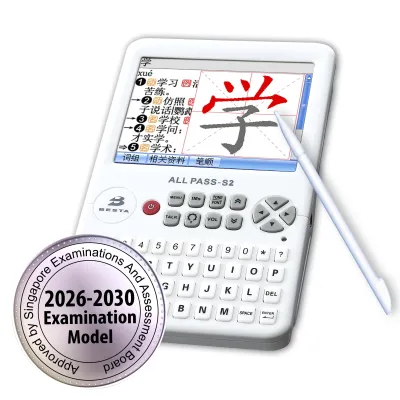
Prices are valid at publication and may change. Please refer to the product page for the latest price.
Evaluating Hardware and Distraction-Free Usability
The physical design of an electronic dictionary directly impacts how comfortably and frequently you will use it during long study sessions. Dedicated e-dictionaries generally feature either liquid crystal displays (LCD) or electronic ink (E-ink) screens. While E-ink screens excel at reducing eye strain and mimicking the appearance of printed paper, they often lack the rapid refresh rates required for fluid stylus input or color-coded stroke order animations. Conversely, color LCD screens provide vibrant multimedia support and fast response times, making them highly suitable for interactive stroke-by-stroke character writing, though they may cause more visual fatigue over several hours of continuous reading.
Input methods represent another critical hardware differentiator between dedicated devices and general-purpose tablets. Many premium e-dictionaries feature physical QWERTY keyboards, which allow for rapid, tactile typing of phonetic inputs like Pinyin or Romaji. This physical keyboard is frequently paired with a touchscreen and an included stylus, enabling you to write complex characters directly onto the screen. This dual-input system is often more precise for character recognition than typing on a glass smartphone screen, where the lack of tactile feedback and stylus precision can slow down your look-up speed.
One of the most significant advantages of a dedicated e-dictionary is the complete absence of digital distractions. Because these devices typically lack web browsers, social media applications, and instant messaging notifications, they foster a focused environment conducive to deep work. When you use a smartphone for translation, a single notification can derail your concentration for several minutes. A dedicated device ensures that your study time remains entirely dedicated to language acquisition, which is particularly beneficial for younger students or those preparing for high-stakes examinations.
Before purchasing, it is essential to check the manufacturer’s specifications regarding portability and power management. Dedicated e-dictionaries are designed to be highly portable, but their weight and dimensions vary depending on the screen size and keyboard layout. Battery life is another vital metric; devices utilizing E-ink or low-power monochrome screens can last for weeks on a single charge, whereas full-color multimedia models may require recharging after a few days of heavy use. Reviewing these specifications ensures the device fits seamlessly into your daily commute or library study routine without requiring constant access to a power outlet.
Comparing Dictionary Content and Offline Capabilities
The true value of any electronic dictionary lies in the authority and depth of its pre-loaded databases. High-quality devices like those from Besta license their content from established, professional publishers, such as Oxford University Press, Merriam-Webster, or authoritative regional language academies. These licensed databases provide precise definitions, grammatical classifications, register indicators, and professionally written example sentences. This contrasts sharply with many free mobile applications that rely on crowdsourced translations or generic, open-source databases, which frequently contain inaccuracies, awkward phrasing, or outdated terminology.

When evaluating different brands, pay close attention to the cross-dictionary jump search functionality. This software feature allows you to highlight any word within a definition or example sentence and instantly look it up across all other installed dictionaries on the device. For instance, if you are reading a definition in a Chinese-English dictionary and encounter an unfamiliar English word, a jump search lets you instantly view that word’s definition in an English-English dictionary without manually retyping it. The speed and fluidity of this cross-referencing capability can dramatically accelerate your reading comprehension and vocabulary acquisition.
Offline capability is another area where dedicated hardware excels over standard mobile apps. While some smartphone apps allow you to download offline packages, these files are often stripped-down versions of the full online database to save storage space on your phone. Dedicated e-dictionaries store their entire, uncompressed databases locally on the device, ensuring instant search results even in areas with poor cellular reception, such as basement classrooms, airplanes, or remote study areas. This reliable offline access ensures that your learning momentum is never interrupted by connectivity issues.
Finally, consider the expandability of the device’s storage and its support for regional language variations. Many dedicated models include an SD card slot or expandable internal memory, allowing you to load specialized glossaries, medical or legal terminology databases, or regional dialect packs. Before buying, verify whether the manufacturer offers downloadable add-ons or if the device is locked to its factory-installed content. This expandability is crucial if you plan to transition from general language learning to professional, domain-specific translation or advanced academic research.
Assessing Built-in Learning and Study Tools
Beyond looking up definitions, a modern e-dictionary should serve as an active learning assistant. Many dedicated devices incorporate spaced repetition systems (SRS) and customizable flashcard tools directly into their operating systems. These tools allow you to save searched words to personalized vocabulary lists with a single tap. The device then schedules these words for review at scientifically optimized intervals, helping you commit them to long-term memory. When comparing devices, check whether you can easily categorize these lists by difficulty, export them for backup, or organize them into specific thematic folders.
Audio pronunciation quality is another critical feature that separates high-tier electronic dictionaries from budget alternatives. Lower-end devices and basic translation apps often rely on computerized text-to-speech (TTS) synthesis, which can sound robotic, unnatural, and sometimes incorrect in its stress patterns or tonal inflections. Premium e-dictionaries frequently feature human-voice recordings for headwords and common phrases, recorded by native speakers in professional studios. Hearing natural intonation, rhythm, and clear phonetic articulation is invaluable for developing accurate pronunciation and listening comprehension.
For learners of character-based languages, handwriting recognition and optical character recognition (OCR) are indispensable tools. When you encounter an unfamiliar character in a printed book, you cannot look it up phonetically if you do not know its pronunciation. A high-quality stylus-based handwriting recognition engine allows you to draw the character on the screen, even if your stroke order is slightly incorrect, and matches it against the database. Some advanced models also feature built-in cameras or scanning wands that use OCR to scan printed text and display definitions instantly, saving you the time of manual input.
Weighing Upfront Cost Against Long-Term Value
Investing in a dedicated electronic dictionary requires a significant upfront financial commitment, with prices often ranging from S$150 to over S$500 depending on the model’s features and database licensing. In contrast, many smartphone translation apps are free to download or cost only a few dollars. However, to access the same level of professional, licensed dictionary databases on a mobile device, you often must pay recurring monthly or annual subscription fees. Over several years of study, these cumulative subscription costs can easily surpass the one-time purchase price of a dedicated hardware device.
Durability and warranty coverage are also critical factors when calculating long-term value. Dedicated e-dictionaries are built to withstand the rigors of daily student life, often featuring clamshell designs that protect the screen from scratches and pressure when stored in a heavy backpack. When evaluating different brands, research the availability of local customer service and warranty terms in your region. A device backed by a reliable local warranty provides peace of mind, ensuring that your investment is protected against hardware malfunctions or manufacturing defects during your years of study.
The overall lifespan and relevance of the device should also influence your decision. Unlike smartphones, which often suffer from battery degradation, software bloat, and planned obsolescence after a few years, a dedicated e-dictionary can remain fully functional and highly relevant for a decade or more. Because the core rules and vocabulary of a language change relatively slowly, the pre-loaded licensed dictionaries will continue to be highly accurate and useful throughout your entire educational journey, making the initial S$ investment highly cost-effective over the long term.
Decision Framework: Which Device Fits Your Study Style?
To finalize your choice, you must align the device’s capabilities with your specific learning environment, study habits, and academic constraints.
You should choose a Besta or similar dedicated e-dictionary if you require a highly focused, distraction-free study environment and need reliable, offline access to premium, licensed bilingual databases. These devices are particularly suited for primary, secondary, or pre-university students who need to build a strong linguistic foundation without the temptations of internet-connected apps, or for those who frequently study in environments where mobile phone use is restricted or impractical.
You should choose a competing hardware brand if your target language requires highly specialized academic glossaries, specific regional dialect databases, or unique input methods that are not supported by Besta’s standard product lineup. Different manufacturers often specialize in different language pairs; for example, some brands focus heavily on Japanese-English databases, while others excel in Chinese-Malay-English resources. Carefully review the pre-loaded dictionary list of each brand to ensure it matches your specific target language and academic level.
You should choose a smartphone or tablet application if you prioritize seamless cloud synchronization across multiple personal devices, prefer a lower upfront S$ cost, and possess the self-discipline to manage digital distractions effectively. Mobile apps are highly convenient for casual learners or travelers who only need quick, occasional translations and do not require the deep, academic-grade cross-referencing and offline reliability of a dedicated hardware device.
Before making any purchase, always verify whether your educational institution, school board, or national testing center permits the use of electronic dictionaries during classes and examinations. Some institutions maintain strict lists of approved models, while others ban all electronic devices entirely. Additionally, test the character-input responsiveness and handwriting recognition of your chosen device or app to ensure it comfortably accommodates your writing style and speed before committing to a purchase.
Frequently Asked Questions (FAQ)
Can I update the dictionaries on a Besta e-dictionary?
Updating the databases on a Besta e-dictionary depends on the specific model and its connectivity features. Many modern models allow you to download firmware updates and additional language packs directly from the manufacturer’s official website using a computer and a USB connection. Some models also support expandable storage via SD cards, allowing you to load compatible third-party dictionaries or specialized glossaries. Always consult the manufacturer’s user manual to verify the exact update procedure and check if certain premium licensed databases require an additional purchase.
Are dedicated e-dictionaries allowed in formal examinations?
Rules regarding electronic devices in formal examinations vary widely by country, school board, and specific subject. While some secondary school or pre-university language examinations permit specific, approved models of electronic dictionaries that lack internet connectivity, many national and international testing boards strictly prohibit all electronic devices to prevent academic dishonesty. You must consult your specific school administration, exam coordinator, or official testing guidelines well in advance of your exam to verify which tools are permitted in the examination hall.
How do I safely clean and maintain the e-dictionary screen?
To maintain the clarity and responsiveness of your e-dictionary screen, you should clean it regularly using a dry, clean, and lint-free microfiber cloth. Gently wipe the screen in circular motions to remove dust, fingerprints, and stylus smudges. Avoid using liquid glass cleaners, household detergents, solvents, or abrasive materials, as these can permanently damage the screen’s anti-glare or oleophobic coatings. If a stubborn smudge requires moisture, apply a tiny amount of distilled water directly to the microfiber cloth rather than spraying it onto the device, and ensure the screen is completely dry before closing the clamshell.

Community discussion
Share your experience or ask a question. Comments are reviewed before publication.