
Selecting the right electronic dictionary can fundamentally shape your language learning journey, especially when balancing deep academic resources against daily convenience. The Besta e-dictionary has long been a staple for serious learners, particularly those focusing on Chinese-English bilingual study, thanks to its dedicated, distraction-free hardware and licensed, authoritative databases. However, as mobile applications and alternative dedicated devices have evolved, the decision is no longer straightforward. To choose the right tool, you must evaluate whether you require the robust, offline-first database structure of a dedicated Besta device, the specialized hardware of competing electronic dictionaries, or the highly portable, cloud-connected ecosystem of modern smartphone apps.
For students preparing for major examinations or professionals translating technical documents, a dedicated device offers a level of focus that a smartphone simply cannot match. By analyzing database depth, input usability, hardware durability, and long-term value, you can identify the exact tool that aligns with your study habits and language goals.
Comparing Dictionary Databases and Content Coverage
The core value of any electronic dictionary lies in its database. Unlike free online translators that rely on crowdsourced or machine-translated glossaries, premium electronic dictionaries like those from Besta typically feature licensed, complete editions of authoritative dictionaries. When comparing devices, verify the exact publishers included in the pre-installed software. Look for established names such as Oxford University Press, Collins, or specialized regional academic publishers. These licensed databases ensure that definitions, grammatical notes, and example sentences are pedagogically sound and accurate.
Products mentioned in this guide
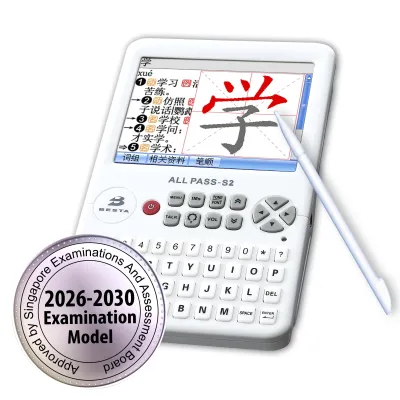
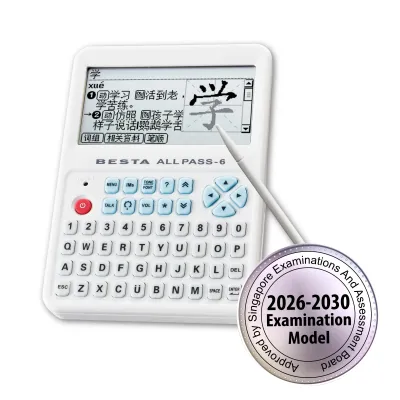
Prices are valid at publication and may change. Please refer to the product page for the latest price.
Offline capability is another critical factor where dedicated electronic dictionaries often outperform general mobile alternatives. A high-quality e-dictionary should store its entire primary database locally on the device, allowing you to look up complex terms without an active internet connection. This is vital in examination halls, remote study areas, or during international travel where data access may be limited or prohibited. Additionally, check if the device supports storage expansion, such as an SD card slot, which allows you to load premium add-on dictionaries or specialized terminology databases as your studies progress.
Furthermore, the breadth of supported language pairs and specialized glossaries can vary significantly between brands. If you are studying a specialized field, look for devices that offer dedicated glossaries for business, medical, legal, or engineering terminology. Before making a purchase, review the product specifications to confirm that the specific language pairs and technical dictionaries you need are pre-installed or officially available for download.
Evaluating Usability and Interactive Learning Tools
A comprehensive database is only useful if you can navigate it quickly and efficiently during active study sessions. Usability begins with the input method. Dedicated electronic dictionaries often feature physical QWERTY keyboards, which provide tactile feedback and allow for rapid typing during long study sessions. However, for logographic languages like Chinese or Japanese, handwriting recognition is an equally critical feature. Evaluate the responsiveness of the stylus and touch screen, ensuring the device can accurately recognize stroke order and cursive inputs. Some modern alternatives also incorporate optical character recognition (OCR) scanning pens, allowing you to scan printed text directly from a textbook for instant translation.

Beyond simple lookups, interactive learning tools can transform a passive reference tool into an active study partner. Many electronic dictionaries include built-in flashcard systems, vocabulary lists, and spaced repetition algorithms designed to help you memorize new words systematically. Look for devices that allow you to easily save search results directly to custom study folders. Audio pronunciation is another essential feature; verify whether the device uses high-quality human voice recordings or synthetic text-to-speech (TTS) engines, as natural intonation and clear pronunciation are crucial for mastering spoken language.
The user interface and screen readability also play a major role in daily usability. A well-designed menu layout should allow you to switch between different dictionaries or search histories with minimal keystrokes. Screen technology is a key consideration here; while backlit color LCD screens are excellent for displaying stroke-order animations and colorful diagrams, they can cause eye strain during extended reading sessions. Conversely, monochrome or e-ink displays offer superior readability in bright sunlight and are much gentler on the eyes, though they may lack the rapid refresh rates needed for smooth menu navigation.
Assessing Hardware, Portability, and Battery Life
The physical design of an electronic dictionary dictates how and where you can use it. If you plan to carry your dictionary daily in a backpack or briefcase, physical dimensions and weight are paramount. A clamshell design is highly popular for dedicated devices because it protects the screen and keyboard from scratches and impacts during transit. Assess the build quality, paying close attention to the hinge mechanism and the durability of the plastics or metals used in the chassis. A flimsy hinge can quickly become a point of failure under the rigors of daily commuting.
Display size and resolution must be balanced against portability. A larger screen allows you to view complete dictionary entries, including multiple definitions and extensive example sentences, without constant scrolling. However, a larger screen also increases the overall footprint of the device. If you prioritize eye comfort for long hours of reading, look for high-resolution displays that render small characters and complex scripts clearly. For logographic characters with high stroke counts, a low-resolution screen can make it difficult to distinguish individual strokes, leading to reading fatigue.
Battery life and power management are equally critical for uninterrupted study. Dedicated electronic dictionaries generally fall into two categories: those powered by built-in rechargeable lithium-ion batteries and those utilizing standard replaceable alkaline batteries (such as AAA). Rechargeable models are highly convenient and can often be powered via standard USB connections, but their overall lifespan is tied to the health of the internal battery. Replaceable battery models, while requiring you to carry spares, offer the advantage of instant power restoration without waiting for a charge cycle, making them highly reliable for travel or exam environments. Always check the manufacturer’s estimated usage hours per charge or battery set to ensure it aligns with your study schedule.
Weighing Price and Long-Term Value
When evaluating the financial aspect of an electronic dictionary, look beyond the initial price tag and consider the long-term value. A dedicated electronic dictionary represents a significant upfront hardware investment, often costing several hundred dollars (sometimes upwards of S$300 to S$500 depending on the model’s features). In contrast, many smartphone dictionary applications are available for a low one-time fee or even as free, ad-supported downloads. However, these mobile apps often require ongoing subscription fees to access premium, authoritative databases, which can accumulate over several years of study to match or exceed the cost of a dedicated device.
The longevity of the hardware and the availability of software support are key components of long-term value. A dedicated e-dictionary is a single-purpose tool built to last for years without the planned obsolescence often associated with smartphones. When choosing a brand, research the manufacturer’s policy on firmware updates and content patches. A device that receives regular updates to its operating system and dictionary databases will remain useful far longer than one abandoned shortly after release. Additionally, check the warranty terms and the availability of local repair services, as a reliable warranty can protect your investment against hardware defects.
Perhaps the most significant value proposition of a dedicated electronic dictionary is the distraction-free learning environment it provides. Smartphones are gateways to social media, instant messaging, and endless notifications, all of which can severely disrupt your cognitive focus during study sessions. By utilizing a dedicated device that lacks web browsers or social apps, you create a physical boundary between study time and leisure time. For many students and parents, the academic benefit of sustained, uninterrupted concentration easily justifies the higher upfront cost of a dedicated electronic dictionary.
Decision Framework: Which Device Fits Your Learning Style?
To finalize your choice, you must match the characteristics of these tools to your personal learning style, academic requirements, and daily environment. There is no single superior option; instead, different configurations excel under different conditions.
You should choose a Besta e-dictionary if your primary goal is dedicated, distraction-free language study with a strong emphasis on authoritative, pre-installed bilingual databases. These devices are ideal for students preparing for formal language examinations where internet-connected devices are strictly prohibited, as well as for learners who find themselves easily distracted by smartphone notifications. The robust offline search capabilities and physical keyboard make it a highly efficient workstation for serious, long-term academic research.
Conversely, you might opt for a competing dedicated device if you require highly specialized hardware features that align with specific regional needs. For instance, some alternative brands specialize in ultra-portable pen-style scanners that excel at rapid reading comprehension, while others offer large e-ink screens designed specifically for extensive reading of classical literature. If your target language requires a highly specialized regional database or a unique input interface not offered by Besta, exploring these alternative dedicated brands is highly recommended.
Finally, a smartphone dictionary application is the most suitable choice if you prioritize maximum portability, lower upfront costs, and the convenience of cloud-synced progress. If you already carry a smartphone everywhere and only need to look up words occasionally during casual conversations or travel, a high-quality app is highly practical. This setup allows you to sync your vocabulary lists across your phone, tablet, and computer, ensuring your study materials are always within reach, provided you have the self-discipline to manage digital distractions.
Before purchasing any dedicated hardware, always perform a final check of the supported language pairs and specific academic glossaries. Ensure that the exact dictionaries required for your curriculum or professional field are fully compatible with the device’s operating system, as buying a premium device only to find your target language is unsupported can be a costly mistake.
Frequently Asked Questions (FAQ)
Can I use a smartphone app instead of a dedicated e-dictionary?
Yes, smartphone apps are highly convenient and often more affordable upfront, but they present distinct trade-offs. While a mobile app allows you to carry your dictionary on a device you already own, it exposes you to constant digital distractions from notifications, messages, and social media. Furthermore, many advanced features and authoritative databases within apps require an active internet connection or ongoing subscription fees. Dedicated e-dictionaries excel by providing a completely offline, distraction-free environment with physical keyboards and pre-installed, licensed academic databases that do not rely on cellular data or Wi-Fi.
How do I update the dictionaries on a dedicated e-dictionary?
The update process varies depending on the specific model and manufacturer of your dedicated electronic dictionary. Standard methods typically include connecting the device to a computer via a USB cable to transfer downloaded update files, inserting an SD card pre-loaded with new content, or using built-in Wi-Fi to download updates directly from the manufacturer’s servers. To ensure compatibility and avoid corrupting your device’s operating system, always visit the manufacturer’s official support page to download authorized firmware updates and verified dictionary databases.
Community discussion
Share your experience or ask a question. Comments are reviewed before publication.