
Evaluating the Creative PX2221 e-dictionary requires a close look at its linguistic databases, hardware usability, and audio capabilities to ensure it aligns with your specific language learning goals. As a dedicated electronic learning tool, this device is designed to offer focused, distraction-free study, but its utility depends heavily on verifying its built-in resources, regional compatibility, and hardware specifications against your academic or professional needs.
Core Dictionary Coverage and Translation Capabilities
To determine if the Creative PX2221 meets your linguistic needs, you must first verify the exact built-in dictionaries and lexical databases preloaded on the device. Because electronic dictionaries vary widely in their licensing, check the product packaging or the official user manual for the specific titles of included monolingual and bilingual dictionaries. Look for established, reputable publishing houses to ensure the definitions, grammatical notes, and example sentences are authoritative and accurate for your target language pairs.
Another critical factor is whether the translation and lookup features operate entirely offline or require an active internet connection. Many learners prefer dedicated e-dictionaries for offline use during exams or in areas with limited connectivity. Review the product specifications to confirm if advanced features, such as sentence translation or cloud-based database queries, depend on Wi-Fi. If offline functionality is your priority, ensure that the core lexical databases are fully stored on the device’s internal memory.
Products mentioned in this guide
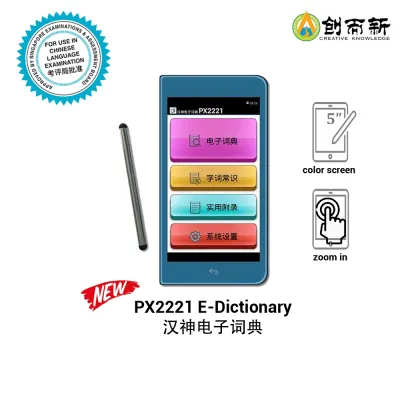
Prices are valid at publication and may change. Please refer to the product page for the latest price.
Additionally, always verify the edition and publication year of the preloaded dictionaries. Language usage evolves, and academic institutions or professional environments often require adherence to contemporary spelling standards and terminology. Checking the copyright dates of the licensed databases in the device’s system settings or product documentation will help you avoid outdated vocabulary and ensure the content aligns with current curriculum standards.
Display, Hardware, and Portability Specifications
The physical design of the Creative PX2221 directly impacts how comfortably you can study during extended sessions. When reviewing the display specifications, pay close attention to the screen size, resolution, and panel type. A higher resolution is particularly important for languages that utilize complex characters, such as Chinese, Japanese, or Arabic, where clear stroke definition prevents eye strain. Look for screen technology that offers adjustable brightness or an anti-glare coating to ensure readability under various lighting conditions.

Input methods are equally vital for lookup speed and overall usability. Evaluate whether the device features a physical keyboard, a touchscreen interface, or a combination of both. If it uses a physical keyboard, check the layout—such as QWERTY or a specialized character input layout—to ensure it matches your typing habits. For touchscreen models, verify if a stylus is included or supported, which can be highly beneficial for handwriting recognition and practicing character stroke order.
To assess the device’s portability and reliability, establish a checklist for battery performance and charging standards. Distinguish between the manufacturer’s listed standby time and the estimated continuous active usage time, as intensive tasks like audio playback or continuous screen backlighting consume more power. Additionally, check the charging interface type; a standard USB-C port is highly desirable for modern compatibility, allowing you to use common cables and power banks while traveling or studying on campus.
Audio Features and Built-in Learning Tools
Accurate pronunciation is a cornerstone of language acquisition, making the audio capabilities of the Creative PX2221 a key area of evaluation. When examining the audio specifications, verify whether the pronunciation files are recorded by native speakers or generated via text-to-speech (sn) synthesis. Native speaker recordings provide natural intonation and rhythm, which are superior for listening practice, whereas text-to-speech is highly useful for reading aloud custom sentences but may sound mechanical.
Beyond simple lookups, explore how the built-in study tools can support your active learning and memorization strategies. Check the user interface for features such as customizable word banks, flashcard functions, and search history logs. These tools allow you to bookmark challenging vocabulary and review it systematically. Understanding how the device organizes these lists—and whether they can be categorized by difficulty or subject—will help you integrate the e-dictionary into your daily study routine.
Finally, consider the audio output options for private study in shared environments like libraries, classrooms, or public transport. Check the device specifications for a standard 3.5mm headphone jack or wireless Bluetooth capabilities. Having reliable private audio options ensures you can practice listening comprehension and pronunciation drills without disturbing those around you, making the device a more versatile companion for daily commutes and study sessions.
Verifying Regional Versions and Firmware Support
Electronic dictionaries are often tailored to specific markets, meaning the Creative PX2221 may exist in several regional variants. Before purchasing, carefully inspect the retail packaging or product listing to identify the regional version and the supported system languages. Some variants may have region-locked features, localized user interfaces, or pre-installed dictionaries that cannot be changed. Ensure the system language and default input methods align with your primary language of instruction.
Long-term usability also depends on the manufacturer’s firmware support and software maintenance policies. Check the official website to see if firmware updates are regularly released to fix software bugs, improve system stability, or update dictionary databases. A device with accessible firmware support ensures that your investment remains functional and secure over years of academic study.
If you encounter conflicting information regarding language encoding, regional power standards, or charger compatibility, stop and consult the retailer or the manufacturer directly before making a purchase. Verifying these details beforehand prevents compatibility issues, ensuring the device charges safely and displays all target language characters correctly without formatting errors.
Frequently Asked Questions (FAQ)
Can I Install Third-Party Dictionaries on the Creative PX2221?
To determine if you can expand the vocabulary of the Creative PX2221, check the official product specifications for custom dictionary support. Some e-dictionaries allow users to load compatible file formats via a microSD card or USB connection, while others are closed systems restricted entirely to the pre-installed databases. Always refer to the manufacturer’s documentation to identify supported file extensions or proprietary expansion options.
Attempting to install unauthorized files or modifying the device’s operating system carries significant risks. Using unsupported dictionary formats can cause system instability, application crashes, or data corruption. Furthermore, attempting to bypass software restrictions or installing unofficial firmware will likely void the manufacturer’s hardware warranty, leaving you without support if the device malfunctions.

Community discussion
Share your experience or ask a question. Comments are reviewed before publication.