
Evaluating an electronic dictionary requires looking beyond the basic description to understand how its specifications translate into daily study habits. This guide breaks down the key features of the PX-2281 Chinese e-dictionary, helping you verify its capabilities against your specific language learning requirements before making a purchase.
Core Dictionary and Vocabulary Specifications
When selecting an electronic dictionary like the PX-2281, the depth of its built-in database is the most critical factor for your progress. You should consult the manufacturer’s official specification sheet to confirm which dictionaries are pre-installed. A robust learning tool typically includes comprehensive Chinese-English and English-Chinese dictionaries, alongside specialized databases for idioms (chengyu) and modern usage.
For learners in Singapore or those targeting international exams, character system support is another essential check. Verify whether the PX-2281 displays both Simplified Chinese characters, which are standard in Singapore schools and professional environments, and Traditional Chinese characters. Having access to both systems ensures you can transition smoothly between different reading materials and regional contexts.
Products mentioned in this guide
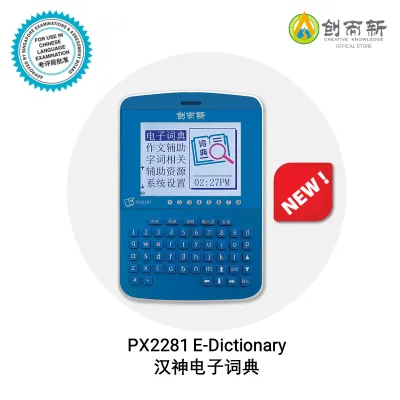
Prices are valid at publication and may change. Please refer to the product page for the latest price.
Additionally, check the product manual to see if the vocabulary database aligns with standardized exam syllabi, such as the HSK (Hanyu Shuiping Kaoshi) levels. An e-dictionary that categorizes words by exam level allows you to build structured vocabulary lists. Confirming these database details beforehand prevents you from outgrowing the device too quickly as your language skills advance.
Input Methods and Search Capabilities
The efficiency of your study sessions depends heavily on how quickly you can look up unfamiliar characters. When evaluating the PX-2281, confirm that the keyboard or interface supports standard Pinyin input with clear tone mark selection. Accurate tone input is vital for narrowing down homophones and finding the exact character you need without scrolling through endless lists.

For characters you encounter in print but do not know how to pronounce, alternative lookup methods are indispensable. Check the device specifications to see if the PX-2281 features a touchscreen with handwriting recognition. If handwriting is not supported, verify if the system allows traditional lookup methods, such as radical search or stroke-count indexing, which are essential backup tools for reading physical books.
You should also verify whether the software supports cross-language queries and multi-word phrase searches. Some entry-level devices only allow single-character lookups, which can make translating complex compound words or idioms frustrating. Checking the search logic in the user guide will help you understand if the device can handle natural, multi-character phrases.
Audio and Pronunciation Features
A reliable electronic dictionary does more than define words; it also guides your spoken language development. When reviewing the audio capabilities of the PX-2281, distinguish between native speaker voice recordings and Text-to-Speech (TTS) synthesis. Native recordings offer natural intonation and rhythm, whereas basic TTS can sometimes sound robotic or mispronounce multi-tonal words.
Next, check whether the audio playback is limited to individual words or if it extends to full example sentences. Hearing how words flow together in a complete sentence is crucial for mastering natural phrasing and sentence-level intonation. This distinction is often detailed in the product’s audio specification section.
To improve your speaking confidence, look for built-in voice recording and playback features. This function allows you to record your own voice and play it back alongside the model audio to identify tonal discrepancies. Verifying the presence of a microphone and comparison software in the PX-2281 specs will confirm if the device supports this active practice method.
Built-in Learning Tools and Study Modes
Beyond quick lookups, an effective e-dictionary should actively support long-term vocabulary retention. Check the PX-2281’s specifications for its custom vocabulary list capacity. The ability to save difficult words into personalized folders makes it much easier to review weak areas before exams or professional presentations.
You should also investigate whether the device includes active study modes, such as built-in flashcards, quiz functions, or spaced repetition systems. These software features automate your review schedule, helping you transition words from short-term memory to long-term recall. Review the user manual to see if these modes are customizable or if they follow a fixed, pre-programmed sequence.
Finally, verify if the device offers supplementary learning resources, such as integrated grammar guides, stroke-order animations, or cultural notes. These extra tools provide valuable context that dictionary definitions alone cannot offer. Checking the product description for these features will help you determine if the device can serve as a standalone study companion.
Hardware, Display, and Usability Checks
The physical design of the PX-2281 directly impacts how comfortable it is to use during extended study sessions. Check the screen size and resolution in the technical specifications to ensure text remains legible, especially when viewing complex Chinese characters with high stroke counts. Additionally, verify if the display features an adjustable backlight, which is essential for studying in low-light environments without straining your eyes.
Power management is another practical consideration for daily use. Review the manufacturer’s specifications regarding the battery type, estimated operating hours per charge, and the charging interface. Devices that use standard rechargeable batteries or common USB connections offer greater convenience when studying on the go or commuting.
Lastly, evaluate the physical input interface, whether it is a physical keyboard, a touchscreen, or a combination of both. A responsive keyboard layout with well-spaced keys prevents typing errors, while a sensitive touchscreen makes handwriting input much smoother. Checking user manuals or product diagrams for these physical details ensures the device will be comfortable for your daily writing and navigation habits.
Frequently Asked Questions (FAQ)
Can the PX-2281 connect to Wi-Fi for dictionary updates?
To verify if the PX-2281 supports wireless updates, check the official specifications for built-in Wi-Fi or Bluetooth connectivity. If the device lacks wireless capabilities, consult the user manual to see if database updates can be performed offline by connecting the device to a computer via a USB cable, or if the pre-installed dictionaries are fixed and cannot be modified.
Does the PX-2281 support other languages besides Chinese and English?
You can determine the full language capabilities of the PX-2281 by reviewing the supported language list in the official product documentation. While designed primarily for Chinese and English, some models may support additional regional languages. Note that accessing these extra databases might require specific firmware versions or separate memory card installations.
How do I reset the PX-2281 if it freezes during a search?
If the device freezes during a search, you can perform a standard soft reset by holding down the power button for several seconds, as outlined in the troubleshooting section of the manual. Before attempting a more comprehensive hard reset, consult the manufacturer’s instructions to verify if restoring factory settings will permanently erase your saved custom vocabulary lists and study history.
Community discussion
Share your experience or ask a question. Comments are reviewed before publication.