
Choosing the right digital drums is one of the most critical decisions you will make when building an electronic music production setup. The choice generally comes down to two distinct hardware categories: a standalone drum machine or a MIDI drum pad controller. Your decision will fundamentally shape how you write beats, perform live, and interact with your musical ideas.
At its core, a drum machine is an independent musical instrument that generates its own sounds and features an internal sequencer to program rhythms. A MIDI drum pad, on the other hand, is a controller that produces no sound on its own; it relies entirely on an external computer, mobile device, or hardware synthesizer to trigger audio. If you prefer a tactile, screen-free workflow and want to perform without a laptop, a drum machine is your ideal partner. If you already work extensively inside a digital audio workstation (DAW) and want access to limitless, high-resolution sample libraries, a MIDI drum pad is the more practical and cost-effective choice.
Core Differences: Standalone Sound vs Software Control
To make an informed purchase, you must understand the underlying architecture of these two digital drums setups. A standalone drum machine contains its own internal sound engine, which can be based on analog synthesis, digital frequency modulation (FM), physical modeling, or sample playback. Because it processes audio internally, you can plug headphones or an audio cable directly into the unit and start creating. The built-in microprocessor handles both the sound generation and the timing of the sequencer, ensuring near-zero latency between pressing a button and hearing the sound.
Products mentioned in this guide
![Yamaha DTX452K Electronic Drums Digital Drum Set DTX-452K DTX 452 K DTX 452K DTX452 [PREORDER]](https://img.lazcdn.com/g/p/af5553ead0032cf1aa86c61dfabcbc22.jpg_400x400q80.jpg_.webp)
![Alesis Nitro Ultimate 9-piece Electronic Drums Nitro Series Dual Zone Pads and Cymbals [LIMITED STOCK]](https://img.lazcdn.com/g/p/a81ec77eaabd4b1f2eebd961254acd96.jpg_400x400q80.jpg_.webp)
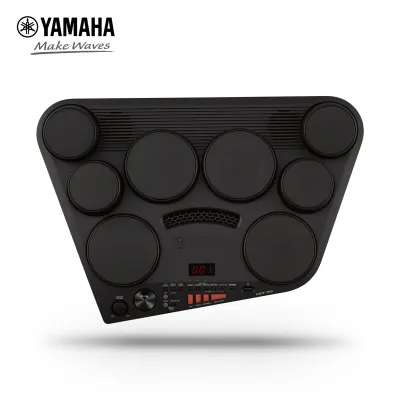
![Yamaha DD75 Digital Percussion Set DD-75 Portable Musical Electronic Instrument DD 75 [PREORDER]](https://img.lazcdn.com/g/p/c2c5758c27b7e76ef28a58fa17673cb1.jpg_400x400q80.jpg_.webp)
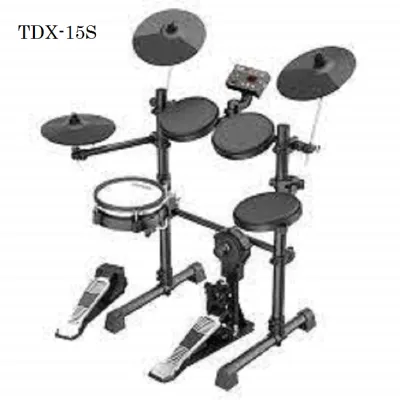
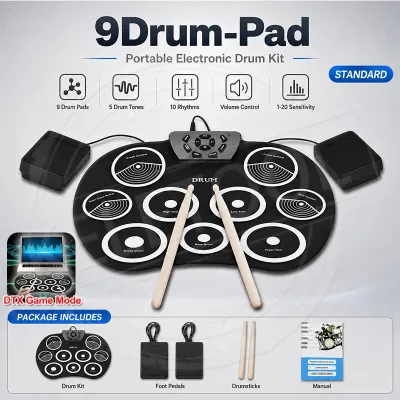
Prices are valid at publication and may change. Please refer to the product page for the latest price.
In contrast, a MIDI drum pad functions as an input device. When you strike a pad, the controller translates the physical force into digital data packets containing note numbers, velocity values, and timing information. This data travels via a USB cable or a traditional MIDI cable to your host device. The host software interprets these messages and triggers a virtual instrument or sample. Because the sound generation happens on your computer, the overall speed and responsiveness of your setup depend heavily on your computer’s processor and your audio interface drivers.
This architectural split also dictates how you manage your studio connections. A drum machine requires dedicated audio inputs on a mixer or audio interface if you want to record its sounds into a computer. A MIDI drum pad simplifies the physical routing because it only requires a single USB connection to transmit control data, leaving your audio interface inputs free for other hardware instruments.
Key Decision Factors for Electronic Music Producers
Every producer has a unique creative rhythm, and the physical interface you choose will directly influence the groove and complexity of your tracks. Evaluating how each device handles physical interaction and sound manipulation will help you pinpoint the right tool for your studio.

Workflow and Tactile Feel
Drum machines are famous for their structured, grid-based sequencing workflows. Most models feature a row of step keys, typically arranged in a 16-step layout, which allows you to program beats visually and systematically. This step-sequencing method is highly effective for genres like techno, house, and electro, where precise, driving rhythms form the foundation of the track. Many hardware drum machines also allow you to chain patterns together into complete songs, allowing you to arrange entire tracks without ever looking at a computer monitor.
MIDI drum pads excel in real-time, expressive performance. They are typically arranged in a grid of velocity-sensitive pads that respond dynamically to the strength of your finger strikes. This layout is perfect for finger drumming, allowing you to capture the natural micro-timing variations and human feel essential for hip-hop, garage, and downtempo beats. Many high-quality MIDI pads also feature polyphonic aftertouch, which lets you modulate parameters like filter cutoff or volume simply by varying the pressure on the pad after you strike it.
When evaluating either device, you should carefully check the manufacturer specifications for pad sensitivity and customization options. High-quality pads allow you to adjust the velocity curves and threshold settings to match your playing style, ensuring that light taps and heavy strikes are registered accurately.
Sound Design and Software Integration
If you choose a drum machine, you are working within a curated, hardware-bound sound environment. While some modern drum machines allow you to import your own WAV samples, you are ultimately limited by the unit’s internal storage capacity and processing power. However, many producers find that these physical limitations spark creativity, forcing them to master the onboard synthesis engines and built-in audio effects to carve out a unique sonic signature.
With a MIDI drum pad, your sound library is virtually infinite. You can trigger multi-gigabyte acoustic drum kits, rare vintage drum machine samples, and cutting-edge synthesizer plugins hosted inside your DAW. Modifying sounds, layering samples, and applying complex chains of software effects is incredibly straightforward when working on a computer screen.
However, this unlimited choice can sometimes lead to decision paralysis. Additionally, using a MIDI controller requires you to verify software compatibility. You must ensure that the controller integrates smoothly with your specific DAW and that the physical knobs, faders, and pads can be easily mapped to your favorite software plugins without tedious manual configuration.
Feature Comparison: What to Check Before You Buy
Before committing to a purchase, it is essential to compare the technical specifications of potential models. You should always download the official user manuals from the manufacturer’s website to verify the exact input and output configurations, as well as any software dependencies.
When calculating your budget, consider the total cost of ownership. While a MIDI drum pad might have a lower initial retail price, you may need to purchase a DAW license, third-party drum plugins, and a dedicated audio interface to achieve low-latency performance. A drum machine is a larger upfront investment, but it functions as a complete, self-contained production environment out of the box.
| Feature | Standalone Drum Machine | MIDI Drum Pad Controller | Verification Needed |
|---|---|---|---|
| Sound Generation | Onboard synthesis, sampling, or hybrid engines | None (requires external software or hardware) | Check manual for synthesis types or included software bundle |
| Sequencing | Built-in hardware step sequencer and pattern memory | Relies on DAW sequencer or software plugins | Verify step count per pattern and song-chaining capabilities |
| Connectivity | Audio outputs (6.35mm), MIDI DIN, sometimes CV/Gate | USB-MIDI, MIDI DIN, expression pedal inputs | Check for dedicated MIDI Out ports if controlling other hardware |
| Power Source | Dedicated DC power adapter or battery power | USB bus power or DC adapter | Verify if the unit can run on USB power alone when connected to a tablet |
| Latency | Near-zero hardware latency | Dependent on computer CPU and audio interface drivers | Check audio interface buffer size settings for optimal response |
How to Choose: Decision Framework
To finalize your decision, evaluate your current studio setup, your performance goals, and how you prefer to interact with technology during the creative process.
Choose a standalone drum machine if:
- You want a screen-free creative experience: If you spend your workday looking at a computer screen, a hardware drum machine offers a welcome break, allowing you to focus entirely on your ears and tactile muscle memory.
- You perform live electronic music: Running a live set without a laptop reduces the risk of software crashes and simplifies your stage setup.
- You enjoy working within creative limitations: Having a fixed set of onboard sounds and tracks can help you finish patterns faster instead of searching through thousands of software samples.
Choose a MIDI drum pad if:
- You are already comfortable inside a DAW: If your production workflow centers around software like Ableton Live, Logic Pro, or FL Studio, a MIDI pad integrates seamlessly into your existing environment.
- You require an endless variety of sounds: If you switch between genres frequently and need access to massive, high-fidelity sample libraries, software-based drum samplers are unmatched.
- You are working with a limited budget: If you already own a capable computer, a MIDI drum pad is the most cost-effective way to add expressive, physical drum programming to your studio.
Verify first if:
- Your computer can handle low-latency audio: If you choose a MIDI pad, ensure your computer meets the system requirements for your DAW and drum plugins, and verify that your audio interface supports stable, low-latency drivers.
- Your existing hardware is compatible: If you plan to connect a drum machine to other synthesizers, verify whether the devices use traditional 5-pin MIDI DIN, TRS MIDI (Type A or Type B), or control voltage (CV/Gate) signals to synchronize their clocks.
Frequently Asked Questions (FAQ)
Can I use a MIDI drum pad without a computer?
Standard MIDI drum pads cannot produce sound on their own because they lack internal sound engines and audio outputs. To use a MIDI pad without a computer, you must connect its physical MIDI Out port to the MIDI In port of a hardware synthesizer, sampler, or sound module. You must also ensure the controller is powered, either via a dedicated DC power adapter or a portable USB power bank. Always check the manufacturer’s specification sheet to confirm if the controller has a standard 5-pin MIDI DIN or TRS MIDI port, as USB-only controllers cannot connect directly to external hardware without a specialized USB MIDI host device.
Do drum machines sound better than software plugins?
Sound quality is determined by digital-to-analog converters (DACs), sample resolution, and the design of the internal synthesis engines rather than the physical form factor of the device. Modern software plugins can easily match or exceed the technical audio specifications of hardware drum machines. However, some hardware drum machines are prized for the unique analog warmth, saturation, or subtle distortion produced by their physical output circuitry. Rather than assuming hardware is inherently superior, you should listen to raw audio demonstrations and check the bit-depth and sample rate specifications of any device or software you are considering.
Community discussion
Share your experience or ask a question. Comments are reviewed before publication.