
Selecting the right Chinese e-dictionary depends heavily on your current language proficiency and how you intend to use the tool. While a beginner needs clear pronunciation guides and stroke-by-stroke writing assistance, an advanced user requires deep classical databases and specialized professional terminology. Matching your tool to your learning stage prevents you from paying for complex features you cannot yet use, or conversely, outgrowing a basic device within a few months.
Evaluating these tools requires looking beyond simple translation features. By understanding the core hardware specifications, software capabilities, and database depths available, you can make an informed investment that actively supports your language acquisition journey.
Core Evaluation Criteria for Any Chinese E-Dictionary
Input methods are the primary way you interact with an e-dictionary, making their accuracy and variety critical. Look for devices that support multi-stroke handwriting recognition, which is essential when you encounter an unfamiliar character and do not know its pronunciation. Optical Character Recognition (OCR) via a built-in camera or scanning pen allows you to scan printed text instantly, which is highly useful for reading physical books or menus. Voice recognition is another helpful feature, but its utility depends on your pronunciation accuracy and the device’s microphone quality. Pinyin input remains the standard for most lookups, so ensure the keyboard layout is comfortable for your typing style.
Products mentioned in this guide
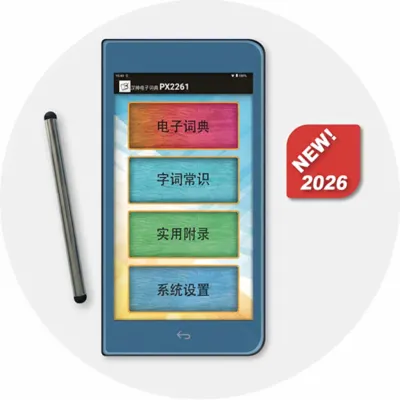
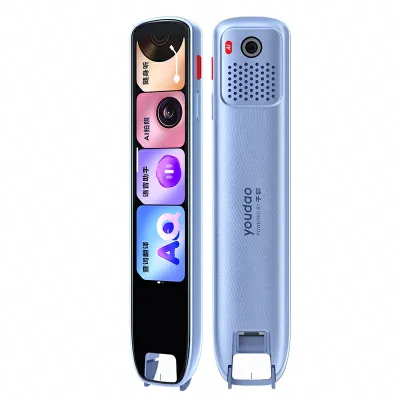
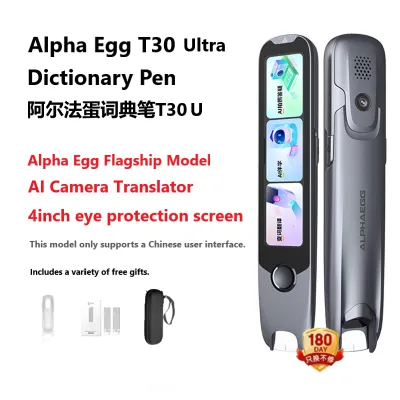


Prices are valid at publication and may change. Please refer to the product page for the latest price.
Screen technology directly impacts eye strain during long study sessions. Dedicated hardware dictionaries often feature either monochrome e-ink displays or color LCD screens. E-ink screens mimic paper, making them exceptionally comfortable for outdoor reading or extended study under bright study lamps, though they have slower refresh rates. Color LCD screens offer vibrant stroke-order animations and faster response times but can cause eye fatigue over time. If you choose an LCD-based device, check for adjustable brightness, blue-light filters, and matte screen protectors to minimize glare.
A reliable e-dictionary must function seamlessly without a constant internet connection. Many high-quality devices store their primary databases locally, allowing you to look up words in areas with poor reception, such as underground transit networks or remote study spots. Cloud-dependent features, such as real-time machine translation or voice-to-text processing, often require a stable Wi-Fi connection. When evaluating a device, verify which databases are fully accessible offline and which require active internet access.
The physical construction of a dedicated e-dictionary determines its longevity. Look for robust hinges on clamshell models and scratch-resistant glass on scanning pens. Battery life varies significantly; e-ink devices can last for weeks on a single charge, whereas color touchscreen models may require daily charging. Additionally, check the manufacturer’s warranty terms and the availability of local customer support, especially if you are investing in a premium device costing upwards of S$200.
Essential Features for Beginners
For those starting their Mandarin journey, mastering the four tones is the most critical hurdle. A beginner-friendly e-dictionary must offer high-quality, native-speaker audio recordings rather than robotic text-to-speech synthesis. Clear tone indicators above Pinyin syllables help train your ear and voice simultaneously. Some advanced beginner models even include pronunciation comparison tools, which record your voice and compare it to a native speaker’s waveform to highlight tonal errors.

Learning to write Chinese characters requires understanding the correct stroke order and identifying radical components. Look for devices that provide step-by-step stroke animations, showing exactly where to start and finish each line. Radical breakdowns are equally important, as they teach you the building blocks of Chinese characters, making it easier to memorize complex structures and look up unfamiliar words in traditional paper dictionaries later on.
Retaining vocabulary requires consistent review, and built-in flashcard systems are invaluable for this purpose. Look for e-dictionaries that incorporate spaced repetition algorithms, which automatically schedule reviews of difficult words just as you are about to forget them. The ability to categorize saved words into custom folders—such as “daily vocabulary” or “examination prep”—helps keep your study sessions organized and targeted.
A cluttered or overly complex interface can quickly discourage a new learner. Beginners should prioritize devices with clean layouts, large fonts, and intuitive navigation menus. The search results should display the most common definitions first, avoiding obscure literary meanings that might cause confusion. Having a dedicated home button and simple back navigation ensures you never get lost in deep sub-menus.
Crucial Capabilities for Intermediate Learners
As you transition from memorizing single words to constructing complex sentences, understanding context becomes paramount. Intermediate learners need an e-dictionary that provides extensive example sentences and common collocations. These examples demonstrate how words function grammatically and which prepositions or measure words pair with them. Look for databases that offer bilingual example sentences so you can verify your understanding of nuanced terms.
Reading physical texts, such as newspapers, novels, or restaurant menus, is a major milestone for intermediate students. An e-dictionary with a built-in scanning pen or a high-resolution camera lookup feature allows you to translate printed characters on the spot. This eliminates the tedious process of manually drawing unfamiliar characters, keeping your reading flow intact and making self-study far more enjoyable.
Mandarin is rich in synonyms that have subtle differences in usage, formality, or emotional coloring. Intermediate tools should include dedicated word differentiation sections that compare similar terms side-by-side. For instance, understanding when to use “满足” (mǎnzú) versus “满意” (mǎnyì) requires clear explanations of their grammatical roles and typical contexts, which basic dictionaries often omit.
Your e-dictionary should not be an isolated island; it needs to integrate with your broader digital study ecosystem. Look for devices and applications that allow you to export your saved vocabulary lists in standard formats like CSV or TXT. This compatibility enables you to import your word lists directly into popular external flashcard applications, allowing you to customize your study routine across multiple devices.
Advanced Tools for Fluent and Professional Use
Advanced learners, academic researchers, and working professionals frequently encounter classical Chinese (Wenyanwen) and four-character idioms (Chengyu). A professional-grade e-dictionary must feature comprehensive idiom databases that explain the historical stories and metaphorical meanings behind these expressions. Support for classical Chinese dictionaries is also essential for translating historical texts, poetry, and formal legal or administrative documents.
General-purpose dictionaries often fall short when dealing with specialized professional fields. If you use Mandarin for business, law, medicine, or engineering, look for devices that support expandable storage or allow you to install specialized terminology databases. These professional add-ons ensure you have access to precise translations of technical terms, which is crucial for maintaining accuracy in professional correspondence and technical translations.
To truly master Chinese characters, understanding their historical evolution from oracle bone script to modern simplified forms is incredibly helpful. Advanced dictionaries often provide deep etymological details, explaining the phonetic and semantic origins of characters. Furthermore, robust cross-referencing capabilities allow you to jump instantly between related characters, synonyms, and antonyms with a single tap, facilitating deep linguistic research.
Scanning dense pages of academic journals or legal contracts requires a device with a powerful processor and ample RAM. Lagging or slow rendering can severely disrupt your workflow when processing large volumes of text. Look for high-performance hardware specifications that ensure instantaneous page turns, rapid OCR processing, and smooth scrolling through lengthy dictionary entries.
Building Your Shortlist: Form Factor and Ecosystem
Dedicated e-dictionaries and scanning pens offer a distraction-free environment that is highly conducive to deep focus. Without social media notifications or incoming emails, you can dedicate your full attention to studying. These devices often feature physical buttons for quick navigation and are built to withstand daily use in classrooms or libraries. In Singapore, certain dedicated models are approved by the Singapore Examinations and Assessment Board (SEAB) for use in national examinations, making them a necessary investment for secondary school students.
Mobile apps offer unmatched portability and convenience, as they reside on a device you already carry everywhere. They frequently receive over-the-air database updates, ensuring you always have access to the latest vocabulary and slang. Many premium apps offer subscription models that unlock advanced dictionaries, stroke order animations, and cloud syncing across your phone, tablet, and computer.
If you perform most of your reading and translation work on a computer, browser extensions and desktop software are indispensable. These tools allow you to hover your cursor over unfamiliar characters on web pages or PDFs to reveal instant pop-up translations. They are ideal for digital professionals, translators, and students who analyze online news articles, academic papers, or corporate reports.
Before making a purchase, carefully verify the device’s compatibility with your existing operating systems and digital accounts. Check for regional content restrictions, as some dictionary databases may only be licensed for use in specific countries. Additionally, consider the long-term costs associated with your chosen tool, such as ongoing subscription fees for premium app features or the cost of purchasing additional hardware accessories and database cards.
Frequently Asked Questions (FAQ)
Do I need a dedicated hardware e-dictionary instead of a smartphone app?
Whether you need a dedicated hardware device depends on your study environment and goals. Dedicated hardware is highly recommended for students preparing for formal examinations, as mobile phones are strictly prohibited in exam halls. These devices also eliminate digital distractions, helping you maintain focus during intensive study sessions. On the other hand, smartphone apps are highly cost-effective, offer frequent database updates, and are incredibly convenient for casual learners or travelers who prefer not to carry an extra device. If your budget allows and you require a focused, exam-compliant tool, a dedicated hardware dictionary is a worthwhile investment; otherwise, a premium mobile app will likely suffice.
How do I update the dictionary databases on my device?
Updating your e-dictionary’s database ensures you have access to the most accurate definitions and newly coined terms. For dedicated hardware devices, updates are typically performed by connecting the device to Wi-Fi and checking for system updates in the settings menu, or by connecting it to a computer via USB to download files from the manufacturer’s official website. Some older models may require inserting an updated SD card containing the new databases. For smartphone applications, updates are managed directly through your device’s app store. Always use official manufacturer channels to download updates to avoid corrupting your device’s software or installing unauthorized files.
Can I use a standard Chinese e-dictionary for other dialects like Cantonese?
Standard Chinese e-dictionaries are designed primarily for Mandarin (Putonghua), utilizing Pinyin for phonetic input and standard Mandarin audio recordings. If you are studying Cantonese or other regional dialects like Hokkien, a standard Mandarin e-dictionary will have limited utility. While the written characters are often shared, the pronunciation, colloquial vocabulary, and grammar differ significantly. To study dialects, you should look for specialized dictionary applications or hardware models that explicitly list support for Cantonese Jyutping input, dialect-specific audio pronunciations, and localized vocabulary databases in their product specifications.

Community discussion
Share your experience or ask a question. Comments are reviewed before publication.