
Selecting the right tool for language acquisition can dramatically shape your fluency trajectory, retention rate, and overall study efficiency. While smartphones and tablets offer access to endless software, a dedicated e dictionary besta remains a highly valued device for serious language learners, students, and bilingual professionals. These dedicated devices eliminate digital distractions, offer robust physical keyboards, and provide licensed, authoritative dictionary databases that operate entirely offline. However, choosing the perfect model requires a clear understanding of how different hardware specifications, preloaded databases, and input interfaces align with your current proficiency level and ultimate learning goals.
To make an informed decision, you must evaluate whether you need a device primarily for academic examinations, daily conversational practice, or high-level professional translation. Different models cater to these distinct paths with varying screen technologies, database sizes, and input methods. By matching your specific learning stage with the corresponding technical features, you can avoid overpaying for specialized professional databases you do not need, or conversely, buying a basic model that you will quickly outgrow as your vocabulary expands.
Assessing Your Language Level and Learning Goals
Before browsing through technical specifications, you must define where you currently stand on the language proficiency spectrum. Language learning is a multi-year journey, and the tools you require during your first few months of study differ vastly from those needed when translating complex legal or technical documents. A beginner typically requires immediate, clear phonetic guidance, simple bilingual definitions, and visual aids to build a foundational vocabulary. At this stage, a highly complex device with multiple specialized technical glossaries can actually hinder progress by cluttering search results with obscure, low-frequency definitions.
Products mentioned in this guide
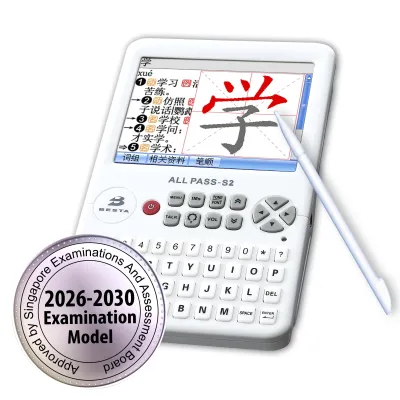
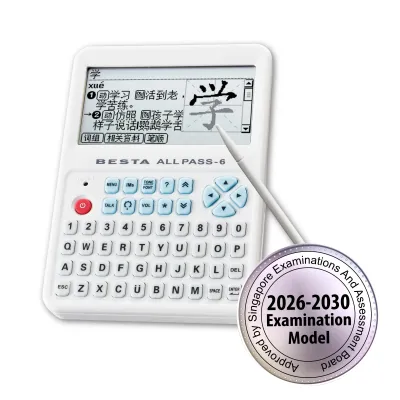
Prices are valid at publication and may change. Please refer to the product page for the latest price.
As you transition into an intermediate learner, your focus shifts from single-word translation to sentence structure, context, and natural expression. Intermediate students, particularly those preparing for standardized national examinations or language proficiency tests, need comprehensive grammar explanations, verb conjugation tables, and extensive idiom databases. For these users, the dictionary must serve as an active study partner rather than a simple vocabulary list. The inclusion of learning suites, study history, and interactive quizzes becomes a major factor in reinforcing daily lessons and tracking progress over time.
Advanced learners and working professionals require an entirely different level of depth and accuracy. At this level, you are no longer just looking up common words; you are analyzing subtle differences between synonyms, reading dense academic texts, or translating industry-specific terminology in fields like medicine, law, or engineering. An advanced user needs access to multiple authoritative monolingual and bilingual dictionaries simultaneously. The ability to cross-reference a single term across five or six distinct databases with a single keystroke is indispensable for maintaining translation accuracy and professional standards.
Your long-term learning trajectory should ultimately dictate your budget and device selection. If you are a parent purchasing a device for a child starting primary school, investing in a mid-range model that complies with local school guidelines ensures the device remains useful through their secondary school years. If you are a casual traveler looking to pick up basic conversational phrases, a highly portable, entry-level model with clear audio output is more than sufficient. Always align the device’s core database capabilities with your three-to-five-year learning plan to maximize the return on your investment.
Key Features to Compare Across E-Dictionary Besta Models
When evaluating a modern e dictionary besta, you must look beyond the physical casing and examine the underlying hardware and software ecosystems. The most critical component of any electronic dictionary is its pre-loaded database library. Unlike free mobile apps that often rely on crowd-sourced or unverified translation databases, high-quality electronic dictionaries feature licensed editions of authoritative dictionaries, such as the Oxford Advanced Learner’s Dictionary or specialized bilingual dictionaries approved by educational ministries. You must verify the exact list of built-in databases, noting the total vocabulary count and whether the device includes specialized terminology glossaries relevant to your studies.

Audio quality and pronunciation support represent another major point of differentiation between models. Basic electronic dictionaries rely entirely on synthesized Text-to-Speech (TTS) technology, which can sound robotic and occasionally mispronounce words with complex intonations or regional accents. Higher-end models incorporate high-fidelity, native-speaker voice recordings for tens of thousands of primary words and common phrases. For languages where pitch, tone, or subtle phonetic variations alter the meaning of a word, having access to real human pronunciation is vital for developing an authentic accent and reliable listening comprehension.
Input methods directly impact how quickly and naturally you can look up unfamiliar words. Standard QWERTY keyboards are excellent for typing western languages, but looking up logographic characters, such as Chinese hanzi or Japanese kanji, requires robust alternative input systems. Look for models equipped with high-precision touchscreen panels that support handwriting recognition, allowing you to draw characters directly on the screen with a stylus. Additionally, some advanced models feature built-in Optical Character Recognition (OCR) scanning capabilities or compatible scanning pens, enabling you to scan printed text from physical books and newspapers for instant translation.
Screen technology is a crucial factor that affects both eye comfort and battery life during extended study sessions. High-resolution color LCD or LED screens are excellent for displaying stroke-order animations, educational videos, and color-coded grammar charts, but they can cause significant eye strain when used for hours in low-light environments. Conversely, monochrome or specialized e-ink displays offer a reading experience that closely mimics physical paper, drastically reducing eye fatigue and allowing for comfortable outdoor reading, though they lack the vibrant visual feedback required for multimedia learning content.
Finally, you must consider the device’s connectivity options and expansion potential. While these devices are prized for their offline reliability, having built-in Wi-Fi allows you to download official firmware updates, purchase supplementary specialized dictionaries, or sync your study progress with cloud storage. If a model lacks wireless connectivity, verify if it features a physical SD or microSD card slot. An expansion card slot allows you to manually load additional licensed vocabulary databases, audio companion files, or personal text documents, ensuring your device can adapt as your academic or professional requirements evolve.
Matching E-Dictionary Features to Your Proficiency Level
Ideal Features for Beginners and Casual Learners
For those taking their first steps in a new language, simplicity, portability, and clear audio guidance are the most valuable features to look for in an electronic dictionary. Beginners do not need to navigate through overwhelming pages of archaic definitions or highly technical jargon. Instead, look for a device that offers a clean, intuitive user interface with large, easily readable text and straightforward navigation menus. A physical form factor that is compact and lightweight is highly recommended, as it allows you to slip the device into a daily bag or pocket for quick reference during commutes or casual conversations.
- Essential Beginner Tools: Prioritize devices that feature real-voice human pronunciation over robotic synthetic speech, as mastering foundational phonetics is critical at this stage.
- Input Helpers: Look for robust touchscreens with responsive handwriting recognition, which helps beginners identify characters when they do not yet know the correct spelling, pronunciation, or phonetic input system.
- Visual Aids: Models that include basic stroke-order animations or simple picture dictionaries are incredibly helpful for visual learners trying to memorize the basic structure of written characters.
Ideal Features for Intermediate Students and Test Takers
Intermediate students and those preparing for major academic assessments require a much more robust suite of study tools and extensive vocabulary databases. At this stage of learning, you need to understand how words function within sentences, which requires detailed grammar guides, verb conjugation tables, and comprehensive idiom databases. If you are preparing for standardized national exams, you must ensure the dictionary contains specific vocabulary lists and practice modules aligned with the official examination syllabus.
- Active Study Suites: Look for models that integrate flashcard functions, customizable vocabulary lists, and built-in spaced repetition systems (SRS) to systematically reinforce memorization.
- Contextual Search: Prioritize devices that offer extensive example sentences, collocation guides, and synonym/antonym listings, which teach you how to use newly acquired words naturally and grammatically.
- Search History Tracking: A robust search history function is highly beneficial, allowing you to quickly review all the words you have looked up over the past week or month to identify persistent gaps in your knowledge.
Ideal Features for Advanced Users and Professionals
Advanced language learners, professional translators, and bilingual business professionals require maximum database depth, processing speed, and cross-referencing capabilities. When working at this level, you frequently encounter rare words, highly technical terminology, and complex sentence structures that basic bilingual dictionaries cannot adequately explain. You need a device that acts as a comprehensive reference library, housing multiple authoritative monolingual, bilingual, and specialized professional glossaries.
- Multi-Dictionary Search: Ensure the device supports global search queries that simultaneously scan every installed dictionary database, presenting the results in a unified, tabbed interface for rapid comparison.
- Specialized Terminology: Look for models that support the installation of professional glossaries covering fields such as international law, medicine, finance, and engineering.
- Advanced OCR Scanning: A device compatible with high-speed OCR scanning pens is incredibly valuable for professionals who need to quickly translate long passages of printed text from physical reference books, contracts, or academic journals.
- Generous Screen Space: Prioritize larger screen sizes that can display dense, multi-layered dictionary entries, complete with historical etymologies and extensive literary examples, without requiring constant scrolling.
What to Verify Before Buying an E-Dictionary in Singapore
Before finalizing your purchase of an electronic dictionary in Singapore, you must perform several crucial verification steps to ensure the device is fully compatible with your specific academic, professional, and regional requirements. First, verify the exact edition, language pairs, and content completeness of the pre-loaded databases. Electronic dictionaries are often manufactured in different regional variants; a model intended for one East Asian market may have a completely different set of pre-loaded dictionaries, keyboard layouts, or system interface languages than a model officially distributed in Singapore. Never infer the exact contents or database editions simply from the device’s exterior design or product cover.
If you are purchasing the device for a student attending a local primary school, secondary school, or junior college, you must verify the device’s official examination compliance status. The Singapore Examinations and Assessment Board (SEAB) maintains strict guidelines regarding the specific electronic dictionary models allowed inside national examination halls, such as the GCE O-Level and A-Level exams. These approved models must operate strictly offline, containing absolutely no communication capabilities, built-in cameras, or unauthorized memory storage options. Purchasing a non-approved model, even if it is technically superior, will result in the student being barred from using the device during crucial examinations.
- Verify Approved Lists: Always cross-reference the exact model number with the latest official SEAB list of approved electronic dictionaries before buying.
- Check Hardware Restrictions: Ensure the model does not feature Wi-Fi, Bluetooth, or recording capabilities if it is intended for exam use.
Additionally, you must verify the local warranty coverage and after-sales service infrastructure available in Singapore. Electronic dictionaries are precise hardware devices featuring sensitive touchscreens, rechargeable batteries, and delicate physical hinges. Confirm that your purchase includes a valid local distributor warranty rather than an international or parallel-import warranty, which may require you to ship the device overseas for repairs. Check the physical location of the authorized service center in Singapore and verify the ready availability of official replacement parts, such as replacement styluses, protective screen covers, and replacement batteries.
Finally, evaluate the device’s physical power system and charging requirements. Modern electronic dictionaries typically utilize built-in rechargeable lithium-ion batteries, which are highly convenient but require a compatible charging interface. Verify whether the device charges via a standard USB-C cable or requires a proprietary charging cable. If you plan to use the device extensively throughout long school days or during travel, ensure the battery specifications match your daily usage habits and that the charging voltage is fully compatible with standard local USB power adapters without risk of overheating or battery degradation.
Frequently Asked Questions (FAQ)
Can I add custom dictionaries to an e-dictionary?
Whether you can add custom dictionaries to your device depends entirely on the specific model’s hardware and operating system restrictions. Many mid-range and high-end models feature dedicated microSD card slots or USB interface ports designed specifically for memory expansion. To add new databases, you must typically purchase officially licensed dictionary files directly from the manufacturer’s authorized digital portal or local distributor, as these files are encrypted to prevent piracy and ensure compatibility with the device’s search engine.
You should exercise extreme caution when attempting to load third-party or open-source dictionary files onto your device. Unofficial files often suffer from formatting errors, missing phonetic symbols, or broken search indexes that can cause the device’s software to crash or freeze. Furthermore, attempting to modify the device’s firmware or install unauthorized third-party operating systems will immediately void your local manufacturer warranty and may permanently damage the hardware.
Is an e-dictionary better than a smartphone app for language learning?
While smartphone apps offer undeniable convenience, lower upfront costs, and constant internet connectivity, a dedicated electronic dictionary provides several distinct advantages for serious language acquisition. The primary benefit of a dedicated device is its completely distraction-free learning environment. When studying on a smartphone, your focus is constantly interrupted by social media notifications, incoming messages, and the temptation to browse the web. A dedicated electronic dictionary has no such distractions, allowing you to maintain deep cognitive focus during study sessions.
Furthermore, dedicated electronic dictionaries are built with specialized hardware optimized specifically for language study. They feature physical keyboards that allow for rapid, tactile typing, high-precision styluses designed for writing complex characters, and highly efficient databases that retrieve search results instantly without requiring an active internet connection. Additionally, because they do not run power-hungry background applications, dedicated dictionaries offer exceptional battery life and are physically rugged enough to withstand years of daily use in classrooms and libraries.
How long do e-dictionary batteries typically last?
The battery life of an electronic dictionary varies significantly depending on the device’s screen technology, audio usage, and primary battery type. Models that utilize standard, user-replaceable AAA alkaline batteries generally offer several weeks or even months of intermittent daily use, as they do not suffer from the natural self-discharge issues of lithium batteries. However, these models often lack bright color screens and advanced multimedia features, making them highly energy-efficient but limited in visual feedback.
Devices equipped with rechargeable lithium-ion batteries and high-resolution color screens typically offer between 8 to 15 hours of continuous active screen-on use per charge. If you frequently use power-intensive features, such as maximum screen brightness, high-volume audio pronunciation playback, built-in Wi-Fi, or continuous OCR scanning, the battery will drain much faster. To maximize your device’s battery lifespan, always use the manufacturer-recommended charging cables, avoid leaving the device plugged in overnight, and lower the screen brightness during indoor study sessions.

Community discussion
Share your experience or ask a question. Comments are reviewed before publication.