
Selecting a beginner-friendly keyboard piano requires balancing key action, layout size, and digital features to support your learning journey. For those considering a Nioye keyboard piano, navigating the available options involves understanding how specific hardware configurations align with your practice goals. By focusing on essential specifications rather than marketing generalizations, you can identify an instrument that fits your living space, budget, and musical aspirations.
Evaluating a digital instrument involves looking past aesthetic designs to examine the core mechanics of the keys, the internal sound engine, and the physical connectivity options. Because beginner needs evolve rapidly during the first year of study, choosing a model with the right foundational features ensures your instrument remains useful as your playing skills develop.
Key Features to Look for in a Beginner Nioye Keyboard
Key count is one of the first decisions you must make when selecting a digital keyboard. A standard acoustic piano has 88 keys, which is the ideal configuration for classical training and long-term skill development. However, full-sized instruments require significant physical space, which can be a major consideration in compact urban living environments, such as typical apartments in Singapore. If space or portability is your primary concern, a 61-key model offers a more compact footprint and is lighter to transport, though it will limit your ability to play advanced classical pieces that utilize the extreme upper and lower registers.
Products mentioned in this guide
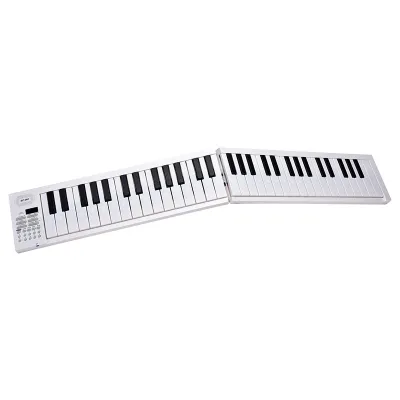

Prices are valid at publication and may change. Please refer to the product page for the latest price.
Key action is another critical factor that directly impacts how you build finger strength and control. Unweighted keys, commonly found on entry-level 61-key models, rely on simple spring tension; they are very light to press but do not prepare your hands for the feel of an acoustic piano. Semi-weighted keys offer a moderate amount of resistance, providing a middle ground for casual players. For serious learners, fully weighted hammer-action keys are highly recommended, as they simulate the physical hammers of an acoustic piano, allowing you to develop proper finger technique, hand posture, and dynamic control over your volume.
Polyphony refers to the maximum number of individual notes or voices that the keyboard can produce simultaneously. When you play a chord while holding down the sustain pedal, each note continues to ring out, consuming the instrument’s polyphony capacity. If a keyboard has a low polyphony limit, such as 32 notes, older notes will be cut off abruptly when you exceed that limit, resulting in a choppy sound. Beginners should look for instruments with at least 64-note or, ideally, 128-note polyphony to ensure smooth, uninterrupted sound layers during expressive practice sessions.
Evaluating Built-in Learning Tools and Connectivity
Built-in practice aids can significantly enhance self-paced learning, especially for beginners who are not working with a private instructor. A built-in metronome is an indispensable tool for developing a steady sense of rhythm and timing. Many beginner keyboards also feature built-in lesson modes that allow you to isolate the left-hand and right-hand parts of demo songs, letting you practice one hand at a time before combining them. These features help break down complex pieces into manageable practice steps.

Physical audio connections are essential for versatile home practice. A dedicated headphone jack, typically in a 3.5mm or 6.35mm format, is crucial for silent practice, allowing you to play at any hour without disturbing family members or neighbors in close-proximity housing. Additionally, ensure the keyboard features a standard 1/4-inch input jack for a sustain pedal. A sustain pedal is vital for learning how to connect notes smoothly, and having a standard input ensures compatibility with a wide range of aftermarket pedals.
Digital connectivity expands your learning options by linking your keyboard to external devices. Look for a USB Type-B port, often labeled “USB to Host,” on the back of the instrument. This interface allows the keyboard to transmit MIDI data to a tablet, smartphone, or computer. By connecting your keyboard to these devices, you can interact with educational software, interactive learning apps, and digital audio workstations (DAWs) for recording. Always check the manufacturer’s specifications to confirm that the keyboard’s MIDI interface is class-compliant, meaning it will work without requiring complex driver installations.
How to Verify Nioye Model Specifications Before Buying
Because product descriptions on online marketplaces can sometimes be vague or inconsistent, it is important to verify the exact specifications of a Nioye model before making a purchase. Start by downloading the official user manual or spec sheet from the manufacturer or an authorized distributor. Carefully check the physical dimensions (width, depth, and height) to ensure the instrument will fit on your designated stand or desk. Additionally, note the weight of the keyboard, especially if you plan to pack it away after practice or transport it to lessons.
Power requirements and electrical compatibility must also be verified to ensure safe operation. Check whether the keyboard uses a standard DC power adapter or if it can also run on batteries for portable use. Ensure that the included power adapter is rated for the local voltage standards of your region, such as Singapore’s 230V, 50Hz electrical grid, and that it carries the appropriate safety certification marks. Using an incompatible or uncertified power supply can damage the internal circuitry of your instrument.
Confirm the exact contents of the packaging list to avoid unexpected secondary expenses. Some retail packages are sold as bare instruments, while others are bundles that include essential accessories such as a music rest, a power adapter, a basic sustain pedal, or a keyboard stand. Knowing exactly what is included in the box allows you to budget accurately for any additional accessories you might need to purchase separately. Finally, verify the warranty terms, return policies, and the reputation of the seller to ensure you have access to reliable customer support and protection against manufacturing defects.
Setting Up Your Practice Space and Basic Maintenance
Creating an ergonomic practice environment is essential for maintaining comfort and preventing physical strain during long practice sessions. Avoid placing your keyboard on a standard writing desk, as these are typically too high for proper piano posture. Instead, invest in a sturdy, adjustable keyboard stand, such as a double-X or Z-stand, which prevents the instrument from wobbling. Adjust your bench height so that your elbows are at a slightly greater than 90-degree angle when your hands rest on the keys, keeping your wrists relaxed and your shoulders down.
Routine maintenance will keep your digital keyboard functioning reliably for years. Dust is one of the primary enemies of electronic instruments, as fine particles can settle beneath the keys and interfere with the sensitive contact pads. Clean the keys and control panel regularly by wiping them gently with a dry, anti-static microfiber cloth. Never use wet cloths, liquid sprays, or harsh chemical cleaners, as moisture can easily seep into the keybed and cause permanent electrical damage.
Environmental protection is particularly important in warm, humid climates. Position your keyboard away from direct sunlight, which can warp plastic casings, discolor the keys, and degrade internal components over time. Avoid placing the instrument directly beneath air conditioning vents, where rapid temperature fluctuations and condensation can occur. When the keyboard is not in use, protect it with a fitted dust cover to shield the keys and control buttons from airborne debris and accidental spills.
Frequently Asked Questions (FAQ)
Do I need an 88-key Nioye keyboard to start learning?
You do not strictly need an 88-key keyboard to begin learning the basics of music theory, scales, and simple melodies. A 61-key model is highly practical for absolute beginners, offering a compact and budget-friendly option that fits easily into smaller living spaces. However, as your skills progress and you begin studying classical repertoire or advanced contemporary arrangements, you will eventually need to transition to a full 88-key keyboard to access the complete range of notes required for those pieces.
Can I connect a Nioye keyboard to my tablet for learning apps?
Most modern digital keyboards can connect to tablets, provided they feature a USB-to-Host or MIDI port. To establish a connection, you will need a compatible USB cable and an On-The-Go (OTG) adapter that matches your tablet’s port, such as a USB-C or Lightning connector. Once connected, the keyboard can send MIDI data to educational apps, allowing the software to detect the notes you play in real time. Always consult the keyboard’s manual to confirm class-compliant MIDI support before purchasing connection accessories.
Community discussion
Share your experience or ask a question. Comments are reviewed before publication.