
Integrating an air drum set into a DJ mix or electronic music production workflow offers a unique way to bridge physical performance and digital sound. By translating physical gestures into MIDI data, these compact systems allow you to trigger samples, launch loops, and control effects dynamically without being anchored to a traditional drum kit or a laptop keyboard. This setup adds a highly visual, engaging element to live DJ sets and provides a novel, tactile method for sequencing beats in the studio.
To successfully incorporate an air drum set into your electronic workflow, you must understand how the hardware communicates with your software, verify your system requirements, and configure your MIDI mapping correctly. While the technology offers incredible freedom, achieving a seamless performance requires careful attention to connection stability, latency optimization, and physical playing techniques. With the right preparation, you can transform empty space into a highly responsive, expressive instrument that elevates your musical performances.
Understanding How Air Drum Sets Function in Electronic Workflows
Air drum sets operate primarily as specialized MIDI controllers, translating physical movements in three-dimensional space into digital commands that your music software can interpret. Unlike traditional electronic drum kits that rely on physical pads to detect strikes, air drum systems use advanced sensors to track the velocity, angle, and timing of your hands and feet. This data is converted into standard MIDI messages, which are sent wirelessly or via USB to your computer, tablet, or smartphone.
Products mentioned in this guide
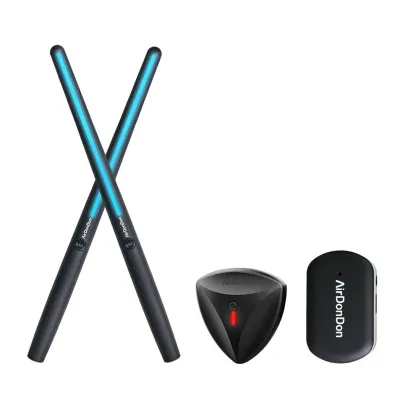
Prices are valid at publication and may change. Please refer to the product page for the latest price.
There are two primary technologies used in modern air drum systems: motion-sensor systems and optical-tracking systems. Motion-sensor systems utilize Inertial Measurement Units (IMUs) embedded within the drumsticks and foot sensors. These IMUs contain gyroscopes and accelerometers that measure rotational speed and acceleration, calculating when a “strike” occurs based on sudden deceleration. Optical-tracking systems rely on a dedicated camera to track illuminated or reflective markers on the tips of the sticks and your shoes, translating their spatial coordinates into triggers.
Once a strike is detected, the system’s software generates a MIDI Note On message, which includes a specific note number and a velocity value ranging from 1 to 127. This velocity value corresponds to how hard or fast you swung the stick, allowing for expressive, dynamic playing. This MIDI data is then routed into your digital audio workstation (DAW) or DJ software, where it triggers virtual instruments, drum samplers, or performance pads.
When integrating an air drum set into an electronic music workflow, it is important to set realistic expectations. These devices are outstanding for live triggering, adding visual flair to a performance, and sketching out rhythmic ideas quickly. However, because they lack physical rebound, they are not direct replacements for acoustic drums or high-end mesh-head electronic kits when it comes to executing extremely complex, high-speed rudiments or subtle ghost notes. Instead, they should be viewed as a unique performance tool that excels at expressive, gestural control.
Verifying Gear and Software Requirements for Integration
Before attempting to connect an air drum set to your performance setup, you must verify that your hardware and software meet the necessary requirements for low-latency MIDI processing. Start by consulting the manufacturer’s manual to check operating system compatibility, ensuring your computer or mobile device supports the required drivers and Bluetooth protocols. Most modern air drum sets require Bluetooth Low Energy (BLE) or a proprietary USB wireless receiver to transmit data with minimal delay.

Your choice of performance software is equally critical, as it must support custom MIDI mapping to utilize the air drum set effectively. Professional DAWs such as Ableton Live, FL Studio, Logic Pro, and Bitwig Studio offer robust, native MIDI mapping capabilities that allow you to assign incoming notes to any virtual instrument or sampler. If you plan to use the air drum set within DJ software like Serato DJ Pro, Traktor Pro, or Rekordbox, verify that your software tier supports secondary MIDI controllers, as some entry-level versions restrict custom mapping.
To achieve the near-instantaneous audio response required for real-time drumming, a dedicated external audio interface is highly recommended. On Windows systems, using generic audio drivers introduces significant latency, making it essential to use an audio interface with dedicated ASIO drivers. On macOS, the native Core Audio driver is highly efficient, but a dedicated interface still provides superior audio quality and routing flexibility for complex live setups.
In advanced performance setups, you may want to run your DJ software and a DAW simultaneously, using the air drums to play live beats over your DJ mix. This requires virtual MIDI routing utilities, such as loopMIDI on Windows or the built-in IAC Driver on macOS, to share MIDI data between applications without hardware conflicts. Additionally, virtual audio routing software can help you send the audio output of your DAW directly into a spare channel on your DJ software or mixer, creating a cohesive, unified audio stream.
Step-by-Step Setup: Connecting and Mapping Your Air Drum Set
Setting up your air drum set requires a systematic approach to ensure accurate tracking and reliable connectivity. Begin with the physical setup by positioning yourself and any tracking hardware according to the manufacturer’s instructions. If you are using an optical-tracking system, place the camera on a stable surface at chest height, ensuring your performance area is free of reflective surfaces, mirrors, or competing light sources that could interfere with the camera’s sensors. For motion-sensor systems, sit or stand in your performing position, point the sticks straight ahead, and press the calibration buttons to establish your central “snare” position.
Next, establish the digital connection between your sensors and your computer or mobile device. Turn on the sensors and open your computer’s MIDI configuration utility. If you are connecting via Bluetooth on macOS, open the Audio MIDI Setup utility, navigate to the MIDI Studio window, click the Bluetooth icon, and pair your sensors. On Windows, use the manufacturer’s dedicated connection software or a third-party Bluetooth MIDI bridge to ensure the sensors are recognized as a standard MIDI input device rather than a generic Bluetooth peripheral.
Once the hardware is connected, launch your DAW or DJ software and navigate to the MIDI preferences menu. Verify that your air drum set is listed as an active MIDI input device and ensure that input tracking is enabled. Load a drum sampler or instrument rack containing the electronic sounds, vocal chops, or loops you wish to trigger. Enter the software’s MIDI mapping mode, which is typically activated by clicking a “MIDI” or “Map” button in the user interface.
With MIDI mapping mode active, select the virtual pad or sample slot you want to assign, then perform the physical striking gesture for that specific drum zone in the air. The software should instantly detect the incoming MIDI note and bind it to the selected parameter. Repeat this process for each zone, mapping your physical gestures to the virtual kick, snare, hi-hat, and any special effect triggers. Once complete, exit the mapping mode and save your configuration as a custom template or project file to avoid having to repeat the mapping process in future sessions.
Creative Techniques for DJ Mixing and Live Beat Making
Incorporating an air drum set into a live DJ mix allows you to add a dynamic, improvisational layer that elevates your performance beyond standard track transitions. Instead of simply playing standard drum patterns, try mapping your air drum zones to trigger high-frequency percussion elements like shakers, tambourines, or electronic cowbells. This allows you to add energy and drive to a track’s build-up without cluttering the low-end frequencies, which are already occupied by the playing track’s kick drum and bassline.
Another highly effective technique is mapping specific air drum zones to trigger one-shot vocal chops, riser effects, or transition sweeps. During a drop or a transition between two tracks, you can physically strike the air to trigger these sounds, creating a highly engaging visual spectacle for your audience. This physical showmanship helps bridge the gap between the digital nature of DJing and the raw energy of a live instrumental performance.
Because air drumming lacks the physical rebound of a real drum head, you must adapt your playing technique to maintain accuracy and control. Instead of relying on stick bounce, use controlled, wrist-driven strokes to actively manage both the downward and upward motion of the sticks. Focus on keeping your movements compact and precise; large, sweeping gestures are not only physically exhausting but can also lead to tracking errors and timing inconsistencies.
For electronic genres like house and techno, practice keeping a steady rhythm by mapping one foot sensor to a virtual kick drum and using the sticks to play syncopated off-beat hi-hats or snare rolls. For faster genres like drum and bass or dubstep, focus on executing clean, high-velocity snare cracks and rapid percussion fills during track build-ups. To maintain physical stamina during extended live sets, keep your shoulders relaxed, your elbows bent at comfortable angles, and take regular breaks during rehearsal sessions to prevent muscle strain.
Troubleshooting Latency, Tracking, and Connection Issues
The most common hurdle when using an air drum set is audio latency, which is the delay between your physical strike and the sound coming out of your speakers. To resolve this, navigate to your software’s audio settings and lower the audio buffer size. A buffer size of 128 samples or 64 samples is generally ideal for real-time performance, reducing latency to imperceptible levels. Keep in mind that lower buffer sizes increase the workload on your computer’s CPU; if you experience audio crackling or dropouts, you may need to close background applications or find a stable middle ground.
Wireless latency and connection drops can also occur, particularly in environments with heavy wireless traffic. Because Bluetooth operates on the highly congested 2.4 GHz frequency band, you can minimize interference by turning off Bluetooth on nearby devices that are not in use and keeping your computer’s Wi-Fi connected to a 5 GHz network. If your air drum set came with a proprietary USB wireless receiver, always use it instead of your computer’s built-in Bluetooth, as these receivers often use optimized, low-latency protocols.
Tracking drift is another common issue with motion-sensor systems, where the virtual positions of your drums seem to shift over time. To fix this, make a habit of recalibrating your sensors frequently during your performance, which can usually be done instantly by holding the sticks in a neutral position and pressing the calibration buttons. For optical-tracking systems, ensure your performance area is free of harsh shadows, direct sunlight, or flashing stage lights, and verify that the camera lens is clean and free of dust.
If you experience persistent connection failures, unresponsive sensors, or software crashes that cannot be resolved through standard settings, check the manufacturer’s companion app for available firmware updates. Keeping your hardware firmware and software drivers up to date is crucial for maintaining compatibility with newer operating system updates. If you suspect a hardware fault, such as a failing battery or a defective sensor, stop troubleshooting and consult the manufacturer’s official support channels for assistance.
Frequently Asked Questions (FAQ)
Can I use an air drum set alongside a standard DJ controller?
Yes, you can integrate both devices into your performance setup simultaneously. Most professional DJ software allows multiple MIDI controllers to be active at the same time, enabling you to use your DJ controller for mixing, EQing, and track selection while using the air drum set to trigger samples and live percussion. Connect both devices directly to your computer, using a high-quality, powered USB hub if you run out of available ports to ensure stable power and data transmission. In your software’s MIDI settings, verify that both devices are enabled and configured to send MIDI data on different channels or note ranges to prevent any control conflicts.
Are air drum sets reliable enough for professional live stage performances?
Air drum sets can be used successfully on stage, but they require careful preparation and risk management due to the unpredictable nature of live venue environments. Optical-tracking systems can be sensitive to dynamic stage lighting, strobe effects, and smoke machines, which can temporarily disrupt camera tracking, while motion-sensor systems can experience wireless interference in crowded venues. To ensure a reliable performance, always conduct a thorough soundcheck under the actual venue lighting and wireless conditions, keep backup charging cables or spare batteries on hand, and have a secondary physical MIDI pad controller connected as a fallback option so you can seamlessly transition if a sensor issue occurs.
Community discussion
Share your experience or ask a question. Comments are reviewed before publication.