
Choosing your first guitar amplifier is a pivotal decision that shapes your early practice habits, tone perception, and overall enthusiasm for the instrument. The Joyo Jam Buddy II presents an unconventional approach to this choice by housing a practice amplifier, channel switches, and delay effects directly inside a floor-based pedal chassis. For a beginner guitarist, this unique form factor offers distinct advantages in terms of space-saving convenience and hands-free control, but it also introduces specific trade-offs in speaker size, control accessibility, and sound projection that you must carefully weigh against your personal practice environment.
What Beginner Guitarists Need in a Practice Amp
In high-density residential areas, such as typical HDB apartments in Singapore, managing volume is a primary concern for any aspiring musician. A beginner needs an amplifier that can deliver satisfying, responsive tones at low volumes without vibrating the walls or disturbing family members and neighbors. This means looking for units with low wattage ratings or those equipped with highly responsive master volume controls that maintain tone quality even when turned down to a whisper.
Tone-shaping controls are the next essential element to consider. As a beginner, you are not just learning how to place your fingers on the fretboard; you are also training your ears to recognize how different frequencies interact. A suitable practice amp should provide clear, intuitive controls for gain, which introduces distortion or overdrive, and equalization. While a full three-band EQ consisting of bass, middle, and treble is ideal for learning how to sculpt your sound, even a simplified tone control can help you understand the balance between bright, treble-heavy sounds and warm, bass-rich tones.
Products mentioned in this guide
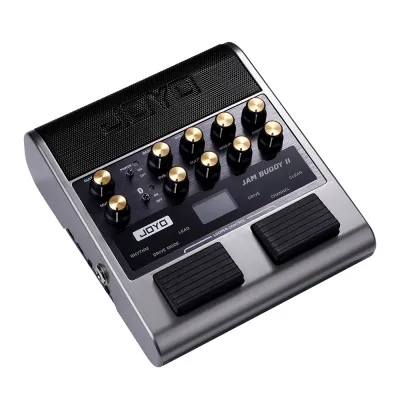
Prices are valid at publication and may change. Please refer to the product page for the latest price.
Portability and physical footprint are equally critical, especially when living space is at a premium. A bulky, heavy amplifier can quickly become an obstacle in a small room, discouraging you from setting up and practicing regularly. A compact footprint allows you to keep the amplifier within arm’s reach of your favorite practice chair or easily store it away in a cabinet when not in use. Additionally, flexible power options, such as the ability to run on rechargeable batteries or a standard power adapter, allow you to practice in different rooms without hunting for a nearby wall outlet.
Finally, dedicated practice aids are indispensable for modern learning. An auxiliary input or wireless Bluetooth connectivity allows you to stream backing tracks, metronomes, or instructional videos directly from your smartphone or tablet through the amplifier’s speakers. This integration helps you practice playing in time with other instruments. Equally important is a dedicated headphone output, which mutes the main speaker entirely, allowing for completely silent practice sessions late at night or during quiet hours.
Evaluating the Joyo Jam Buddy II Against Beginner Needs
To determine if the Joyo Jam Buddy II is the right fit for your journey, you must systematically evaluate its physical design and technical specifications against these beginner requirements. Start by inspecting the control panel layout. Unlike traditional desktop amplifiers that sit at eye level, the Jam Buddy II is designed to sit on the floor. This means you will need to bend down to adjust the knobs, which include controls for gain, tone, master volume, and delay parameters. You should verify whether this floor-based interaction suits your practice style, or if you prefer having controls easily accessible on a desk next to your computer.

Next, examine the input and output configuration on the rear or side panels of the unit. Confirm that it features a standard 6.35mm instrument input for your guitar cable, a 3.5mm headphone jack for silent practice, and an auxiliary input for external audio. Some versions or production runs of this unit may also feature Bluetooth connectivity; you should check the manufacturer’s product manual or the retail packaging to verify if wireless audio streaming is supported on the specific model you are purchasing.
Power supply specifications require careful verification to avoid compatibility issues. Check the unit’s power requirements, which are typically printed near the DC input jack. You want to confirm whether the device operates on a built-in rechargeable lithium battery or requires an external power adapter. If an adapter is required, verify the exact voltage and the polarity symbol, which is typically center-negative for guitar gear. Using an incorrect adapter can permanently damage the internal circuitry, so verifying these details before plugging anything in is a critical safety step.
You must also analyze the speaker specifications and rated output power. The Jam Buddy II typically features a low-wattage output paired with small, full-range speakers. While this low wattage is perfect for quiet bedroom practice, small speakers have physical limitations. They cannot move as much air as a traditional 8-inch or 10-inch guitar speaker, which means the low-end bass response will feel tighter and less prominent. If you are looking for a deep, room-filling bass response for heavy rock or metal riffs, you should keep these physical speaker dimensions in mind when setting your expectations.
Setup and Daily Use Considerations
Operating your equipment safely ensures its longevity and protects your hearing. When setting up the Joyo Jam Buddy II, always follow a strict power-on sequence. Before flipping the power switch or plugging in the power cable, ensure that the master volume and gain knobs are turned completely down to zero. Once the unit is powered on, gradually increase the volume to a comfortable listening level. This simple habit prevents sudden, loud audio spikes that can startle you, damage your hearing, or cause physical harm to the small speaker cones.
The order in which you connect your cables also matters. Always plug your instrument cable into your guitar first, and then insert the other end into the amplifier’s input jack. When you are finished practicing, turn off the amplifier before unplugging your guitar. This prevents loud electrical pops and hums from traveling through the circuit, which can degrade the speaker over time and put unnecessary stress on the internal amplifier components.
If your unit utilizes a built-in rechargeable battery, proper battery maintenance is essential for preserving its overall lifespan. Avoid leaving the unit plugged into the charger indefinitely once it has reached full capacity, as continuous overcharging can degrade lithium-ion batteries over time. Conversely, try not to let the battery drain completely to zero percent before recharging it. In a warm, tropical climate, it is also crucial to store the amplifier away from direct sunlight, enclosed vehicles, or heat-generating appliances, as excessive heat can accelerate battery degradation and pose safety risks.
Environmental factors play a significant role in the maintenance of musical electronics. High relative humidity can lead to moisture buildup inside the amplifier’s chassis, potentially causing oxidation on the metal jacks, control potentiometers, and internal circuit boards. To prevent scratchy noises when turning the knobs or intermittent signal loss, store the amplifier in a well-ventilated room, preferably away from open windows where rain or humid air can directly enter. Using a simple dust cover or storing the unit in a dedicated gig bag when not in use can also protect the sensitive inputs from dust accumulation.
When to Consider Alternative Practice Amps
While the Joyo Jam Buddy II offers a highly portable, pedalboard-style solution, it may not remain the ideal choice as your playing skills and musical interests evolve. One of the primary reasons to consider an alternative is the need for higher volume and larger speaker displacement. If you plan to jam with a live drummer or play in a small band setting, a low-wattage floor amp with small speakers will not have the projection or headroom required to cut through the mix. In these scenarios, you will need to transition to a traditional combo amplifier with at least 30 to 50 watts of power and a 10-inch or 12-inch speaker.
Another factor is the desire for advanced digital modeling and complex effects routing. The Jam Buddy II provides basic tone shaping and a built-in delay effect, which is excellent for keeping things simple while learning. However, if you want to experiment with a wide array of virtual amplifier models, modulation effects like chorus, flanger, and phaser, or deep reverb options, a dedicated digital modeling desktop amplifier might be a better long-term investment. These modeling amps often come with companion mobile apps that allow you to customize and save dozens of unique presets.
You should also evaluate your recording needs. Many modern practice amplifiers feature a direct USB audio interface output, allowing you to connect the amp directly to a computer or laptop. This feature lets you record your guitar playing directly into digital audio workstation software without needing to purchase a separate external audio interface. If recording your progress, creating covers, or producing your own music is a priority, looking for an amplifier with built-in USB recording capabilities is highly recommended.
Finally, consider your budget and physical setup preferences. If you prefer a clean, clutter-free desk space where you can easily adjust your settings while sitting down, a desktop-style practice amp may offer better ergonomics than a floor-based unit. Compare the retail prices of these different categories, which often range from S$100 to S$300 for entry-level options, to ensure you are investing in a form factor that aligns with your daily practice habits and long-term musical goals.
Frequently Asked Questions (FAQ)
Can I use headphones with the Joyo Jam Buddy II for silent practice?
Yes, you can use headphones for silent practice, but you must verify the specific jack size on the unit. Most compact practice amplifiers use a standard 3.5mm headphone output, which is compatible with standard consumer headphones or earphones. When you insert a headphone plug into this jack, the internal speakers should automatically mute, routing all audio directly to your ears. Always ensure the volume is turned down before putting on your headphones, and gradually increase it to a safe level to protect your hearing from sudden signal peaks.
Does this amp work well with acoustic-electric guitars or just electric?
The Joyo Jam Buddy II is primarily designed for electric guitars, featuring preamp circuitry tailored to handle magnetic pickups and provide overdrive or distortion. While you can physically plug an acoustic-electric guitar into the input jack, the sound may not be ideal. Acoustic-electric guitars typically require a flat, full-range frequency response to preserve their natural woody tone, whereas electric guitar amps color the sound by rolling off high and low frequencies. For the best results with an acoustic-electric guitar, look for an amplifier specifically labeled for acoustic instruments.
How do I connect my phone to play backing tracks through the amp?
To play backing tracks, you need to identify the correct auxiliary input port on the amplifier, which is typically a 3.5mm stereo jack labeled ‘Aux In’ or ‘Aux’. You will need a compatible audio cable, such as a 3.5mm-to-3.5mm auxiliary cable, or an appropriate adapter if your phone does not have a headphone jack. Alternatively, if your specific version of the amp supports Bluetooth, follow the manufacturer’s instructions to pair your phone wirelessly. Always start with your phone’s volume set low, and balance it with the amplifier’s master volume to prevent audio distortion or clipping.

Community discussion
Share your experience or ask a question. Comments are reviewed before publication.