
Evaluating a specialized electronic dictionary requires looking beyond basic translation features to see how the device handles your specific target languages, study environments, and learning habits. The px2181 dictionary is designed as a dedicated tool for language acquisition, but its value depends entirely on whether its licensed databases, offline capabilities, and hardware features align with your personal goals. Before investing in a dedicated handheld device, you must analyze your current learning stage and verify the exact specifications provided by the manufacturer.
Handheld electronic dictionaries offer a distraction-free alternative to smartphones, but they represent a financial investment that can range from S$150 to over S$300 in the Singapore market. To ensure you do not end up with an underutilized gadget, you must first diagnose your exact language learning needs. Once those needs are clear, you can systematically compare them against the verified technical specifications of the device.
Diagnose Your Specific Language Learning Needs
Before browsing product listings or comparing hardware models, you must define your primary use case. A student preparing for rigorous academic examinations requires a completely different toolset than a business professional reviewing contracts or a casual traveler navigating foreign transit systems. If your primary goal is reading comprehension, you will need rapid word lookup and deep grammatical explanations. If you are focusing on conversational fluency, real-time voice translation and sentence-level audio feedback become much more critical.
Products mentioned in this guide
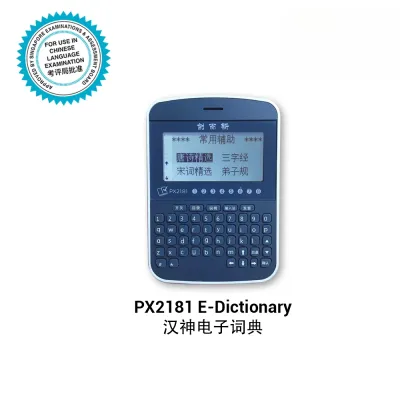
Prices are valid at publication and may change. Please refer to the product page for the latest price.
Your target language pairs and regional dialect requirements must also dictate your choice. For instance, language learners in Singapore often require robust support for bilingual combinations such as English-Mandarin, English-Malay, or English-Tamil. Within these languages, regional variations and specific scripts matter. You must identify whether you need Simplified or Traditional Chinese characters, specific localized vocabulary, or phonetic guides like Hanyu Pinyin, Furigana, or Romanized scripts to ensure the dictionary matches your syllabus or target region.
Connectivity constraints are another vital factor to evaluate before purchase. Consider where you will do the majority of your studying. If you plan to use the device during your daily commute on the MRT, on long flights, or inside quiet library zones where public Wi-Fi is spotty or requires web-portal authentication, robust offline database access is non-negotiable. Conversely, if you primarily study at home with a stable fiber-broadband connection, a device that relies on cloud-based translation servers might offer more dynamic updates.
Finally, reflect on your preferred input methods. Some learners absorb vocabulary best by physically typing out words on a keyboard, which aids muscle memory and active recall. Others prefer scanning printed text directly from physical books, newspapers, or documents using an optical scanner. Voice input is highly beneficial for practicing pronunciation, but it requires a quiet environment to function accurately. Identifying which of these input methods dominates your study routine will help you filter out unsuitable devices.
Key PX2181 Dictionary Specifications to Verify Before Buying
When evaluating the px2181 dictionary, your first task is to verify the pre-installed language databases and their licensing agreements. Do not rely on generic product titles or cover illustrations; instead, check the manufacturer’s official spec sheet for licensed, authoritative dictionaries such as Oxford, Collins, Longman, or local bilingual publications. You must verify the exact edition of these databases, whether they are fully complete or merely abridged glossaries, and whether they are stored locally on the device for offline use or require an active internet connection.

Next, examine the optical character recognition (OCR) and scanning capabilities if the device includes a scanning sensor. You must verify the range of supported font sizes—typically from 6-point to 22-point text—and whether the sensor can accurately read text from different mediums, such as matte textbook paper, glossy magazines, or digital tablet screens. Additionally, check if the device supports multi-line scanning and vertical text alignment, which is essential if you are studying classical Chinese, Japanese, or Korean literature.
Audio and pronunciation features require close inspection to ensure they support active listening and speaking goals. Look for specifications indicating whether the device utilizes high-quality native speaker audio recordings for its vocabulary words or relies entirely on synthetic Text-to-Speech (TTS) algorithms. Synthetic voices often struggle with natural intonation, word stress, and regional accents. You should also confirm if the device displays the International Phonetic Alphabet (IPA) or localized phonetic transcriptions to help you master correct pronunciation.
Lastly, review the physical hardware and ergonomics of the device to ensure it fits your daily routine. Check the screen size, resolution, and panel type; an e-ink or high-resolution LCD screen is easier on the eyes during extended study sessions than a low-grade, highly reflective display. Verify the keyboard layout—whether it features a physical QWERTY keyboard, a stylus-based handwriting panel, or a virtual touch keyboard. Finally, check the battery capacity and charging port type, ensuring it offers enough continuous runtime to survive a full day of classes or study sessions without needing a wall outlet.
Matching the PX2181 to Your Learner Profile
For students and exam candidates, academic compliance and comprehensive vocabulary building are paramount. If you are a student in Singapore, you must be particularly cautious: the Singapore Examinations and Assessment Board (SEAB) has strict guidelines regarding electronic dictionaries permitted in national examination halls. Any device with internet connectivity, built-in cameras, or unauthorized communication features is strictly prohibited. If the verified specifications of the device include Wi-Fi or Bluetooth without a certified exam-lock mode, it cannot be used in exam halls, though it may still serve as a powerful home study tool.
Professionals, technical writers, and translators have vastly different requirements, focusing heavily on specialized terminology. If your daily work involves legal contracts, medical reports, or engineering documents, a standard consumer-grade dictionary will fall short. You must verify if the device supports specialized industry glossaries or allows you to import custom terminology databases. If the device lacks these professional-grade databases or the ability to side-load custom text files, it will not meet the demands of professional translation work.
Casual learners and travelers generally prioritize portability, rapid voice translation, and conversational phrasebooks. If you fit this profile, a heavy, keyboard-centric device with deep academic etymologies might feel cumbersome. Instead, you need a lightweight form factor that boots up instantly and offers quick-access buttons for voice translation. If the device requires a lengthy boot sequence or lacks a responsive microphone system, it will prove frustrating when you are trying to translate a menu or ask for directions on the go.
Ultimately, you must apply a strict decision rule before making a purchase. If the verified specifications of the px2181 dictionary do not explicitly support the offline databases, input preferences, or regional linguistic variations required by your specific profile, you should skip this model. Investing in a device that does not align with your daily study habits will only lead to frustration and a return to smartphone-based distractions.
When to Skip the PX2181 and Explore Alternatives
If you find that the specifications of this electronic dictionary do not align with your goals, several excellent alternative pathways exist. If budget is your primary constraint and you always have access to a stable internet connection, high-quality smartphone dictionary apps are a highly cost-effective alternative. Many professional-grade dictionary databases offer dedicated mobile apps with one-time purchase options that cost a fraction of dedicated hardware, allowing you to leverage your phone’s high-resolution screen and fast processor.
For readers who primarily study physical printed books and do not require manual keyboard input, a dedicated scanning translation pen is often a superior choice. These pens are ergonomically designed to glide across printed lines, offering faster OCR and translation than a traditional handheld electronic dictionary. They are highly portable, fit easily into a pencil case, and allow you to maintain your reading flow without having to look up and type each unfamiliar word on a separate screen.
If your language learning journey revolves around reading foreign literature and e-books, you should consider a dedicated e-reader with built-in dictionary integration. Modern e-readers allow you to tap any word on the screen to instantly pull up a definition, translation, or phonetic guide without leaving the page. This integration, combined with a glare-free e-ink screen that minimizes eye strain, provides a seamless reading experience that handheld electronic dictionaries cannot easily replicate.
Finally, do not overlook the value of traditional paper dictionaries for deep, distraction-free academic study. Paper dictionaries force you to engage in active search, which cognitive research suggests can improve vocabulary retention. They require no battery charging, suffer no software glitches, and are universally accepted in all examination environments, making them an enduringly reliable tool for serious linguistic scholars.
Frequently Asked Questions (FAQ)
Can I add custom vocabulary or third-party dictionaries to the PX2181?
To determine if you can import custom word lists or third-party databases, you must consult the manufacturer’s official user manual or product documentation. Many proprietary electronic dictionaries operate on closed operating systems that restrict users from side-loading external files or installing third-party applications. However, some advanced models allow you to transfer text files (.txt) or specific dictionary formats (such as StarDict files) via a USB connection. Always verify this capability before purchasing if you rely on custom industry glossaries.
Does the PX2181 require a subscription for premium translation features?
You must carefully review the product packaging, official store listings, or licensing terms to confirm if any features require ongoing fees. While basic dictionary lookups are typically a one-time purchase, some modern devices require active monthly or annual subscriptions to access advanced features. These premium features may include real-time cloud-based AI translation, pronunciation grading, or updates to specialized medical and legal databases. Verify whether the core databases you need are fully unlocked out of the box.
Community discussion
Share your experience or ask a question. Comments are reviewed before publication.