
Choosing between the Sonicake SmartBox and other beginner multi-effects processors depends entirely on your specific practice environment, recording needs, and hardware preferences. In the entry-level segment, there is no single universal winner that suits every guitarist. Instead, the right choice comes down to matching a unit’s verified technical specifications with your personal workflow, whether you are practicing silently at home or starting to record your own tracks. By evaluating your setup requirements and comparing hardware features systematically, you can determine which processor integrates seamlessly into your rig.
Identify Your Practice and Recording Needs
Before comparing specific hardware models, you must clarify where and how you plan to use your multi-effects processor. For many guitarists, especially those living in compact spaces like HDB apartments, silent practice is a primary requirement. If you need to keep noise levels low to avoid disturbing family members or neighbors, a unit with high-quality headphone output and realistic cabinet emulation is essential. Alternatively, if you plan to plug the processor directly into the front of a physical guitar amplifier, your needs will differ significantly from someone recording directly into a computer.
Your physical connection requirements will dictate which inputs and outputs are non-negotiable. If you enjoy playing along with backing tracks, look for a dedicated auxiliary input or wireless connectivity options. For home recording, a built-in USB audio interface capability allows you to connect the unit directly to your computer without needing an external audio interface. You should also consider whether you want to load third-party Impulse Responses (IRs), which are digital speaker cabinet profiles that can dramatically improve the realism of your direct tone, or if you are satisfied relying entirely on the manufacturer’s built-in cabinet simulations.
Products mentioned in this guide
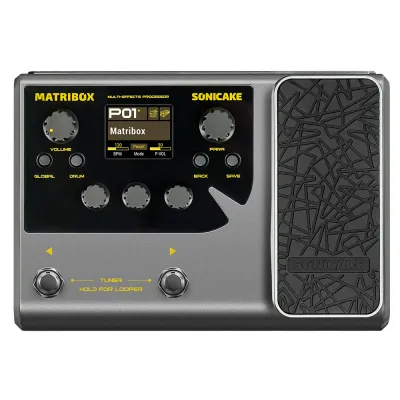
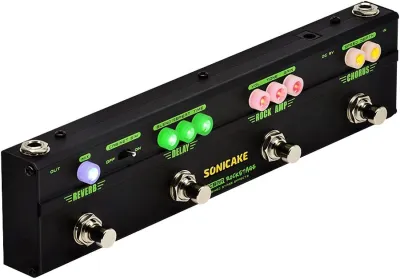
Prices are valid at publication and may change. Please refer to the product page for the latest price.
Understanding these needs early prevents you from buying a unit that lacks the necessary routing for your specific environment. For example, if you plan to use the processor both at home and in a small studio, having balanced outputs or a dedicated line-out can save you from signal degradation issues.
Verify Key Specifications on the Sonicake SmartBox
To determine if the Sonicake SmartBox is the right fit for your setup, you must carefully verify its official specifications against your musical goals. Start by checking the manufacturer’s documentation for the exact number and categories of built-in amplifier models and effects. Different processors excel at different genres; some focus heavily on high-gain modern metal tones, while others offer a wider variety of vintage low-gain drives and ambient modulation effects. Ensure the built-in library aligns with the specific genres you want to play.

If direct digital recording is a priority, confirm the USB audio interface specifications of the SmartBox. You should verify the supported sample rates (such as 44.1 kHz or 48 kHz) and bit depths (typically 16-bit or 24-bit) to ensure compatibility with your digital audio workstation (DAW). Some entry-level units only support basic playback and require proprietary drivers, while others are class-compliant and work immediately upon plugging in.
Power supply options are another critical factor for portability and convenience. Check whether the unit can run on standard nine-volt power adapters, USB power from a computer or power bank, or if it requires specific battery types. If you plan to use the unit away from a wall outlet, USB or battery power can be a major advantage.
Finally, review the physical footprint and hardware layout of the SmartBox. Consider the type of footswitches used—whether they are hard-clicking switches or soft-touch switches—and whether the unit supports an external expression pedal. An expression pedal is vital if you plan to use wah-wah effects or control volume dynamically while playing, so verifying this compatibility beforehand prevents future frustration.
Additionally, check if the unit features an integrated tuner or a looper function. A built-in tuner is an indispensable tool for daily practice, while a basic looper allows you to practice soloing over your own chord progressions, making it a highly valuable learning tool for beginners.
Compare the SmartBox Against Entry-Level Alternatives
When evaluating the Sonicake SmartBox against other beginner-friendly multi-effects units on the market, you should focus on several key operational differences. The user interface and editing workflow can vary dramatically between models. Some units feature physical knobs and a clear hardware screen that allow you to tweak your tone on the fly. Others rely heavily on companion desktop software or mobile applications connected via Bluetooth or USB. If you prefer a tactile, plug-and-play experience without looking at a screen, hardware-centric controls are preferable; if you enjoy deep editing on a computer, robust software integration is key.
Signal chain flexibility is another major differentiator in the entry-level segment. Some multi-effects processors use a fixed signal chain, meaning you must always place your overdrive before your modulation, and your delay before your reverb. More advanced units allow you to reorder the effects freely, which is crucial if you want to experiment with unconventional sounds, such as placing a reverb before a high-gain distortion. Check the user manuals of the units you are comparing to see if they support flexible routing.
Build quality directly impacts where you can use the processor. If you only plan to use the unit on a desktop next to your computer, a lightweight plastic chassis is perfectly adequate. However, if you intend to take the unit to local rehearsals, jam sessions, or open mic nights, a metal chassis and durable metal footswitches will better withstand the rigors of transport and foot stomping.
Lastly, consider the manufacturer’s ecosystem and history of product support. Look into how frequently the manufacturer releases firmware updates to fix bugs or add new features. A vibrant user community is also highly valuable, as it allows you to download custom presets created by other players, saving you time when trying to replicate specific famous guitar tones.
Furthermore, compare the availability of customer support and warranty coverage in your region. Having access to reliable local support can make a significant difference if you encounter hardware issues or need assistance with firmware updates.
Decision Framework: When to Choose the SmartBox
Making your final decision requires weighing your verified technical needs against your budget. You should choose the Sonicake SmartBox if you prioritize its specific form factor and the exact feature set it officially supports. If its built-in amplifier models, software bundle, and physical layout align perfectly with your practice routine, and its price fits comfortably within your budget in S$, it represents a practical entry point into the world of multi-effects.
Conversely, you should opt for an alternative entry-level unit if your playing style demands hardware features that the SmartBox lacks. For instance, if you absolutely require a built-in expression pedal for real-time control, or if you need specific physical routing options like an effects loop to integrate with your existing physical pedals, another model will serve you better.
Before making any purchase, always verify compatibility with your existing computer operating system if you plan to use the unit for recording. Additionally, if you are planning to use third-party cabinet simulations, double-check whether the unit supports user-loaded IRs, as this feature is not universal among all entry-level processors. Taking the time to verify these details beforehand ensures you select a unit that will grow with your playing.
Ultimately, the best unit is the one that removes friction from your practice routine. If a processor is too complex to set up, you may find yourself playing less. Choose the device that makes you want to plug in and practice every day.
Frequently Asked Questions (FAQ)
Can I use the Sonicake SmartBox directly with headphones?
Yes, you can use the Sonicake SmartBox for silent practice, but you should always check the official specification sheet to confirm the presence of a dedicated headphone output and its recommended impedance rating. When practicing with headphones, it is crucial to ensure that the unit’s built-in cabinet simulation is active. Without cabinet simulation, the direct signal of an amplifier model can sound harsh and buzzy through headphones; the simulation replicates the natural frequency response of a physical guitar speaker cabinet, providing a much more realistic and pleasant playing experience.
Does the SmartBox work as a USB audio interface for recording?
Many modern multi-effects units, including the Sonicake SmartBox, offer USB connectivity, but you must verify the manufacturer’s website to confirm if it functions as a fully compliant USB audio interface. Check for compatibility with your specific operating system, whether you use Windows or macOS, and note if you need to install proprietary drivers to achieve low-latency recording. Additionally, verify the supported sample rates and bit depths to ensure the unit integrates smoothly with your preferred digital audio workstation (DAW) software.

Community discussion
Share your experience or ask a question. Comments are reviewed before publication.