
Choosing the right Besta dictionary depends on matching the device’s built-in database, input method, and features to your current language level and study habits. Whether you are a student preparing for national examinations, a professional mastering a second language, or a casual learner, selecting the correct format ensures you have the right tools without paying for unnecessary features. By evaluating your specific learning goals, you can easily decide between a traditional handheld electronic dictionary and a modern scanning dictionary pen.
While both formats serve the core purpose of translating and defining words, they cater to very different study environments. Handheld models offer a structured, distraction-free environment with comprehensive dictionary databases and physical keyboards. Scanning pens, on the other hand, prioritize speed and convenience, allowing you to look up words instantly while reading printed books or documents. Understanding these differences is the first step toward making an informed purchase.
Assessing Your Language Proficiency and Learning Goals
Your current language level dictates the depth of information you need from a dictionary. Beginners typically require basic vocabulary lists, clear stroke-order animations for character-based languages, and simple bilingual translations. At this stage, a device with highly specialized professional glossaries can be overwhelming and counterproductive. Instead, look for models that offer intuitive visual aids, picture dictionaries, and clear audio pronunciations to build a strong foundation.
Products mentioned in this guide
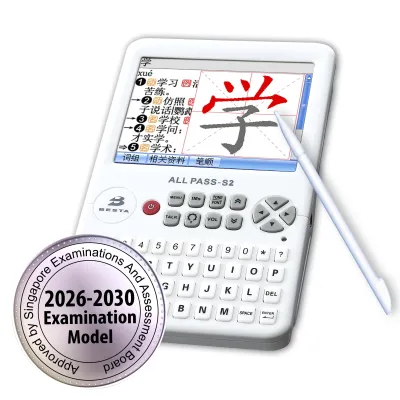
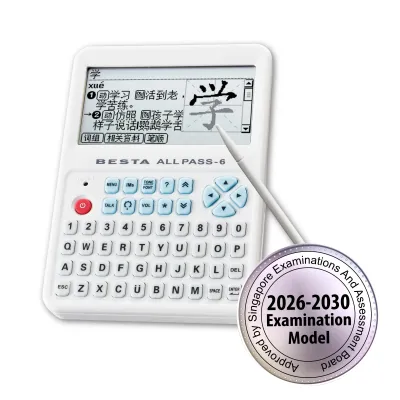
Prices are valid at publication and may change. Please refer to the product page for the latest price.
As you progress to an intermediate level, your needs shift toward understanding how words are used in context. Intermediate learners benefit greatly from detailed grammar explanations, collocations, synonyms, antonyms, and extensive example sentences. If you are at this stage, look for a dictionary that offers robust search functions, such as cross-referencing, which allows you to jump from a word inside a definition to its own dedicated entry with a single tap.
Advanced learners and professionals require authoritative, unabridged collegiate dictionaries and specialized terminology databases. If you are translating technical documents, studying classical literature, or working in fields like business, medicine, or law, verify that the device contains licensed professional glossaries. At this level, simple word-to-word translations are insufficient; you need deep etymological references and subtle stylistic distinctions.
For students in Singapore, exam compatibility is a critical factor that overrides other features. The Ministry of Education (MOE) maintains a strict list of approved electronic dictionaries that candidates can bring into national examinations, such as the GCE O-Level and A-Level Mother Tongue exams. These approved models have restricted capabilities—such as no internet connectivity, no user-expandable storage, and specific pre-loaded databases—to ensure exam integrity. If you are buying a dictionary for school exams, you must cross-reference the model number directly with the latest official MOE guidelines before purchasing.
Your primary study environment also influences the ideal device specifications. If you plan to study in quiet libraries or school halls, a headphone jack or silent keyboard is essential. For those who study during a daily commute on the MRT, a compact, lightweight device with a long-lasting battery and a backlit screen is much more practical than a bulky, heavy handheld model.
Key Features to Evaluate in a Besta Dictionary
When comparing different models, the quality and licensing of the built-in databases are far more important than the sheer number of dictionaries advertised. Some manufacturers inflate their dictionary counts by including minor word lists or outdated public-domain glossaries. Instead, look for licensed editions from reputable publishers, such as Oxford, Longman, or authoritative local language academies. Check the product specifications to confirm whether the databases are unabridged or simplified student editions.

Audio pronunciation is another critical feature to evaluate, especially for language learners working on their speaking and listening skills. High-quality dictionaries distinguish between human voice recordings and text-to-speech (TTS) synthesis. Human voice recordings provide natural intonation, accurate accents, and realistic pronunciation for individual vocabulary words. TTS synthesis is highly useful for reading aloud full sentences or paragraphs, but it can sometimes sound robotic or miss subtle phonetic nuances.
Hardware ergonomics directly affect how comfortable you will be during long study sessions. Evaluate the screen size, resolution, and display technology. A color screen with adjustable backlighting is easier on the eyes in low-light environments, while a monochrome screen often offers superior battery life. If you choose a handheld model, test the physical keyboard layout to ensure the keys are responsive and large enough for comfortable typing. For character-based languages, a high-quality resistive or capacitive touchscreen that supports stylus-based handwriting recognition is incredibly helpful.
Finally, consider the power source and charging methods of the device. Many modern electronic dictionaries and scanning pens feature built-in rechargeable lithium-ion batteries that charge via standard USB-C ports. This is highly convenient for daily use, as you can share chargers with your phone or laptop. However, some traditional handheld models still run on standard AAA batteries. While less environmentally friendly, AAA batteries can be a lifesaver during long examinations where you cannot plug into a wall outlet, allowing you to swap in fresh batteries instantly.
Handheld Electronic Dictionaries vs. Dictionary Pens
Traditional handheld electronic dictionaries are designed as dedicated, self-contained study stations. Their primary advantage is a completely distraction-free environment, as they do not feature social media apps, web browsers, or games. The physical keyboard and large screen make it easy to type out words, read long, detailed definitions, and navigate complex menus. Handheld models also excel at hosting massive, multi-volume dictionary databases that require significant screen real estate to display properly.
Furthermore, handheld devices often include built-in study tools that aid long-term memory retention. These features include customizable vocabulary flashcards, spaced-repetition learning systems, and interactive grammar quizzes. For character-based languages, the stylus input allows you to practice writing characters directly on the screen, with the device providing real-time feedback on stroke order and structure. This active physical engagement is highly beneficial for cognitive retention.
In contrast, dictionary pens (or scanning translation pens) prioritize speed and reading continuity. When reading a physical book, newspaper, or printed study sheet, typing out unfamiliar words on a keyboard can disrupt your reading flow. With a scanning pen, you simply slide the optical tip across the printed line, and the device uses optical character recognition (OCR) to display the definition almost instantly. This makes scanning pens incredibly efficient for extensive reading and quick comprehension checks.
However, scanning pens have distinct limitations that you must consider. Their small, narrow screens are excellent for displaying quick translations or short definitions, but they are poorly suited for reading long, academic dictionary entries or comparing multiple definitions side-by-side. Additionally, scanning pens require physical contact with a flat, printed surface. They can struggle with highly textured paper, tightly bound book spines where the page curves, or unusually large or stylized fonts. Portability is excellent, but they require a steady hand, making them slightly more challenging for very young children to operate smoothly.
How to Verify Specifications and Authenticity Before Buying
Because electronic dictionaries represent a significant financial investment—often ranging from S$100 to over S$400 depending on the features—it is crucial to verify the specifications and authenticity of the device before making a purchase. Start by cross-referencing the exact dictionary titles, database editions, and copyright years listed on the official product packaging or the manufacturer’s website. Do not rely on vague descriptions on third-party listings, which may use outdated promotional materials.
Pay close attention to regional language support and interface localization. Ensure that the system menus, keyboard layouts, and help files are in a language you understand. For users in Singapore, it is also important to check if the device supports both Simplified and Traditional Chinese characters, as well as local phonetic input systems like Hanyu Pinyin. Verify whether the manufacturer offers firmware updates and how those updates are delivered—whether via a simple Wi-Fi connection or by connecting the device to a computer.
To guarantee you receive a genuine product with licensed software and a valid warranty, always purchase from authorized retailers, official brand stores, or established local bookstores. Genuine devices come with official warranty cards that protect you against manufacturing defects and software glitches. Purchasing from authorized sources also ensures that you have access to reliable local customer support and repair services if the screen or battery requires servicing.
Avoid buying from unverified third-party sellers on online marketplaces or peer-to-peer classified platforms. These listings often feature parallel imports designed for other regional markets, which may lack the specific dictionary databases required for local school curricula. Furthermore, parallel imports rarely carry local warranty coverage, leaving you without recourse if the device malfunctions. If a deal seems unusually cheap, it may be an outdated model, a refurbished unit, or a device with unlicensed, pirated dictionary databases that lack accurate search functions and updates.
Frequently Asked Questions (FAQ)
Can I add or update dictionaries on a Besta device?
Most traditional handheld Besta electronic dictionaries come with fixed, pre-loaded dictionary databases that cannot be modified, expanded, or deleted by the user. This limitation is primarily due to strict copyright and licensing agreements with book publishers, as well as security requirements for school exam compatibility. While some modern smart models and scanning pens allow you to download official firmware updates or minor system patches via Wi-Fi, you generally cannot install third-party dictionary files or custom databases. Always verify the exact pre-loaded database list before purchasing to ensure it meets your long-term learning needs.
Do Besta dictionary pens work on digital screens?
Most optical scanning dictionary pens are designed specifically for printed paper and may struggle when used on digital screens. Backlit computer monitors, tablets, and smartphones emit light and have pixel grids that can interfere with the pen’s optical character recognition (OCR) sensor, leading to scanning errors or failed lookups. Additionally, highly reflective glossy screens or e-ink displays with slow refresh rates can cause glare and motion blur. If you plan to use a dictionary pen primarily for reading digital documents or e-books, check the manufacturer’s technical specifications to confirm if the model officially supports screen scanning.

Community discussion
Share your experience or ask a question. Comments are reviewed before publication.