
Building a DJ or karaoke setup requires more than just collecting high-quality audio gear; it demands a stable, ergonomic foundation to protect your investment and optimize your performance. The specific stands you need depend entirely on your equipment mix—whether you use a laptop, controller, mixer, microphones, or heavy speakers—and the physical constraints of your performance space. By matching each device to its dedicated support system, you prevent accidental drops, improve sound projection, and ensure comfortable access during long mixing or singing sessions.
Diagnose Your Equipment and Space Constraints
Before purchasing any support gear, take a precise inventory of your current equipment and the physical environment where it will live. Begin by listing every core device, noting its exact dimensions and weight. A compact DJ controller has vastly different support needs than a heavy four-channel club mixer, and assuming a stand fits without checking the manufacturer’s specifications can lead to unstable setups.
Next, evaluate the physical footprint of your performance or practice area. In many home environments, such as cozy apartments or dedicated study rooms in Singapore, floor space is at a premium. Determine whether your gear must share a single desk surface, or if you have the floor clearance to accommodate freestanding tripod bases. If your setup sits close to a wall, you will need to account for the depth of the stands and the space required for rear-facing cable connections.
Products mentioned in this guide
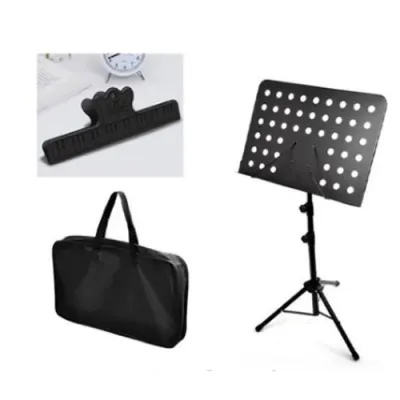
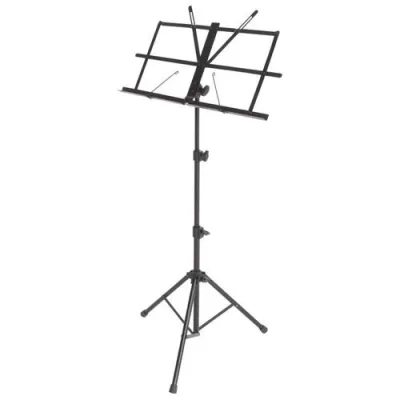
Prices are valid at publication and may change. Please refer to the product page for the latest price.
Ergonomics should dictate the height and angle of your stands. Decide whether you will perform primarily while standing or sitting, as this choice affects your natural sightlines and arm reach. Your elbows should ideally rest at a 90-degree angle when operating controllers or mixers, and your laptop screen should sit near eye level to prevent neck strain during extended sets.
Match Stands to Your Specific Gear Categories
Laptop and Controller Stands
Laptops and controllers form the brain of modern digital DJ and karaoke systems, making their placement critical. If your desk space is limited, an elevated laptop stand can lift your computer directly above your controller, utilizing vertical space efficiently. Look for stands that offer open-frame designs to facilitate proper ventilation, as laptops running demanding performance software can generate significant heat. Multi-tier stacking configurations allow you to layer your gear logically, keeping your hands close to the mixing controls while maintaining a clear view of your track library.

Mixer Stands
Dedicated mixers require robust, flat support that can handle the downward pressure of rapid fader movements and button presses. When selecting a mixer stand, verify that the platform dimensions match your mixer’s footprint and that there is ample clearance for bottom- or rear-exiting cables. The stand must position the mixer in immediate proximity to your media players or controllers, allowing you to transition smoothly between devices without stretching or losing your balance.
Microphone Stands
Microphone stands must match the performer’s movement style and the physical layout of the room. For stationary karaoke hosts or DJs who speak from a seated position, a desktop articulated arm offers excellent flexibility and keeps the desk surface clear. If performers prefer to stand and move around, a classic tripod boom stand provides the necessary reach and angle adjustment. For high-energy karaoke sessions where singers frequently pass the mic, a heavy-duty straight stand with a round, weighted cast-iron base is often the safest choice, as it occupies less floor space and resists tipping when bumped.
Speaker Stands
Speaker stands are essential for isolating vibration and elevating your monitors to the correct listening height. You must verify the stand’s maximum weight capacity against the specifications of your specific speaker model. For home setups with hard parquet or tiled floors, look for stands equipped with rubber feet to absorb vibrations and prevent sliding. If you are setting up on carpeted surfaces, carpet spikes can provide superior stability by anchoring the stand directly to the subfloor.
Verify Stability, Portability, and Safety Limits
Equipment safety relies on understanding the physical limits of your stands. Always check the manufacturer’s stated maximum load capacity and aim to keep your gear’s weight well below this limit, leaving a safe margin of at least 20 to 30 percent. This buffer accounts for the dynamic forces applied when you press buttons, slide faders, or accidentally lean on the equipment during a performance.
The base design of a stand directly influences its stability on different floor types. Tripod bases offer excellent stability on uneven surfaces but require a larger physical footprint, which can present a tripping hazard in tight spaces. Flat plate bases and weighted round bases offer a cleaner look and a smaller footprint, making them ideal for tight corners, though they must be sufficiently heavy to counter any top-heavy equipment.
If you run a mobile DJ business or frequently transport your karaoke setup across Singapore for events, portability becomes a major factor. You must weigh the trade-offs between lightweight folding mechanisms and overall structural rigidity. While aluminum stands are easy to carry, heavy-duty steel stands offer superior wind resistance and stability for outdoor or high-traffic public venues, even if they add weight to your gear bag.
Finalize Your Stand Selection and Setup Plan
With your diagnostic details in hand, cross-reference your equipment inventory with your selected stand types to ensure every piece of gear has a dedicated, secure home. Avoid the temptation to double up heavy items on a single light-duty stand unless the manufacturer explicitly rates it for multi-device support.
When planning your budget, prioritize allocation toward the stands supporting your most expensive, heavy, or fragile items. A premium pair of main speakers or a high-end mixer deserves a top-tier, reliable stand, whereas a simple microphone clip or accessory tray can be sourced more economically. Spending a bit more upfront on robust support can save you thousands of dollars in equipment repairs later.
Finally, plan a comprehensive cable management strategy as you assemble your stands. Secure all power, audio, and USB cables to the stand shafts using hook-and-loop fasteners or integrated cable clips. Leaving loose cables hanging creates a significant hazard; a single snagged foot can easily pull a stand over, sending your valuable controllers or speakers crashing to the ground.
Frequently Asked Questions (FAQ)
Can I use a keyboard stand for my DJ controller?
Yes, you can use a keyboard stand for a DJ controller, provided you use a utility platform accessory or ensure the controller’s chassis is wide enough to span the stand’s support arms securely. Standard X-style keyboard stands can sometimes wobble under the lateral force of scratching or rapid button pressing, so look for double-braced models or Z-stands that offer greater lateral stability. Always check that the depth of the stand arms matches your controller to prevent it from sliding off the front or back.
How high should my speaker stands be for a home karaoke setup?
For the best sound quality and vocal clarity, your speaker stands should be adjusted so that the high-frequency drivers, or tweeters, sit approximately at the ear level of your audience. In a typical home karaoke setup where guests are seated on a sofa, this usually means elevating the speakers to a height of about 1.2 to 1.4 metres. If your guests are standing and dancing, you may need to raise the stands higher, ensuring they are securely locked with safety pins to prevent any top-heavy instability.
Community discussion
Share your experience or ask a question. Comments are reviewed before publication.