
Quick Answer: Which Keyboard Stand Fits Your Setup?
Choosing between an X-stand and a Z-stand depends on how you plan to use and store your instrument. If you have a dedicated practice corner in your home and prioritize stability, a Z-stand is the superior choice. Z-stands offer rock-solid support, maximum legroom, and an open floor space that accommodates sustain pedals comfortably, making them ideal for long, focused practice sessions.
Conversely, if you live in a compact space, such as a typical Singapore HDB flat, or need to transport your gear to music lessons, an X-stand is highly practical. Double-X stands, in particular, strike an excellent balance between portability and structural integrity. They fold completely flat in seconds, allowing you to slide them under a bed or into a wardrobe when not in use. While single-X stands are the most affordable, they are best reserved for very light keyboards and casual players who do not mind a bit of lateral movement.
Stability and Wobble: Supporting 61-Key and 76-Key Models
Understanding the physical forces at play during a practice session is essential when selecting a keyboard stand. When you play, your hands exert downward and lateral forces on the keys. These forces travel through the keyboard chassis and into the stand. A stand with a weak structural design will flex or sway, causing the keys to bounce and disrupting your playing rhythm. For beginners developing their touch and finger strength, a stable playing surface is critical.
Products mentioned in this guide

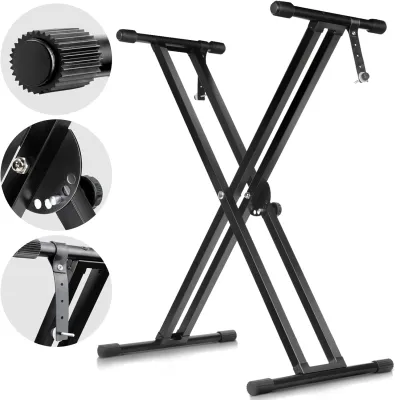
Prices are valid at publication and may change. Please refer to the product page for the latest price.

The classic X-stand relies on two crossed metal tubes joined by a central bolt, forming an X-shape. This design acts like a giant pair of scissors. In a single-X stand, this single central pivot point is the sole structural anchor. When supporting a 61-key or 76-key keyboard, such as the Yamaha PSR-E series or Casio CT-S series, a single-X stand is highly susceptible to lateral wobble. If you play an expressive piece or strike keys at the far left or right ends of the keybed, the stand will sway from side to side. Double-X stands mitigate this issue by adding a second set of crossed bars parallel to the first, creating a much more rigid truss system that reduces lateral movement significantly.
In contrast, a Z-stand uses a rectangular, frame-based architecture. It consists of two vertical, Z-shaped steel pillars connected by a heavy-duty horizontal crossbar. This design distributes the weight of the keyboard straight down through two wide, flat base feet that rest securely on the floor. Because the center of gravity is spread across a wider, more rigid footprint, Z-stands are virtually immune to lateral wobble. Even when you are playing vigorously, the keyboard remains perfectly still, providing a feel that closely mimics an acoustic piano.
Before making a purchase, always check the manufacturer’s stated weight capacity and physical base dimensions on the product label. While entry-level 61-key keyboards are relatively light—typically weighing between 3.5 kg and 5 kg—some 76-key models can be significantly heavier and wider. Placing a wide, heavy keyboard on a narrow, single-X stand raises the center of gravity dangerously high, increasing the risk of the entire setup tipping over if bumped.
Playing Comfort: Legroom, Seating, and Sustain Pedal Placement
Ergonomics play a vital role in how long and how comfortably a beginner can practice. Maintaining proper posture—sitting with your spine straight, shoulders relaxed, and forearms parallel to the floor—helps prevent muscle fatigue and long-term strain. The physical design of your keyboard stand directly influences your ability to maintain this posture by dictating where your legs, knees, and feet can go.
X-stands present a significant ergonomic challenge due to their crossed-bar construction. Because the bars cross directly in the center, the space beneath the keyboard is severely restricted. When you sit at an X-stand, your knees will inevitably bump against the metal bars. To avoid this, players are often forced to sit further back, stretching their arms forward to reach the keys. This awkward reaching posture strains the lower back, neck, and shoulders, and prevents the development of proper wrist and elbow alignment. Taller players and adults learning on a beginner keyboard will find this restriction particularly uncomfortable.
Z-stands completely eliminate this issue. By pushing the vertical support pillars to the far left and right sides of the keyboard, the Z-shape leaves the entire space directly beneath the instrument wide open. You can pull your bench or chair fully forward, allowing your knees to slide comfortably under the keyboard just as they would at a traditional acoustic piano. This open clearance ensures you can sit at the correct height and distance, keeping your elbows at a natural 90-degree angle and your wrists in a neutral, relaxed position.
Furthermore, the open floor space of a Z-stand is highly beneficial for pedal placement. If you are using a sustain pedal, such as the Yamaha FC4A or Casio SP-20, you need to place it where your foot naturally rests. With an X-stand, the lower crossbars often block the ideal pedal position or interfere with the pedal’s cable, forcing you to stretch your leg at an odd angle. A Z-stand leaves the floor entirely clear, allowing you to position your pedals securely without any structural obstructions.
Portability and Storage: Folding Mechanisms and Transport
For many households, a keyboard stand cannot remain permanently set up in the middle of a room. Living in modern urban environments often requires multi-functional spaces where musical gear must be packed away when guests arrive or when the room is needed for other activities. This is where the folding mechanisms and weight of the stand become decisive factors.
X-stands are the undisputed champions of portability. Most models feature a quick-release pull-pin mechanism or a circular disc clutch at the central joint. To fold the stand, you simply pull the spring-loaded pin, collapse the bars together, and let the pin lock back into place. The entire stand folds completely flat into a single, lightweight metal frame that weighs very little. You can easily slide it under a bed, lean it against a wall behind a door, or pack it into the boot of a car for transport to a music lesson or a performance.
Z-stands, by design, are more substantial and less convenient to move on a daily basis. A standard Z-stand is constructed from thick steel tubing and is held together by several hand-tightened knobs or hex bolts. To break it down completely, you must unscrew these fasteners, separating the stand into multiple heavy pieces. While some modern, premium Z-stands feature folding joints that allow the Z-arms to collapse inward, they still remain significantly bulkier, heavier, and more awkward to carry than a folded X-stand.
If your living situation requires you to put away your keyboard after every single practice session, a double-X stand is highly practical. It gives you a reasonable level of stability while remaining incredibly easy to store. However, if you have a dedicated corner in a bedroom or study where the keyboard can stay assembled, the bulkiness of a Z-stand is a non-issue, and its superior stability far outweighs its lack of portability.
Brand Compatibility: Mounting Yamaha and Casio Beginner Keyboards
When pairing a stand with popular beginner keyboards like the Yamaha PSR-E series (such as the PSR-E373) or the Casio Casiotone series (such as the CT-S1 or CT-S300), physical compatibility is a key consideration. These entry-level keyboards have lightweight, plastic chassis that require secure placement to prevent sliding during play.
Most X-stands rely on simple friction to keep the keyboard in place. The top arms of the stand are capped with ribbed rubber sleeves or foam pads. The keyboard simply rests on top of these grips. While this setup is universal and fits almost any keyboard brand, lightweight plastic instruments can still slide if bumped accidentally. Some X-stands include safety straps with plastic pegs that can screw into the bottom of compatible keyboards, but many entry-level Yamaha and Casio models do not have the corresponding threaded holes to accept these pegs.
Z-stands offer a mix of friction-based resting pads and more secure mounting options. Many Z-stands feature adjustable top arms that can be narrowed or widened to match the exact depth of your keyboard. This is a crucial feature to check: beginner keyboards are often quite shallow from front to back. If the top arms of a Z-stand are too deep, the keyboard may not sit securely on the rubber pads, or it may overhang at the back, creating an uneven and unsafe balance. Always measure the physical depth of your keyboard and compare it to the specifications of the stand’s top support arms before purchasing.
Additionally, do not assume that a Z-stand will allow you to bolt your keyboard down directly. While some mid-range arranger keyboards and digital pianos feature pre-drilled, threaded metal inserts on their underside for securing to a stand, most entry-level, budget-friendly keyboards from Yamaha and Casio do not. They feature smooth, solid plastic bottoms. For these models, you will rely entirely on the friction of the stand’s rubber pads. Ensure the stand you choose has high-quality, non-slip rubber grips that will hold the plastic chassis firmly in place without scratching it.
Cost and Value: Budgeting for Your First Keyboard Stand
When budgeting for a beginner keyboard setup, it is easy to focus all your resources on the instrument itself and treat the stand as an afterthought. However, a poor-quality stand can ruin your playing experience, while a good one will last for years. Understanding the price tiers and what features they offer helps you make a smart investment.
X-stands are highly appealing to budget-conscious beginners. In the local market, a basic single-X stand can be found for as little as S$25 to S$40, while a sturdier double-X stand typically ranges from S$45 to S$70. At this price point, you get a highly functional, portable support system. The extra S$20 to S$30 spent to upgrade from a single-X to a double-X stand is highly recommended, as the added stability and safety for your instrument far exceed the minor cost difference.
Z-stands represent a higher tier of investment, generally starting around S$60 and running up to S$150 or more for premium, heavy-duty models. This higher price is justified by the use of thicker steel tubing, welded joints, independent height and width adjustments, and superior paint finishes that resist rust in humid climates. A Z-stand is built to last and can easily support heavier instruments.
If you view your beginner keyboard as a stepping stone and plan to upgrade to a weighted, 88-key digital piano in the future, investing in a high-quality Z-stand or a heavy-duty double-X stand now is highly cost-effective. A cheap single-X stand will not be able to safely support a heavy 88-key digital piano later on, forcing you to buy a second stand. Choosing a durable, versatile stand from the start saves you money and ensures your instrument remains safe.
Decision Framework: Choose X-Stand or Z-Stand?
To finalize your decision, evaluate your practice environment, portability needs, and budget against the following structured criteria.
Choose an X-stand (preferably double-X) if:
- Your budget is limited: You want a reliable support system without spending more than S$50.
- Space is at a premium: You live in a compact HDB flat and need to fold the stand flat to store it under a bed or in a closet after every practice session.
- You need portability: You plan to carry your stand to music lessons, school, or external rehearsals regularly.
Choose a Z-stand if:
- You have a dedicated space: The keyboard will reside permanently in a specific corner of your living room, bedroom, or study.
- You prioritize comfort and posture: You want maximum legroom so you can sit with proper posture without your knees hitting metal crossbars.
- You use a sustain pedal: You want an open floor space so your pedal stays in place and is easy to reach.
- You want absolute stability: You want to eliminate all lateral wobble and bounce while playing.
Verify first if:
- Check the dimensions: Measure the depth and width of your Casio or Yamaha keyboard to ensure it matches the top arms of your chosen stand.
- Check the bottom chassis: Look at the underside of your keyboard to see if it has pre-drilled screw holes or if it relies entirely on friction-based rubber pads.
Frequently Asked Questions (FAQ)
Can I use a single-X stand for a heavy 88-key digital piano?
No, it is highly recommended to avoid using a single-X stand for a heavy, full-size 88-key weighted digital piano. Weighted digital pianos often weigh between 11 kg and 25 kg, which is significantly heavier than beginner 61-key keyboards. A single-X stand has a narrow base and a single central pivot point, making it highly unstable under such a heavy load. The high center of gravity creates a severe tipping hazard, and the structural joints can fail under continuous stress. For 88-key digital pianos, always choose a heavy-duty double-X stand, a Z-stand, or a dedicated wooden furniture stand designed specifically for your model.
Do Yamaha and Casio keyboards have pre-drilled holes for Z-stands?
Most entry-level, highly portable keyboards from Yamaha (such as the PSR-E series) and Casio (such as the Casiotone CT-S series) do not have pre-drilled screw holes on their bottom chassis. These models are designed to sit directly on the friction-based rubber pads of a stand. However, some mid-range arranger keyboards, workstations, and digital pianos do feature threaded metal inserts for bolt-on mounting. Always inspect the underside of your specific keyboard model or consult the manufacturer’s user manual to verify if it supports bolt-on mounting before purchasing a stand with matching security screws.
Community discussion
Share your experience or ask a question. Comments are reviewed before publication.