
Choosing the right Bluetooth piano keyboard as a beginner in Singapore requires balancing key action, connectivity types, and the physical constraints of local living spaces. While wireless features offer incredible convenience for modern learning apps and audio streaming, understanding the distinction between Bluetooth MIDI and Bluetooth Audio is essential to avoid common setup pitfalls. By focusing on verifiable specifications and local retail standards, you can secure an instrument that supports your musical growth for years to come.
Quick Guide to Choosing Your First Bluetooth Keyboard
When starting your musical journey, the term “Bluetooth keyboard” can refer to two entirely different wireless functions. Bluetooth MIDI allows your keyboard to send performance data to learning applications on a tablet or computer, while Bluetooth Audio lets you stream music from your phone through the keyboard’s built-in speakers. Identifying which of these features you need is the first step in narrowing down your options.
Beyond wireless connectivity, a beginner must prioritize the physical feel of the keys. Touch-sensitive keys are non-negotiable, as they allow you to play louder or softer depending on how hard you press them, mimicking the dynamics of an acoustic piano. For those committed to classical training, a full set of 88 weighted keys is highly recommended, whereas casual players or those with limited space might opt for a compact 61-key model.
Products mentioned in this guide
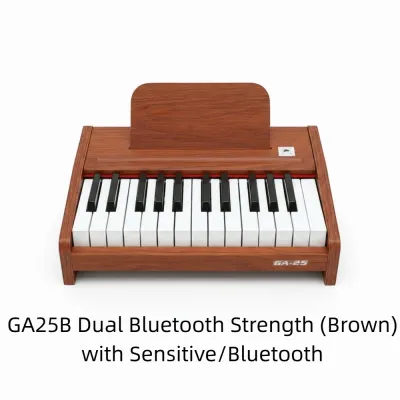
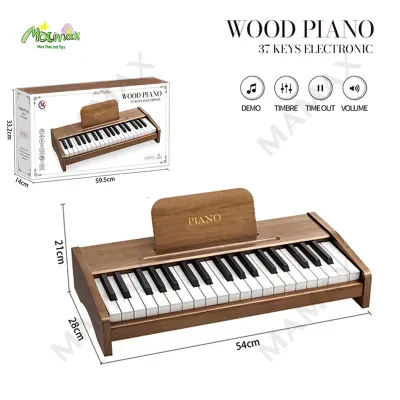
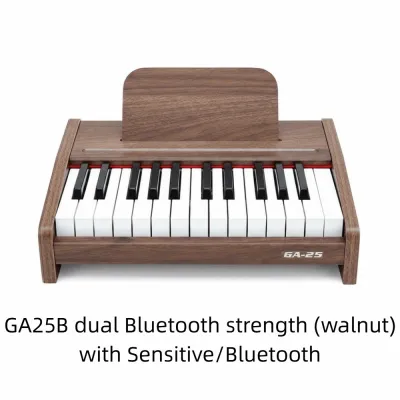
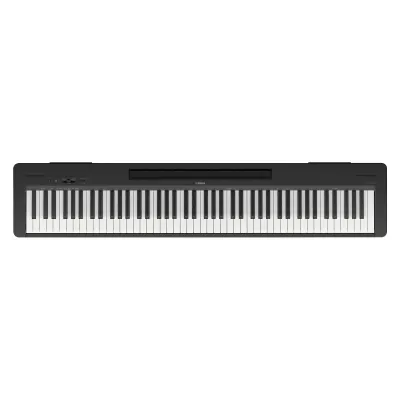
Prices are valid at publication and may change. Please refer to the product page for the latest price.
Budget allocation in Singapore typically ranges from S$200 for basic, portable 61-key models to upwards of S$1,500 for premium 88-key digital pianos with advanced hammer-action keybeds. Setting a realistic budget helps you filter out low-quality instruments that lack proper touch sensitivity or local warranty support. Prioritizing authorized local distributors ensures you receive a reliable instrument backed by local customer service.
Key Features to Look for in a Beginner Bluetooth Keyboard
Key Action and Touch Sensitivity
The mechanism beneath the keys, known as the key action, directly influences your playing technique and finger strength development. Synth-action keys are unweighted and rely on springs, offering very little resistance; while suitable for electronic music, they do not prepare you for the feel of an acoustic piano. Semi-weighted keys offer a middle ground, using light weights to provide moderate resistance while keeping the instrument highly portable.

For a true piano-playing experience, fully weighted keys—often referred to as hammer action—are the gold standard. These keys simulate the physical hammers of an acoustic piano, providing a heavier touch in the lower register and a lighter touch in the treble. Touch sensitivity is equally critical, ensuring that the sound engine responds dynamically to the velocity of your keystrokes, allowing for expressive performances.
Key Count and Portability
Keyboards generally come in three standard sizes: 61 keys, 73 keys, and 88 keys. A 61-key keyboard covers five octaves, which is perfectly adequate for learning basic chords, pop songs, and simple melodies. These models are lightweight, easy to store, and fit comfortably on small desks or temporary stands, making them ideal for compact living arrangements.
An 88-key keyboard represents the full range of a standard acoustic piano. If your goal is to study classical music, take formal piano examinations, or play complex arrangements, an 88-key instrument is essential. While these models require a dedicated space and a sturdy stand, they ensure you will not run out of keys as your repertoire expands over time.
Sound Engines, Polyphony, and Speakers
The quality of the built-in sound engine determines how realistic the piano tones sound. High-quality digital keyboards use multi-layered stereo samples of acoustic grand pianos to deliver rich, resonant tones. Additionally, pay close attention to the polyphony limit, which is the maximum number of individual notes or voices the keyboard can produce simultaneously.
For beginners, a minimum of 64-note polyphony is recommended, though 128-note polyphony is preferred. High polyphony prevents notes from cutting off abruptly when you play complex chords while holding down the sustain pedal. The built-in speaker system should also be clear and powerful enough for home practice, typically requiring at least dual 6-watt to 12-watt speakers to fill a standard room without distortion.
Physical Dimensions and Housing Constraints
In Singapore, where residential space is often at a premium, the physical footprint of your keyboard is a major consideration. A standard 88-key digital piano measures approximately 130 centimeters in length and 30 centimeters in depth. Before purchasing, measure your designated practice area carefully to ensure the instrument fits without obstructing walkways.
Weight is another factor if you plan to pack the keyboard away after practice. Portable models under 12 kilograms can be easily moved and stored in closets or under beds. Heavier console-style digital pianos, which often weigh over 20 kilograms, are designed to remain stationary on dedicated wooden stands, serving as a permanent piece of furniture in your home.
Demystifying Bluetooth Audio and MIDI for Keyboards
Understanding Bluetooth Audio
Bluetooth Audio turns your digital keyboard into a wireless speaker system. By pairing your smartphone, tablet, or laptop to the keyboard, you can stream backing tracks, metronome beats, or instructional video audio directly through the keyboard’s speakers or connected headphones. This allows you to play along with your favorite songs or tutorials seamlessly.
It is important to note that Bluetooth Audio is a one-way receiver technology in almost all digital keyboards. This means the keyboard receives audio from your smart device, but it cannot transmit its own playing sounds wirelessly to Bluetooth headphones. For silent practice, you must still rely on a physical, wired headphone connection to avoid severe audio delay.
Understanding Bluetooth MIDI
Bluetooth MIDI (Musical Instrument Digital Interface) transmits performance data rather than actual sound. When you press a key, the keyboard sends digital information—such as the specific note, how hard it was pressed, and how long it was held—to a compatible app on your tablet or computer. This data is processed instantly by the app to track your progress or record your playing.
This wireless connection is incredibly useful for interactive learning platforms, sheet music readers, and digital audio workstations (DAWs). It eliminates the need for messy cables running from your keyboard to your tablet, allowing for a clean, distraction-free practice environment. Most modern iOS, iPadOS, Android, and macOS devices support Bluetooth MIDI natively.
Latency and the Necessity of Wired Connections
Latency is the short delay between the moment you press a key and the moment you hear the corresponding sound. While Bluetooth MIDI has very low latency that is barely noticeable during casual learning sessions, Bluetooth Audio can suffer from significant lag. This delay can make real-time playing frustrating if you attempt to route the keyboard’s sound wirelessly through external Bluetooth speakers.
If you are engaging in precise recording, music production, or advanced classical practice, a wired connection remains the most reliable option. Connecting your keyboard to your computer or tablet via a standard USB-B to USB-C or Lightning cable ensures zero latency and a perfectly stable connection. Always keep a compatible USB cable on hand as a backup for your wireless setup.
Navigating Keyboard Purchases and Retailers in Singapore
Physical Showrooms versus Online Retailers
When purchasing your first keyboard, visiting a physical music showroom in Singapore is highly beneficial. Testing different instruments in person allows you to feel the weight of the keys, listen to the speaker quality, and assess the overall build. Showroom staff can also provide valuable demonstrations and answer specific technical questions regarding connectivity.
Conversely, authorized online retailers offer the convenience of home delivery, which is especially helpful for bulky 88-key instruments. Many local distributors run online-exclusive promotions or bundle deals that include essential accessories. To get the best of both worlds, test the models in a physical store first, then compare prices across authorized local online storefronts.
Verifying Warranty and Power Specifications
Always ensure your purchase includes an official local distributor warranty, which typically covers parts and labor for 12 to 24 months. Be cautious of parallel imports or grey market models sold on online marketplaces; these often lack local warranty coverage, meaning you would have to pay out-of-pocket for repairs or ship the instrument overseas for servicing.
Additionally, verify that the keyboard comes with a safety-certified UK-style (Type G) power plug suitable for Singapore’s 230V 50Hz electrical grid. Using uncertified power adapters or third-party voltage converters can pose safety hazards and potentially damage the sensitive electronic components of your keyboard. Look for the local safety mark on the power adapter before plugging it in.
Identifying Red Flags in Listings
When browsing online listings, be wary of deals that seem too good to be true. Extremely low prices often indicate refurbished units, older discontinued models, or listings that do not include essential components like the power supply or music rest. Always read the product description carefully to confirm exactly what is included in the box.
Another red flag is the lack of clear brand and model specifications. Reputable manufacturers always provide detailed spec sheets outlining key action, polyphony, and Bluetooth protocols. If a listing uses generic terms like “professional electronic piano” without a verifiable brand name or model number, it is best to avoid it and stick to established musical instrument brands.
How to Build Your Personal Keyboard Shortlist
Step 1: Define Your Primary Use Case
Begin by identifying your primary musical goals. If you are a complete beginner looking to explore piano playing casually, a portable 61-key keyboard with Bluetooth MIDI for learning apps is an excellent, cost-effective starting point. This setup keeps things simple and allows you to test your interest without a significant financial commitment.
If you are committed to serious piano study, classical lessons, or preparing for graded examinations, prioritize an 88-key digital piano with fully weighted keys. This ensures you develop the correct finger strength and technique from day one, preventing the need for an expensive upgrade just a few months into your learning journey.
Step 2: Filter by Physical and Budget Constraints
Measure the exact space where you plan to set up the keyboard. If you live in a cozy apartment, a slim, portable model that can be placed on a folding stand or desk is highly practical. If you have a dedicated music corner, you can consider a console-style digital piano with an integrated wooden stand and three-pedal unit.
Next, establish a strict budget range in S$. For a basic starter setup, allocate S$200 to S$500. For an intermediate, fully weighted 88-key digital piano, expect to invest between S$600 and S$1,200. Remember to factor in the cost of essential accessories if they are not included in the keyboard bundle.
Step 3: Cross-Reference Compatibility and Manuals
Before finalizing your shortlist, download the official user manuals for the models you are considering. Check the specifications section to confirm the exact Bluetooth version and supported profiles (such as GATT for MIDI or A2DP for Audio). This step is crucial to ensure the keyboard will pair seamlessly with your specific smartphone or tablet.
Additionally, visit the support pages of your preferred learning applications to check their list of officially supported keyboards. Some proprietary educational apps have specific hardware requirements or work best with certain brands. Verifying this compatibility beforehand saves you from the frustration of wireless pairing issues later on.
Step 4: Plan for Essential Accessories
To complete your setup, you will need several key accessories that may or may not come bundled with your keyboard. A sturdy stand is essential; double-X or Z-stands offer the best stability for heavier keyboards. An adjustable bench is also highly recommended to help you maintain the correct posture and elbow height while playing.
- Sustain Pedal: Look for a pedal with a non-slip rubber base and a standard 1/4-inch jack. A physical pedal is necessary for sustaining notes and playing legato passages.
- Wired Headphones: Choose over-ear, closed-back headphones with a long cable. These block out external noise and allow you to practice silently at any hour without disturbing others.
- Dust Cover: A simple spandex or velvet dust cover protects the sensitive key contacts from dust and humidity, extending the lifespan of your instrument.
Frequently Asked Questions (FAQ)
Can I use any Bluetooth headphones with a digital piano?
No, you generally cannot use standard Bluetooth headphones directly with a digital piano. Most digital keyboards only feature Bluetooth receivers (for playing audio from your phone through the keyboard) or Bluetooth MIDI transmitters (for sending note data to apps). They do not have the Bluetooth audio transmitters required to send sound to wireless headphones.
Even if you use an external Bluetooth transmitter plugged into the keyboard’s headphone jack, you will likely experience noticeable audio latency. This delay between pressing a key and hearing the sound in your headphones makes real-time playing highly difficult. For the best, lag-free practice experience, always use a pair of quality wired headphones.
Do I need an 88-key keyboard to start learning?
You do not strictly need 88 keys to begin learning the basics of music theory, simple melodies, and chord progressions. A 61-key keyboard is perfectly sufficient for the first few months of casual learning, pop music, and synthesizer practice. It is also much easier to accommodate in smaller living spaces.
However, if you plan to take formal classical piano lessons or progress past the beginner stage, you will eventually need an 88-key keyboard. Classical pieces frequently utilize the extreme high and low registers of the instrument. Starting with an 88-key weighted keyboard from the beginning helps you build proper finger strength and avoids the need for a future upgrade.
Will a Bluetooth keyboard work with all learning apps?
Most modern learning apps that support wireless MIDI connections will work with a standard Bluetooth MIDI keyboard. However, compatibility can vary depending on your smart device’s operating system and the specific app’s software requirements. Some apps may require you to connect via their in-app settings menu rather than your device’s main Bluetooth settings.
Before making a purchase, it is highly recommended to check the app developer’s official website for compatibility lists. In some cases, proprietary educational platforms work more reliably with specific brand ecosystems or require a wired USB connection to guarantee zero latency. Checking these details beforehand ensures a smooth, hassle-free setup.

Community discussion
Share your experience or ask a question. Comments are reviewed before publication.