
Finding the right keyboard holder is one of the most important decisions you will make when setting up your first electronic keyboard or digital piano. While it is tempting to place your new instrument on a dining table, a desk, or even a bed, these temporary solutions often hinder your learning progress and put your equipment at risk. A dedicated keyboard stand provides the structural support, height customization, and stability needed to practice comfortably and safely. By choosing a holder that matches your instrument’s weight and your playing environment, you set yourself up for a much more enjoyable and productive musical journey.
For most beginners, the ideal choice balances stability, space efficiency, and affordability. Double-X stands and Z-style stands are generally the most reliable options for home practice. They offer a secure foundation that prevents the keyboard from shaking while you play, and they can be adjusted to accommodate different seating heights. Investing in a proper stand from the start not only protects your keyboard from accidental falls but also helps you maintain correct posture, preventing physical strain during long practice sessions.
Why Your First Keyboard Needs a Proper Stand
Maintaining correct posture and wrist health is essential when learning to play any keyboard instrument. When you place a keyboard on an improvised surface like a dining table or a study desk, the keys are almost always too high or too low. This mismatch forces you to raise your shoulders, bend your wrists at awkward angles, or slouch forward to reach the keys. Over time, these poor ergonomic habits can lead to muscle fatigue, neck pain, and repetitive strain injuries in your wrists and forearms. A dedicated keyboard holder allows you to adjust the instrument to the precise height where your elbows can rest comfortably at a ninety-degree angle, promoting a relaxed and healthy playing posture.
Products mentioned in this guide
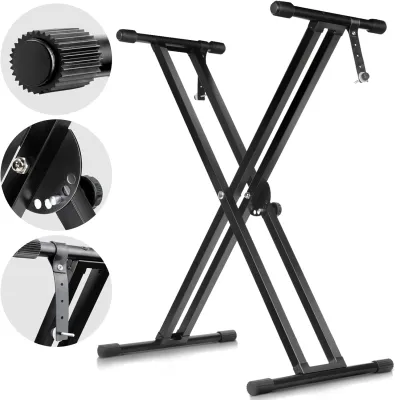
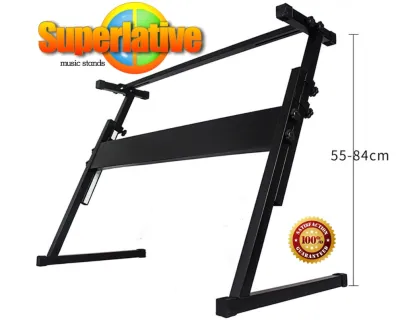

![[SG Seller] Double X Adjustable Portable Self-installation piano Keyboard Stand](https://img.lazcdn.com/g/p/b80c0e4f73cccbdb23d62602c484413c.jpg_400x400q80.jpg_.webp)

Prices are valid at publication and may change. Please refer to the product page for the latest price.
Stability is another critical factor that directly impacts your playing experience. Electronic keyboards, especially those with weighted keys, require a solid foundation that does not wobble or sway when you press the keys. If your stand is flimsy or unstable, the entire instrument will shake with every keystroke, making it difficult to focus on your finger placement and dynamics. A sturdy stand absorbs the physical energy of your playing, ensuring that the keys remain perfectly still even during energetic practice sessions or when playing expressive, fast-paced passages.
Space management and instrument safety are equally important considerations, particularly in compact living environments. Improvised setups often require you to pack your keyboard away after every session, creating a barrier to daily practice. A dedicated stand keeps your instrument permanently set up and ready to play, encouraging more frequent practice. Furthermore, a proper holder features non-slip rubber grips and secure locking mechanisms that prevent the keyboard from sliding off or tipping over. This protects your valuable electronic instrument from costly damage caused by accidental bumps, curious pets, or busy household traffic.
Essential Features to Evaluate Before Buying
Before purchasing a keyboard holder, you must evaluate several physical and mechanical features to ensure a safe and comfortable fit for your instrument. The first and most critical specification to check is the weight capacity of the stand. Every keyboard stand is rated to support a maximum weight, which you must cross-reference with the actual weight of your electronic keyboard. Keep in mind that fully-weighted 88-key digital pianos are significantly heavier than basic 61-key beginner keyboards. Choosing a stand with a weight capacity that comfortably exceeds your keyboard’s weight provides an extra margin of safety and prevents structural sagging over time.

Height adjustability is another essential feature that determines how versatile your setup will be. A good keyboard holder should offer a wide range of height settings, allowing you to play comfortably whether you are sitting on a standard piano bench, an office chair, or standing up. Look for stands that utilize a reliable locking mechanism, such as a pull-pin or a gear-locking system, rather than simple friction knobs. These mechanical locks ensure that the stand cannot slip or collapse unexpectedly under the weight of your instrument while you are playing.
The footprint of the stand and the amount of legroom it provides are crucial for long-term comfort. When practicing while seated, your knees and feet need sufficient clearance underneath the keyboard. Some stand designs have central support bars that can obstruct your knees, forcing you to sit further back and stretch your arms uncomfortably. Evaluating how the stand’s legs interact with your seating arrangement will help you maintain an ergonomic position. Additionally, consider the overall floor space the stand occupies, especially if you need to fit it into a small bedroom or a shared living area.
Finally, pay close attention to the quality of the materials, joints, and folding mechanisms. A high-quality keyboard holder is typically constructed from durable steel tubing with clean, robust welds at the joints. If you plan to transport your keyboard to lessons, rehearsals, or performances, ease of folding is a vital feature. The stand should fold down flat quickly and compactly without requiring complex tools. High-quality rubber end caps on the feet and support arms are also essential, as they prevent the stand from sliding on smooth floors and protect your instrument’s chassis from scratches.
Common Keyboard Holder Designs and Their Best Uses
The market offers several distinct structural designs for keyboard holders, each tailored to different playing styles, space requirements, and instrument types. Understanding the primary categories of stands allows you to select the shape that best fits your home setup and musical needs. The three most common designs are X-style stands, Z-style stands, and table-style stands, alongside more specialized options like column and A-frame stands. Each of these configurations presents unique trade-offs between portability, structural stability, and available legroom.
X-Style Stands (Single and Double)
X-style stands are the most popular and widely available entry-level keyboard holders on the market. Named for their crossing metal support bars, these stands are highly favored for their simplicity, affordability, and exceptional portability. A single-X stand consists of a single pair of crossed legs, making it incredibly lightweight and easy to fold flat for storage under a bed or in a closet. This design is highly suitable for lightweight, portable 61-key beginner keyboards that do not exert heavy downward force.
However, single-X stands have notable limitations when it comes to legroom and stability. Because the metal bars cross directly in the center, they block the space beneath the keyboard, often causing your knees to bump into the frame when you sit down to play. This can make extended seated practice sessions uncomfortable. Additionally, single-X stands can exhibit a slight side-to-side wobble when supporting heavier instruments or when subjected to enthusiastic playing.
To address these stability concerns, double-X stands feature a dual-bracing design with two pairs of crossed metal bars. This extra reinforcement significantly reduces wobble and increases the overall weight capacity of the stand. If you are using a heavier 88-key digital piano with weighted keys, or if you anticipate upgrading to one in the near future, a double-X stand is a much safer and more stable choice than a single-X model, while still retaining the convenient folding capability.
Z-Style and Table-Style Stands
Z-style stands are named after their Z-shaped side profiles, which provide a highly stable and ergonomic platform for keyboard players. Unlike X-style stands, Z-style holders do not have crossing bars in the center, leaving the entire space beneath the keyboard completely open. This design offers excellent knee clearance and legroom, allowing you to sit in a natural, comfortable position with your feet flat on the floor. It also makes it much easier to position and use sustain pedals without your feet bumping into the stand’s frame.
Table-style stands, which feature four independent legs similar to a small utility table, offer similar ergonomic benefits. They provide outstanding weight distribution and are incredibly sturdy, making them an excellent choice for heavy professional keyboards and digital pianos. Because the weight is distributed evenly across four vertical legs, table-style stands are virtually immune to side-to-side wobbling, providing a rock-solid feel that closely mimics the stability of an acoustic piano.
While both Z-style and table-style stands offer superior stability and comfort, they are generally heavier and more bulky than X-style stands. They often require a bit more assembly time and do not fold down as quickly or compactly, making them less ideal for frequent travel. However, if your keyboard setup is going to remain permanently in one spot in your home, the ergonomic advantages and robust stability of a Z-style or table-style stand make them highly worthwhile investments for beginners.
Column and A-Frame Stands
Column stands feature a modern, sleek aesthetic consisting of a single central vertical pillar with support arms extending outward to hold the keyboard. These stands are highly popular among performing musicians because they look clean on stage and often allow for multiple keyboards to be stacked vertically. However, column stands are typically designed for standing play and may not offer the best ergonomics or legroom for a beginner who practices primarily while seated. They also tend to be more expensive and can have a larger floor footprint.
A-frame stands utilize a wide, ladder-like frame that is exceptionally stable and capable of holding multiple lightweight synthesizers or electronic keyboards simultaneously. While they are excellent for home studios with multiple instruments, they occupy a significant amount of floor space and are generally overkill for a beginner with a single electronic keyboard. The wide frame can also make it difficult to sit close to the instrument comfortably.
For most beginners, the specialized features of column and A-frame stands do not justify their higher cost and larger physical footprint. Unless you have a specific need to stack multiple instruments or require a highly stylized stage look, sticking to a classic double-X, Z-style, or table-style stand will provide a more practical and comfortable learning environment.
Matching the Holder to Your Keyboard's Size and Weight
To ensure a secure fit and prevent your instrument from tipping over, you must carefully match the physical dimensions and weight of your keyboard to the specifications of the holder. Never assume that a stand will fit your keyboard based solely on the number of keys. A lightweight 61-key keyboard has very different support requirements compared to a heavy 88-key digital piano with fully-weighted action. Before making a purchase, locate your keyboard’s user manual or visit the manufacturer’s official website to find the exact weight and physical dimensions of your instrument.
Once you know the weight of your keyboard, compare it to the maximum load capacity of the stand you are considering. It is highly recommended to choose a stand that is rated to hold at least twenty to thirty percent more than your keyboard’s actual weight. This safety margin ensures that the stand remains stable even when you apply downward pressure while playing expressive passages. If you plan to upgrade your instrument in the future, investing in a heavy-duty stand now will save you the expense of buying a new holder later.
You must also verify that the width and depth of the stand’s support arms are compatible with your keyboard. The support arms should extend across at least two-thirds of the keyboard’s depth to prevent it from tipping forward or backward if you press the keys near the edges. Additionally, ensure that the width of the stand can be adjusted to match the length of your keyboard. If the stand is set too wide, the keyboard may not rest securely on the rubber pads; if it is too narrow, the setup will feel top-heavy and unstable. Taking these precise measurements beforehand guarantees a safe, snug, and worry-free setup in your home.
Setup, Stability, and Safety Checks at Home
Once your new keyboard holder arrives, taking the time to set it up correctly and perform a few safety checks will protect your instrument and ensure a stable playing experience. Begin by carefully assembling the stand according to the manufacturer’s instructions, ensuring that all bolts, screws, and locking pins are tightened securely. Inspect the metal frame and joints for any visible manufacturing defects, such as cracked welds or stripped threads, before placing your valuable keyboard on top of the stand.
After assembly, place the stand in its designated spot and test it for stability. If your home has slightly uneven floors, such as tile or older floorboards, the stand may wobble. Many modern keyboard stands feature adjustable rubber end caps on the feet that you can rotate to compensate for uneven surfaces. Adjust these caps until all four corners of the stand make firm, even contact with the floor, eliminating any rocking motion.
Next, examine the rubber grips on the support arms where your keyboard will rest. These grips are essential for preventing the instrument from sliding around while you play. Over time, dust, pet hair, and humidity can accumulate on the rubber, reducing its friction and effectiveness. Wipe the grips and the bottom of your keyboard with a clean, damp cloth to remove any debris, ensuring a secure, high-traction connection.
Finally, organize your cables to prevent accidental trips and damage. Route the power adapter, headphone, and sustain pedal cables neatly along the frame of the stand, securing them with cable ties or hook-and-loop straps. Keep cables clear of any moving parts or folding joints on the stand to avoid pinching or fraying the wires. Ensuring that cables do not hang loosely on the floor reduces the risk of someone catching their foot on a wire and pulling the entire keyboard setup to the ground.
Frequently Asked Questions (FAQ)
Can I use a generic table or a guitar stand for my keyboard?
Using a generic table is not recommended because standard tables are typically too high for proper keyboard ergonomics, which can lead to wrist strain and poor posture. Tables also lack the non-slip rubber grips and safety strap attachments found on dedicated keyboard stands, increasing the risk of your instrument sliding off. Guitar stands are structurally designed to support vertical, neck-heavy instruments and are completely unsuitable for holding wide, flat-bottomed electronic keyboards.
Do I need a double-X stand for a 61-key beginner keyboard?
A single-X stand is generally sufficient and highly cost-effective for a lightweight 61-key beginner keyboard, as these instruments typically weigh very little. However, if you have pets or young children in your home, or if you plan to upgrade to a heavier 88-key digital piano in the future, investing in a double-X stand is highly recommended. The double-X design offers significantly better stability and peace of mind for a very small difference in price.
How do I prevent the keyboard from sliding off the stand?
To prevent your keyboard from sliding, ensure that the rubber grips on the stand’s support arms are clean and free of dust. Many keyboard stands also come with safety straps that can be screwed directly into the threaded holes on the underside of compatible keyboards. If your keyboard does not have these holes, you can use high-friction rubber pads, non-slip drawer liners, or adhesive foam tape on the support arms to keep the instrument securely in place.

Community discussion
Share your experience or ask a question. Comments are reviewed before publication.