
Choosing the right power adapter for your Casio keyboard is essential to ensure stable performance and protect your instrument’s delicate internal circuitry. To find the correct adapter, you must match the keyboard’s exact voltage, minimum current (amperage), polarity, and physical plug dimensions. Using an incompatible power supply can lead to a keyboard that fails to turn on, experiences audio distortion, or suffers permanent electrical damage. By verifying your specific model’s requirements, you can confidently select a compatible power source.
How to Identify Your Casio Keyboard's Power Requirements
Before searching for a replacement power supply, you must locate the electrical specifications printed directly on your instrument. Turn the keyboard over or check the rear panel near the power input jack to find the manufacturer’s physical label or nameplate. This label lists the required input voltage, measured in volts (V), and the current draw, measured in amperes (A) or milliamperes (mA).
Next, look closely at the label for the direct current (DC) polarity symbol, which indicates whether the device requires a center-positive or center-negative connection. This symbol typically consists of three circles connected by lines, with a plus (+) and minus (-) sign pointing to either the center dot or the outer ring. Matching this polarity is critical, as reversing it can instantly damage the mainboard.
Products mentioned in this guide
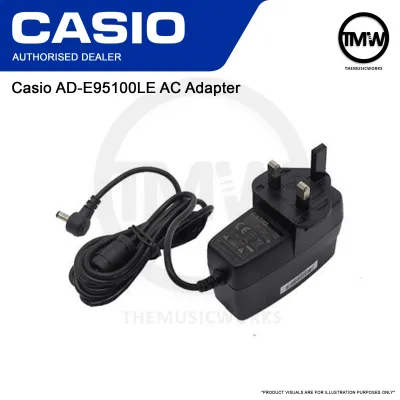
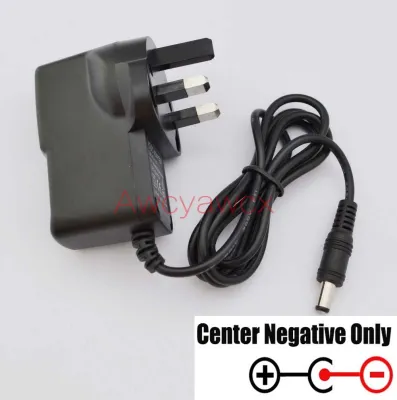
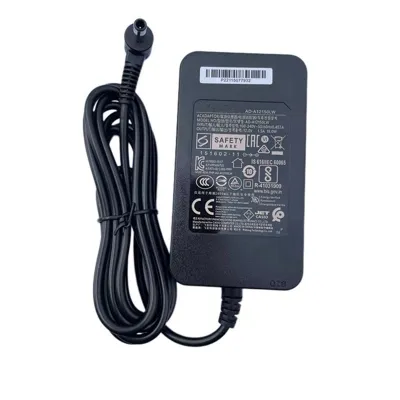
Prices are valid at publication and may change. Please refer to the product page for the latest price.
If the physical label on your keyboard has worn off or is missing entirely, do not guess the power requirements. Instead, consult the original user manual or visit the manufacturer’s official support website to download the digital manual for your exact model. Finally, take note of the physical size of the DC input jack on the keyboard to ensure the barrel plug fits securely without damaging the port.
Key Specifications to Check Before Buying an Adapter
Understanding the core electrical parameters of a power adapter prevents costly mistakes and ensures your keyboard runs safely.

Voltage Matching The output voltage of the adapter must exactly match the voltage rating specified on your keyboard. If your keyboard requires 9V, you must use a 9V adapter; using a 12V adapter will overload the internal components, while a 5V adapter will not provide enough power to operate the system.
Current Capacity Unlike voltage, the current rating (amperage) of the adapter does not need to be an exact match, but it must meet or exceed the keyboard’s requirements. If your keyboard draws 1.0A, using an adapter rated for 1.5A or 2.0A is perfectly safe, as the keyboard will only draw the current it actively needs. However, an adapter with insufficient amperage will overheat and may cause the keyboard to shut down.
Polarity Alignment You must verify that the polarity diagram on the adapter matches the diagram on the keyboard. A center-negative keyboard must only be paired with a center-negative adapter, and a center-positive keyboard requires a center-positive adapter. Mismatched polarity is one of the most common causes of immediate hardware failure.
Connector Dimensions The barrel plug at the end of the adapter cable must have the correct outer diameter (OD) and inner pin diameter (ID) to establish a stable electrical connection. A plug that is too loose will cause intermittent power drops, while a plug that is too tight can crack the input jack.
Finding the Right Adapter for Popular Casio Series
Casio produces a wide range of keyboards, from compact starter models to professional digital pianos, and their power requirements vary significantly across different product lines.
CT-S and CTK Series These portable arranger keyboards are highly popular among students and intermediate players. While many models in these series utilize standard low-voltage DC inputs, the exact voltage and plug sizes can differ between older CTK models and the modern CT-S Casiotone lineup. Always check the full model number (such as CT-S300 or CTK-3500) to verify the exact power requirements, as assuming all keyboards in the same series use the same adapter can lead to compatibility issues.
SA and Mini Keyboards Designed for beginners and young learners, mini keyboards generally have very low power demands. Many of these models can run on batteries or low-current adapters. When choosing an adapter for an SA-series keyboard, verify whether it requires a specialized low-current power supply or if it can safely accept a standard multi-purpose adapter.
Digital Pianos and Workstations High-end digital pianos and professional workstations feature advanced sound engines and powerful built-in speakers, which demand substantially more power. These instruments typically require heavy-duty adapters with higher voltage and amperage ratings. For these premium models, it is highly recommended to use the manufacturer’s specified adapter to ensure the keyboard receives clean, stable power. Always cross-reference the exact model number found on the back of your instrument rather than relying on general series names.
Safety Tips for Connecting Your Keyboard
Proper handling of your power adapter protects both your musical investment and your home’s electrical system.
Always plug the power adapter into the wall outlet first before inserting the DC barrel plug into your keyboard. When packing up, reverse this order by unplugging the DC connector from the keyboard first. This sequence prevents minor electrical arcs from occurring at the keyboard’s sensitive input jack.
Regularly inspect the adapter cable for signs of wear, such as fraying, exposed wires, or loose connections near the plug. In Singapore, ensure your adapter carries the appropriate safety certifications, such as the Safety Mark, which indicates the device has been tested and approved for safe domestic use. Spending S$20 to S$40 on a certified, high-quality adapter is a minor investment compared to the cost of repairing a damaged keyboard mainboard.
Understand the difference between a simple physical plug adapter and a voltage transformer. A plug adapter only changes the shape of the prongs to fit local outlets, whereas a voltage transformer converts the actual grid voltage. Stop using any power supply immediately if it becomes excessively hot to the touch, emits a burning odor, or causes the keyboard to flicker or restart.
Frequently Asked Questions (FAQ)
Can I use a generic universal adapter for my Casio keyboard?
Yes, a generic universal adapter can work safely, provided you can manually configure its voltage, polarity, and connector tip to match your keyboard’s exact specifications. Before plugging it in, double-check that the voltage selector switch is set correctly and that the polarity tip is oriented properly. An incorrect setting on a universal adapter can deliver excessive voltage or reversed polarity, which can instantly damage your instrument.
Is it safe to use an adapter with a higher amperage rating?
Yes, it is entirely safe to use an adapter with a higher amperage (A or mA) rating than your keyboard requires, as long as the voltage is an exact match. The keyboard’s internal circuits will only draw the amount of current needed to operate. However, you must never use an adapter with a higher voltage rating, as this will force excess electrical pressure into the keyboard and cause severe, irreversible damage.

Community discussion
Share your experience or ask a question. Comments are reviewed before publication.