
A Korg keyboard can be an excellent choice for beginners, but the brand produces a wide spectrum of instruments ranging from lightweight synthesizers to fully weighted digital pianos. Suitability depends entirely on matching the specific model’s key action, sound engine, and connectivity to your personal learning goals. Rather than relying on the brand name alone, this guide helps you evaluate the technical specifications and practical features to determine if a specific Korg keyboard aligns with your educational needs.
Understanding Your Beginner Goals and Needs
Before browsing specific models, you must define what learning piano means for your musical journey. If your goal is to play classical repertoire or pass formal graded examinations, your technical requirements will be highly specific. You will need an instrument that closely mimics the physical mechanics of an acoustic piano to build proper finger strength and control.
Conversely, if your interest lies in modern music production, songwriting, or playing casual pop tunes, your needs will differ. A lightweight keyboard with synthesizer action, MIDI controller capabilities, and a wide variety of electronic sounds might serve you better than a heavy, traditional digital piano.
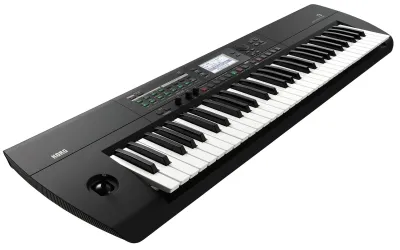
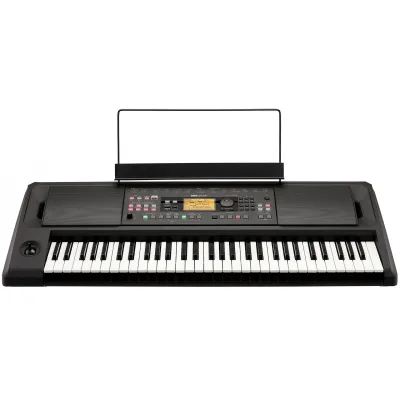
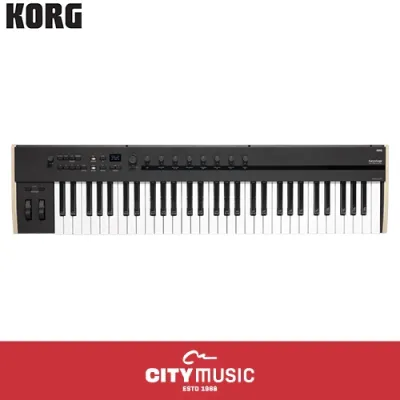
Products mentioned in this guide
![Korg Digital Keyboard Piano EK-50 EK-50L Limitless Professional Portable Entertainer Black 61 Keys Velocity Sensitive EK 50 50L EK50 EK50L Electronic Instrument - Absolute The Music Works Store [LIMITED STOCK]](https://img.lazcdn.com/g/p/079f44fdbdd9435ddad184414b7e1962.jpg_400x400q80.jpg_.webp)
![Korg B2SP+ 88 Keys Digital Piano Compact Upright Fully Weighted B2SP Plus [LIMITED STOCK]](https://img.lazcdn.com/g/p/42b9e7a7f49d113c2a0dc023dc6d5a14.jpg_400x400q80.jpg_.webp)
Prices are valid at publication and may change. Please refer to the product page for the latest price.
Living space and lifestyle constraints also play a major role in your decision. In Singapore, where residential space in apartments or condominiums is often limited, a massive console-style digital piano with a fixed wooden cabinet might not be practical. A portable slab keyboard that can be stored away or set up on a folding stand offers a space-saving alternative without sacrificing key quality.
Budget is another critical factor to establish early. Setting a realistic budget in S$ helps narrow down the options between entry-level portable keyboards and mid-range digital pianos. Knowing your financial boundaries prevents you from overpaying for advanced synthesis features that a beginner rarely uses during the first few years of study.
Evaluating Key Action and Feel on Korg Keyboards
The most critical technical specification for any beginner piano student is the key action. Key action refers to the mechanical design underneath the keys that determines how they resist and respond to your finger pressure. Choosing the wrong key action can hinder your technique and make transitioning to an acoustic piano difficult.

Fully weighted hammer action keys use actual mechanical weights to simulate the hammers of an acoustic piano. This design is essential for building the finger strength, dexterity, and muscle memory required for formal piano training. If a keyboard lacks weighted keys, your fingers will not develop the control needed to play expressively on traditional instruments.
Semi-weighted and synth-action keys use springs rather than weights to return the keys to their resting position. While semi-weighted keys offer some resistance, they do not replicate the feel of an acoustic piano. Synth-action keys are completely unweighted and highly springy, making them excellent for fast synthesizer leads or organ playing, but highly unsuitable for foundational piano practice.
When reviewing Korg’s product specifications, look for specific key action technologies. Korg often uses its Natural Weighted Hammer Action (NH) in its entry-level digital pianos, which provides a heavier feel in the lower register and a lighter touch in the high register. For more advanced models, they employ the Real Weighted Hammer Action 3 (RH3), which is crafted to offer a highly realistic, graded response.
You must also verify that the keyboard features touch sensitivity, often listed as velocity sensitivity. This feature ensures that the volume and character of the sound change depending on how hard or soft you strike the keys. Without touch sensitivity, the instrument will produce the same volume regardless of your touch, making dynamic expression impossible to practice.
Assessing Built-in Features and Learning Support
A suitable beginner keyboard should offer a suite of built-in tools that facilitate daily practice. A built-in metronome is indispensable for developing a steady sense of rhythm and timing. Transposition features allow you to change the key of the instrument easily, which is helpful when playing along with vocalists or other instruments.
Basic onboard recording capabilities are highly beneficial for self-evaluation. Recording your practice sessions allows you to listen back objectively, helping you identify uneven timing or missed notes that you might not notice while playing. Look for models that offer simple one-button recording to keep your practice sessions streamlined.
The quality of the primary acoustic piano sound engine is paramount, as this is the tone you will hear most frequently. Check the polyphony specifications of the model; a higher polyphony count ensures that sustained notes do not cut off abruptly during complex passages. Korg is well-regarded for its high-fidelity piano samples derived from professional stage instruments.
Connectivity options are crucial for modern learning methods. Ensure the keyboard has a USB-MIDI port or Bluetooth MIDI capabilities, which allow you to connect the instrument to a tablet, smartphone, or computer. This connectivity is essential if you plan to use interactive learning apps, digital sheet music, or music notation software.
Many Korg models come bundled with educational software trials or partner app subscriptions. While these bundles add value, you should verify their current compatibility with your specific devices and operating systems. Check the terms of these subscriptions, as they are often limited-time trials that require a paid renewal to continue using.
Comparing Korg to Other Beginner Keyboard Options
When comparing a Korg model to alternatives from other reputable manufacturers, personal preference plays a significant role. The subjective feel of the key action and the tonal character of the piano samples can vary widely between brands. If possible, visit a local music showroom in Singapore to test the keys and listen to the sounds in person before making a final choice.
Evaluate the completeness of the product bundle to avoid unexpected post-purchase expenses. Some models include essential accessories like a sustain pedal, a music rest, and a power adapter in the box, while others require you to purchase them separately. A high-quality sustain pedal is particularly important, as cheap plastic switch pedals do not offer realistic control.
Consider the local warranty terms and authorized dealer support available in Singapore. Purchasing through an authorized local distributor ensures that you have access to reliable after-sales service, technical support, and genuine replacement parts if any issues arise. This peace of mind is especially valuable for electronic instruments exposed to high humidity.
The user interface and menu navigation can significantly impact your learning experience. Some keyboards feature simple, dedicated buttons for primary functions, while others require complex key combinations or companion apps to change settings. A beginner-friendly interface allows you to focus on practicing rather than troubleshooting menu settings.
Final Checklist Before You Buy
Before finalizing your purchase, run through a concrete checklist to ensure the model fits your practical needs. First, confirm the key count; an 88-key layout is standard for piano repertoire, while a 61-key or 73-key model is only suitable if portability is your absolute priority.
Verify the physical connections on the back of the keyboard. Ensure there is a standard 1/4-inch jack for a sustain pedal, and check if the keyboard supports half-damper pedaling, which allows for more nuanced sustain control as your skills progress.
Calculate the total cost of ownership in S$, factoring in necessary accessories. If the keyboard does not come as a complete bundle, you will need to budget for a sturdy keyboard stand, a comfortable bench, and a pair of quality headphones for silent practice.
Finally, measure your designated practice space at home and compare it to the physical dimensions of the keyboard. Ensure the power supply specifications match your home outlets, and verify that you have a stable, level surface to support the weight of the instrument safely.
Frequently Asked Questions (FAQ)
Do I need an 88-key Korg keyboard to start learning piano?
For formal piano education and classical repertoire, an 88-key keyboard with fully weighted keys is highly recommended. This standard size ensures you can play any piece of music without running out of keys at either end of the keyboard. However, if you are focused on casual pop playing, basic music theory, or electronic music production, a 61-key or 73-key model can serve as a practical, space-saving alternative for your early learning stages.
Can I connect a Korg keyboard to learning apps on my tablet?
Yes, most modern Korg keyboards can connect to tablets and computers, but you must verify the specific connectivity options of your chosen model. Look for USB-MIDI or Bluetooth MIDI support in the product specifications. Depending on your tablet’s operating system and port type, you may need a compatible adapter, such as a USB-C to USB-A adapter or a specialized camera connection kit, to establish a stable connection.

Community discussion
Share your experience or ask a question. Comments are reviewed before publication.