
Choosing your first digital piano is a critical step that shapes your entire learning journey. The Yamaha P-225 is widely considered a strong contender for beginners due to its balance of realistic key action, compact design, and modern connectivity. If your goal is to develop proper acoustic piano technique without dedicating a massive amount of space or budget to a traditional instrument, this model offers a highly practical starting point. However, determining whether it is the absolute right fit for your specific home environment and learning style requires looking closely at its physical action, built-in features, and total setup costs.
Identifying Your Core Needs as a Piano Beginner
Before committing to any digital piano, you must define what you hope to achieve during your first few years of practice. A student focusing on classical repertoire requires a highly responsive, weighted keyboard that mimics the physical resistance of an acoustic grand piano. Conversely, a casual player or someone interested in modern music production might prioritize software integration, lightweight portability, and a variety of synthesized sounds over strict mechanical realism.
Your physical practice environment also plays a decisive role in your choice. In Singapore, where residential space is often at a premium, a bulky cabinet-style piano may not be practical if you need to store the instrument when it is not in use or move it between rooms.
Products mentioned in this guide
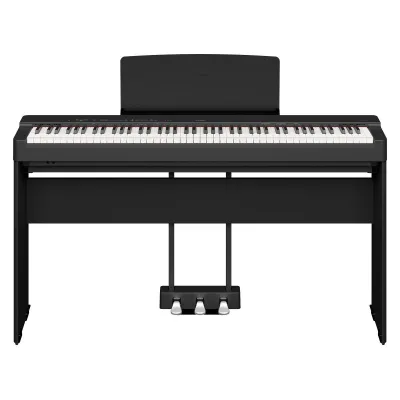
Prices are valid at publication and may change. Please refer to the product page for the latest price.
Finally, establishing a realistic budget is essential. For a high-quality entry-level digital piano with fully weighted keys, beginners in Singapore should generally expect to invest between S$800 and S$1,300. This range typically covers the keyboard itself, though you must also account for essential accessories like a stable stand, a comfortable bench, and a pair of quality headphones for silent practice.
Evaluating the Yamaha P-225 Key Action and Touch
The physical feel of the keys is the most critical factor for any beginner, as it directly influences how you develop finger strength, dexterity, and dynamic control. According to the manufacturer’s specifications, the Yamaha P-225 features the Graded Hammer Compact (GHC) key action. This mechanism is designed to replicate the graded feel of an acoustic piano, where the keys in the lower register feel heavier to the touch than those in the higher register.

Weighted keys are highly recommended by piano instructors because they teach your hands how to control volume and tone through physical force. Without this resistance, transitioning to an acoustic piano later can feel incredibly difficult, as your fingers will lack the necessary muscle memory and control.
To ensure this key action suits your personal preference, plan a visit to an authorized local dealer in Singapore. When testing the instrument in person, pay close attention to the physical resistance of the keys and how quickly they return to their resting position. Listen carefully to the mechanical noise of the keys when the volume is turned down, and verify that the key surface texture provides a secure grip that prevents your fingers from slipping during longer practice sessions.
Checking Learning Features and Sound Capabilities
A great beginner digital piano should offer tools that make daily practice more efficient and engaging. Reviewing the official user manual reveals that the Yamaha P-225 includes essential learning features such as a built-in metronome for rhythm training, a record function to analyze your progress, and a Duo mode. Duo mode splits the keyboard into two identical halves with the same pitch range, allowing a teacher and student to play side-by-side during lessons.
Modern connectivity is another area to verify before purchasing. The P-225 is designed to integrate with educational software, including Yamaha’s Smart Pianist app, which allows you to control settings, select voices, and view interactive sheet music directly from a tablet or smartphone. You should check the official compatibility lists to ensure your specific mobile device and operating system are supported via the keyboard’s USB or wireless connections.
For those living in shared apartments or HDB flats, sound management is crucial. The instrument features built-in speakers, but it also includes dedicated headphone jacks. This allows you to practice at any hour of the day or night without disturbing family members or neighbors, making it much easier to maintain a consistent daily practice routine.
Space, Portability, and Setup Requirements
Understanding the physical footprint of the instrument ensures it will fit comfortably into your designated practice area. The Yamaha P-225 is designed as a slim, portable digital piano, making it significantly more compact than traditional console models. You should measure your available floor space and compare it against the official product dimensions and weight specifications before making a purchase.
When buying this model, it is important to verify exactly what is included in the standard retail box. Typically, the basic package includes the keyboard unit, a music rest, a power adapter, and a basic sustain footswitch. However, a simple footswitch can slide around on tiled or wooden floors, so you may want to budget for a more substantial, piano-style sustain pedal.
For long-term home use, the stability of your setup is paramount. While a portable X-stand is convenient for storage, a dedicated wooden stand, such as the compatible Yamaha L-200, provides a much more stable foundation that prevents the keyboard from wobbling during energetic playing. If you choose the wooden stand, you can also opt to attach the matching LP-1 three-pedal unit, which replicates the full pedal layout of an acoustic piano.
Assessing the Price Point and Overall Value
Evaluating the overall value of the Yamaha P-225 requires comparing its retail price at authorized Singapore distributors against other entry-level options on the market. While there are cheaper keyboards available, models below a certain price point often sacrifice weighted key action, which can hinder your technical development as a pianist.
When calculating your total investment, remember to factor in the cost of necessary accessories if they are not included in a promotional bundle. A complete setup—including the keyboard, a sturdy stand, a height-adjustable bench, and a pair of closed-back headphones—will add to the initial retail price.
Additionally, consider the value of local after-sales support. Purchasing your instrument through an authorized local retailer ensures that you receive a genuine product backed by a valid local warranty. This warranty provides peace of mind and access to professional repair services should you encounter any technical issues during your first few years of ownership.
Final Verdict: Is the P-225 Right for You?
The Yamaha P-225 is an excellent match for beginners who require a space-saving, portable instrument that does not compromise on key action realism. Its compact design makes it ideal for smaller living spaces, while its modern app integration and weighted keys provide a solid foundation for classical or contemporary piano training.
However, if you prefer an instrument that serves as a permanent piece of living room furniture, you might want to look at console-style digital pianos that come with integrated wooden cabinets and sliding key covers. Similarly, if your primary interest lies in music production or sound design, a dedicated synthesizer or MIDI controller with a wider variety of onboard sounds might serve your needs better.
Before making your final decision, use this checklist to confirm your readiness: verify the dimensions of your practice space, test the key action at an authorized local showroom, and confirm that your chosen retailer provides an official local warranty.
Frequently Asked Questions (FAQ)
Do I need an external amplifier for the Yamaha P-225?
For standard home practice in a typical living room or bedroom, you do not need an external amplifier. The manufacturer specifies that the P-225 is equipped with a built-in stereo speaker system that provides ample volume for personal monitoring. However, if you plan to perform in larger venues, play alongside louder instruments in a band, or practice in a noisy rehearsal space, you will need to connect the keyboard’s audio outputs to an external keyboard amplifier or a public address (PA) system.
Can I use the Yamaha P-225 as a MIDI controller?
Yes, you can use the Yamaha P-225 as a MIDI controller to interact with music production software on your computer or mobile device. The instrument features a USB-to-Host port, which allows you to transmit MIDI data directly via a standard USB cable. To set this up, consult the user manual to verify if any specific drivers are required for your operating system, connect the cable to your device, and select the keyboard as your MIDI input device within your digital audio workstation (DAW) or learning application.

Community discussion
Share your experience or ask a question. Comments are reviewed before publication.