
Selecting the right English dictionary pen requires a careful balance of optical scanning precision, linguistic authority, and physical usability. As digital learning tools continue to evolve, these handheld devices have transitioned from simple text scanners into sophisticated study companions. They offer an efficient alternative to manual typing or flipping through heavy paper volumes, allowing language learners, students, and professionals to scan printed text and receive instant definitions, translations, and pronunciations. However, the market is filled with options that vary widely in performance, database quality, and software capabilities.
To make an informed purchase, you must look beyond flashy marketing claims and evaluate the core specifications that directly impact your daily study routine. A high-quality dictionary pen should not only recognize text accurately across various fonts and paper types but also provide definitions from trusted, authoritative lexicographical sources. Furthermore, the physical design must support comfortable, long-term use, while the software ecosystem should offer seamless updates and offline functionality. By understanding these key features, you can select a device that aligns with your specific learning goals, academic level, and budget.
Evaluate Scanning Accuracy and Translation Depth
The primary measure of any dictionary pen is its optical character recognition (OCR) capability. This technology determines how quickly and accurately the device translates physical printed characters into digital text. When evaluating a pen, check the manufacturer’s specifications regarding font compatibility and text size limits. A reliable device should easily recognize standard serif and sans-serif fonts, as well as stylized or italicized text commonly found in literature and academic journals. Additionally, consider the paper quality you will scan most frequently; while standard matte textbook paper is easily read by most optical sensors, glossy magazine pages or highly reflective textbook covers can cause glare, which may interfere with the scanner’s accuracy.
Products mentioned in this guide
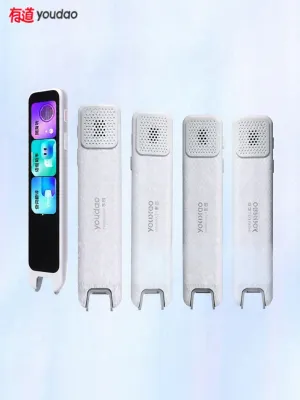
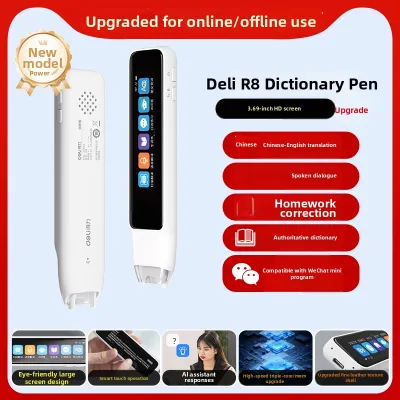
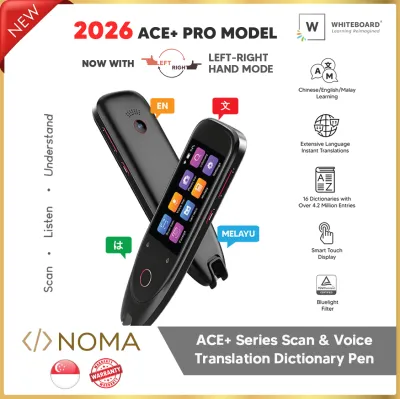
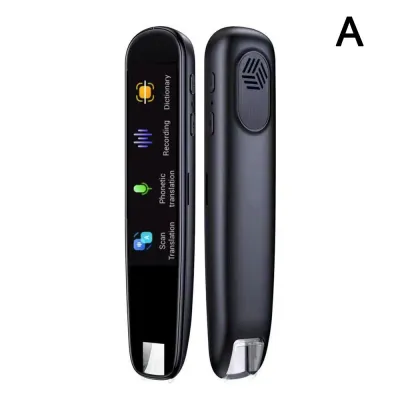
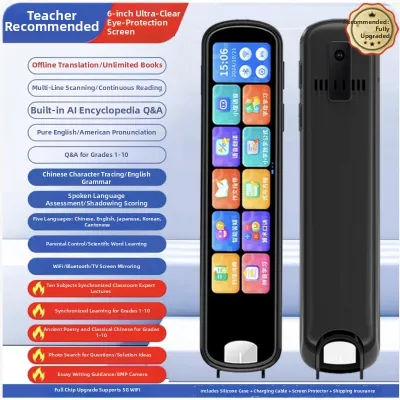
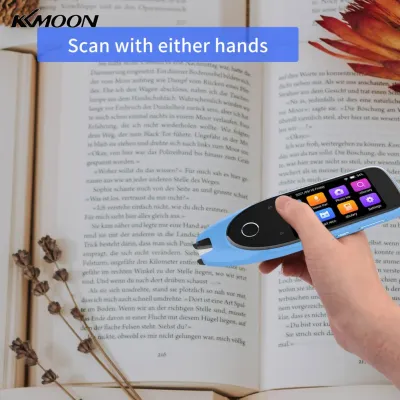
Prices are valid at publication and may change. Please refer to the product page for the latest price.
Beyond raw text recognition, the depth of the built-in linguistic database is what truly defines the utility of a dictionary pen. A device with a massive vocabulary count is of little use if the definitions are poorly written or lack grammatical context. Look for pens that feature licensed, copyrighted databases from established publishers, such as Oxford University Press, Collins, or Merriam-Webster. These authoritative dictionaries provide accurate phonetic transcriptions, clear parts of speech, collocations, and authentic example sentences. Verify whether the device includes the complete, unabridged editions of these dictionaries or merely simplified, abridged versions that might omit advanced academic terminology.
Translation modes are another critical factor to assess, especially if you plan to read complex texts. Basic dictionary pens are designed for single-word lookups, which is ideal for quick vocabulary checks. However, advanced learners and professionals often require multi-line sentence scanning and paragraph translation. This feature relies on sophisticated machine translation algorithms to analyze the context of an entire sentence, ensuring that idioms, phrasal verbs, and complex grammatical structures are translated accurately. Check if the pen allows you to sweep the optical tip across consecutive lines of text without losing the continuity of the sentence.
Finally, audio pronunciation features play a vital role in language acquisition. Hearing a word pronounced correctly helps reinforce memory and improves spoken English skills. When comparing devices, distinguish between real human voice recordings and synthesized text-to-speech (TTS) engines. Human voice recordings, typically provided by native speakers, offer natural intonation, rhythm, and accentuation. Synthesized voices, while highly advanced in modern devices, can sometimes sound robotic or misplace emphasis on multi-syllable words. Ensure the device allows you to toggle between British and American English pronunciations, as this is particularly important for students preparing for specific international examinations.
Assess Hardware, Display, and Daily Ergonomics
The physical design of a dictionary pen directly influences how comfortable and practical it is to use during extended study sessions. The display screen is the central interface for reading definitions, and its size and resolution are paramount. A screen that is too small or has low resolution will force you to scroll constantly to read a single definition, which disrupts your reading flow and causes eye strain. Look for a clear, high-contrast touchscreen that can display multiple lines of text simultaneously. This allows you to view the scanned word, its phonetic spelling, part of speech, and the primary definition at a single glance without excessive navigation.

Ergonomics and physical handling are equally important, particularly when the device is intended for different age groups. The pen should have a balanced weight distribution and a comfortable grip that prevents hand fatigue. Pay close attention to the scanning angle tolerance specified by the manufacturer. Some pens require you to hold the device at a strict, upright ninety-degree angle to scan successfully, which can feel unnatural and tiring. Better designs offer a wider scanning angle tolerance, typically between sixty and eighty degrees, allowing you to hold the pen like a traditional writing instrument. If the user is left-handed, verify that the pen supports left-to-right scanning directions and features a screen rotation setting to accommodate left-handed grips.
Battery capacity and the charging interface are critical for ensuring uninterrupted daily use. Look for a device equipped with a rechargeable lithium-ion battery, and check the manufacturer’s specified battery capacity in milliampere-hours (mAh). While actual battery life depends on screen brightness and Wi-Fi usage, a larger battery capacity generally translates to fewer charging interruptions. Additionally, prioritize devices that utilize a standard USB-C charging interface. This matches the cables used by most modern smartphones and laptops, allowing you to charge the pen easily at home, in school, or at a library without carrying proprietary charging cords.
Build quality and overall durability must not be overlooked, especially for younger students who may carry the pen in a crowded school bag. The scanning tip is a moving part, often spring-loaded to activate the optical sensor and light-emitting diodes when pressed against paper. Inspect the build quality of this tip mechanism, as it is the most vulnerable point of failure. A robust, well-constructed tip should glide smoothly across paper without scratching the surface or feeling loose. For added protection, check if the manufacturer includes a protective silicone sleeve or a hard-shell carrying case to safeguard the screen and optical sensor from scratches and impacts.
Check Connectivity, Software, and Content Updates
Understanding how a dictionary pen integrates with your study environment and maintains its database over time is essential for long-term satisfaction. One of the most critical decisions you will make is choosing between offline and online functionality. In many academic settings, such as school libraries, classrooms, or examination halls, Wi-Fi access may be restricted, unstable, or entirely prohibited. Therefore, a high-quality dictionary pen must possess a robust offline database that contains all core dictionaries and translation engines. Online connectivity should be treated as an auxiliary feature, used primarily for cloud-based translation of complex paragraphs, voice assistant queries, or accessing specialized online databases.
The underlying operating system of the pen also plays a significant role in its performance and longevity. Closed operating systems, which are custom-built by the manufacturer solely for dictionary and translation functions, tend to be highly stable, fast-booting, and free from distractions. They prevent students from installing unauthorized third-party applications, ensuring the device remains a dedicated learning tool. Conversely, some pens run on open or semi-open operating systems that allow the installation of approved educational apps. While this offers greater flexibility, it can sometimes lead to slower system performance, shorter battery life, and potential software conflicts.
Regular software maintenance is crucial for keeping the device functional and up to date. Language is constantly evolving, with new words, idioms, and technical terms entering the lexicon regularly. Furthermore, manufacturers frequently release software patches to improve OCR accuracy, fix system bugs, and enhance user interface responsiveness. Verify that the device supports over-the-air (OTA) updates via Wi-Fi. This allows you to update the firmware and expand the built-in dictionary databases easily without needing to connect the pen to a computer using specialized software.
Data synchronization and export options are valuable features for active learners who want to review their scanned vocabulary. When reading a book, you will likely scan numerous unfamiliar words. A good dictionary pen should allow you to save these words to a personal vocabulary list or “favorites” folder directly on the device. Check if the pen can sync this data with a companion mobile application or cloud storage service. This enables you to export your saved word lists to your smartphone, tablet, or computer, where you can organize them, create digital flashcards, or print them out for structured revision sessions.
Match Features to Your Learning Stage and Goals
Not all dictionary pens are created equal, and the ideal device for a primary school student will differ significantly from one suited for a university researcher or a working professional. Matching the pen’s features to the user’s specific learning stage ensures that you do not pay for unnecessary, complex features or, conversely, end up with a device that lacks the depth required for advanced study.
For young learners who are just beginning their English language journey, the focus should be on simplicity, engagement, and physical durability. Look for pens that prioritize phonics instruction, helping children understand the relationship between letters and sounds. Gamified elements, such as interactive spelling challenges or pronunciation grading systems that award stars for correct speech, can make learning more engaging. The user interface should be highly visual, featuring large icons and simplified definitions that are easy for a child to comprehend. Physical durability, lightweight construction, and a comfortable grip for small hands are also paramount for this age group.
Secondary school students require a more academic tool focused on vocabulary expansion and exam preparation. At this stage, the dictionary pen should include comprehensive grammar explanations, verb conjugations, and detailed collocations that show how words are used in context. Look for devices that pre-install subject-specific glossaries, such as science, mathematics, and literature terms, which are invaluable for secondary school coursework. The ability to scan and save complex sentences for later grammatical analysis is also highly beneficial for students preparing for national or international English examinations.
University students and working professionals demand the highest level of translation depth and specialization. If you are studying or working in a specialized field, verify if the dictionary pen supports professional glossaries, such as medical, legal, engineering, or business English databases. Multi-language support is also a key consideration; professionals working in multicultural environments may require a pen that translates seamlessly between English and other languages, such as Chinese, Malay, or Tamil. For this group, fast scanning speeds, large storage capacities for extensive databases, and robust data export options are critical for research and report writing.
For readers with visual impairments or learning differences like dyslexia, a dictionary pen can serve as a powerful assistive technology. When selecting a device for this purpose, emphasize accessibility features. Look for pens with high-quality text-to-speech capabilities that can read aloud entire scanned paragraphs clearly and at adjustable speeds. A large, high-contrast display screen with adjustable font sizes and background colors can significantly reduce visual fatigue. Additionally, ensure the device features clear audio output through a high-quality built-in speaker, as well as a standard headphone jack or Bluetooth connectivity for private listening.
Build Your Pre-Purchase Verification Checklist
Before finalizing your purchase, it is essential to establish a structured verification process to ensure you are buying a genuine, high-performing device that meets your academic needs. The market for electronic learning tools includes various parallel imports and grey-market devices that may lack local warranty coverage or feature outdated software. To protect your investment, use the following checklist to verify product claims and seller authenticity.
First, verify that you are purchasing from an authorized seller or the official brand store. This ensures that the device comes with a valid local warranty, which is crucial for resolving any hardware defects, screen malfunctions, or battery issues that may arise. Check the specific terms of the warranty, including the duration and the process for claiming repairs or replacements. Additionally, review the seller’s return policy; since a dictionary pen is a highly tactile device, having a clear return window allows you to test the pen’s performance and return it if it does not meet your expectations.
Second, cross-reference the included dictionary copyrights and editions. Do not rely solely on vague product descriptions that promise “millions of words.” Instead, look for explicit mentions of licensed databases from reputable publishers. Check the official manufacturer website or product manuals to confirm which specific editions are pre-installed on the device. This step is particularly important for students who must adhere to specific academic standards or examination syllabi that require particular dictionary references.
Third, if possible, visit a physical retail store to test the device in person. This hands-on evaluation is the best way to assess the scanning tip’s responsiveness, the screen’s touch sensitivity, and the overall comfort of the grip. Test the pen on different types of paper, including matte textbooks and glossy magazines, to observe the scanning speed and accuracy firsthand. If you are purchasing online and cannot test the device physically, read verified customer reviews that focus on long-term durability and real-world scanning performance rather than initial impressions.
Finaly, set a realistic budget based on your identified learning profile. In Singapore, basic offline dictionary pens typically start around S$100, offering standard word lookups and basic pronunciation features. Mid-range devices, priced between S$150 and S$250, generally introduce larger touchscreens, licensed dictionaries, and better offline translation capabilities. Premium models, which can range from S$250 to S$400 or more, offer extensive multi-language databases, advanced cloud-based translation, professional glossaries, and robust companion app integration. Prioritize the features that are essential for your daily study routine to avoid overpaying for advanced functions you may never use.
Frequently Asked Questions (FAQ)
Can an English dictionary pen replace a traditional paper dictionary?
A dictionary pen offers unmatched speed and convenience, allowing you to look up unfamiliar words in seconds without disrupting your reading flow. This efficiency is highly beneficial for maintaining comprehension during long reading sessions. However, traditional paper dictionaries still hold value for deep study. Flipping through a physical book encourages spatial memory retention, as you associate a word’s definition with its physical location on a page. It also facilitates serendipitous word discovery, exposing you to adjacent vocabulary that you might not have searched for intentionally. For most learners, a dictionary pen is an excellent primary tool for daily reading, while a paper dictionary remains a valuable resource for intensive linguistic study.
Do dictionary pens work on digital screens like e-readers or tablets?
Most dictionary pens are optimized for printed paper and may struggle when scanning digital screens, such as tablets, smartphones, or computer monitors. The optical character recognition (OCR) sensors in these pens rely on reflected light to capture images of the text. Emissive backlit screens can cause severe glare and pixel distortion, which interferes with the sensor’s ability to recognize characters accurately. While some pens can scan e-ink screens on specialized e-readers under specific lighting conditions, the performance is generally inconsistent. If you primarily read digital books, it is usually more effective to utilize the built-in dictionary lookup features of your e-reader or tablet software rather than using a physical scanning pen.
Is a subscription required to access the full dictionary database?
For the majority of reputable dictionary pens, a subscription is not required to access the core pre-installed dictionary databases. When you make a one-time hardware purchase, it typically includes lifetime access to the built-in licensed dictionaries and offline translation engines. However, some manufacturers may offer optional premium cloud services that require an ongoing subscription. These subscription-based features might include advanced artificial intelligence translation engines, real-time voice translation, specialized professional glossaries, or cloud storage for syncing large volumes of scanned vocabulary. Always review the product specifications carefully before purchasing to confirm which databases are included permanently and which require additional fees.

Community discussion
Share your experience or ask a question. Comments are reviewed before publication.