
Choosing your first musical instrument is an exciting step, but the wide array of options can make the decision feel challenging. For beginners, compact instruments offer an accessible, low-pressure way to explore music without committing to a large, expensive setup. The Yamaha PSS-A50 and Yamaha PSS-F30 are two popular mini keyboards designed specifically for entry-level players, children, and mobile musicians. While they share a similar physical footprint and the same brand heritage, they are built for entirely different musical paths.
Your choice between these two models depends on your creative goals, your preferred learning style, and how you plan to interact with technology. If you want to connect your keyboard to a computer, use music production software, and play with expressive dynamics, the PSS-A50 is designed to support your growth. If you prefer a straightforward, self-contained instrument to learn basic melodies, explore automatic accompaniments, and practice without complex settings, the PSS-F30 is the more suitable starting point. Both instruments offer a compact design, making them highly practical for space-conscious homes in Singapore.
Key Feel and Playability for Beginners
When starting your musical journey, the physical interaction with the keys shapes your early playing habits and technique. Both the PSS-A50 and PSS-F30 feature 37 mini keys, which are specifically scaled for smaller hands, children, or musicians who need a highly portable layout. Because these keys are narrower and shorter than standard piano keys, they allow beginners to reach intervals easily without straining. However, the mechanical behavior of these two keybeds differs significantly, which directly impacts how you develop your playing technique.
Products mentioned in this guide
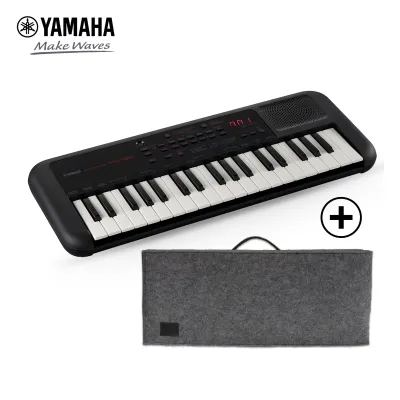
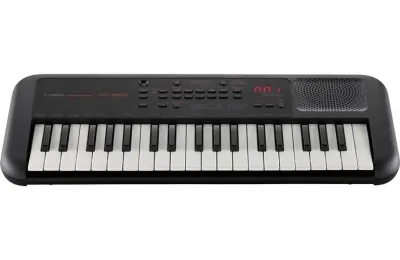
![Yamaha PSS-E30 PSS-A50 Mini Keyboard 37 Keys High Quality PSSE30 PSSA50 Kid Toy Gifts Light Weight Music Instrument Battery USB Powered PSS E30 A50 Absolute Piano The Music Works [LIMITED STOCK]](https://img.lazcdn.com/g/p/febce4b8975c04bd0986e8d090fe4ee1.png_400x400q80.png_.webp)
Prices are valid at publication and may change. Please refer to the product page for the latest price.
The PSS-A50 is equipped with touch-sensitive (velocity-sensitive) keys. This means the instrument detects how hard or soft you strike a key, translating that physical force into volume and tonal variation. If you press gently, the sound is quiet; if you strike firmly, the sound is loud. This feature is essential for learning musical expression and dynamics, helping you transition more smoothly to full-sized digital pianos or acoustic instruments in the future. It teaches your fingers to control the weight and speed of each keystroke, which is a fundamental skill in piano playing.
In contrast, the PSS-F30 features a non-velocity-sensitive keybed. No matter how hard or soft you press the keys, the volume remains at a constant level. While this limitation makes it less suitable for developing expressive classical piano techniques, it provides a highly consistent and predictable response for absolute beginners. If you are solely focusing on learning note names, basic finger coordination, and simple melody lines, the lack of touch sensitivity can actually reduce frustration, as every note will sound clearly regardless of finger strength.
Portability is a major design highlight for both models, especially if you live in a compact apartment or plan to practice on the go. Both keyboards are exceptionally lightweight and compact, allowing you to store them easily on a shelf, in a drawer, or carry them in a backpack. Their small footprint means you do not need a dedicated keyboard stand; any desk, dining table, or lap serves as a functional practice space. This makes them well-suited for Singaporean homes where space is at a premium and multi-functional furniture is common.
Sound Engine and Built-in Learning Tools
The internal sound engines of these two keyboards cater to different learning styles and musical interests. The PSS-F30 is designed as an educational and self-contained entertainment tool, featuring a wide variety of built-in voices, automatic accompaniment styles, and preset songs. These accompaniment styles act as a virtual backing band, helping beginners understand rhythm, timing, and chord progressions by playing along with different musical genres. It also features a Smart Chord function, which allows you to play full, complex chords with a single finger, making it rewarding for absolute beginners who want to hear complete arrangements early on.

The PSS-A50 takes a more creative, production-oriented approach. It features a built-in arpeggiator, which generates complex rhythmic patterns and phrases from single notes or chords, and a motion effect function that modifies the sound in real time. While it has fewer built-in voices and accompaniment styles than the F30, its sound engine is tailored for creating modern electronic tracks, loops, and soundscapes. The voices on the A50 are designed to be clean and versatile, making them highly suitable for recording and layering in a digital environment.
Both models feature built-in speakers and a headphone jack, which is incredibly useful for practicing in shared living environments. In Singapore’s high-density housing, plugging in a pair of headphones allows you to practice late at night or early in the morning without disturbing family members or neighbors. The headphone jack also doubles as an auxiliary output if you ever want to connect the keyboard to external speakers or an audio interface for a larger sound.
Connectivity for Apps and Software
Your choice between these two instruments should also consider how much you want to integrate digital technology into your learning process. The PSS-A50 features a micro-USB port that supports MIDI connectivity. This allows you to connect the keyboard directly to a computer, tablet, or smartphone, transforming it into a functional MIDI controller. You can use it to input notes into digital audio workstations (DAWs), interact with interactive learning apps, or control software synthesizers. This connectivity makes the A50 a versatile tool that can grow with you as you explore music production.
The PSS-F30 lacks this USB-MIDI connectivity, meaning it cannot communicate with external music software or apps. It is strictly a standalone instrument. If you plan to use online tutorials that require a MIDI connection to track your playing accuracy, or if you want to explore digital music production, the F30 will limit your options. It is designed to be played as-is, without the need for external devices or software configurations.
For power, both models offer flexible options to suit different setups. They can run on standard AA batteries, making them wireless and portable for outdoor use or travel. Alternatively, they can be powered via a USB power adapter or a USB power bank. This flexibility ensures you can practice even when you are far from a wall outlet, whether you are in a classroom, a park, or traveling.
Evaluating Price and Bundle Value
When budgeting for your first keyboard, it is important to look beyond the initial price tag and evaluate the complete package. Because retail prices can fluctuate, you should check authorized local music retailers and online marketplaces in Singapore to compare current S$ pricing. Keep in mind that promotional periods, school holidays, or student discounts can significantly alter the final cost.
Always verify exactly what is included in the box before making your purchase. Some retail packages include a USB power cable but omit the actual AC wall adapter, requiring you to use an existing phone charger or purchase a compatible adapter separately. If you plan to use the keyboard away from a power source, factor in the ongoing cost of rechargeable AA batteries or a dedicated power bank. Comparing these additional costs will help you determine the true out-of-pocket expense for each model.
Decision Guide: Which Keyboard Fits Your Needs?
To make the right choice, evaluate your long-term musical goals against the specific strengths of each model.
Choose the PSS-A50 if:
- You want to develop dynamic playing habits using touch-sensitive keys.
- You plan to connect your keyboard to a computer or tablet for music production or learning apps.
- You are interested in electronic music, sound design, and using an arpeggiator to create tracks.
- You want an instrument that can double as a portable MIDI controller for a home studio.
Choose the PSS-F30 if:
- You are looking for a straightforward, highly affordable instrument to introduce yourself or a child to basic music concepts.
- You want a wide variety of built-in instrument sounds and automatic accompaniment styles to play along with.
- You prefer a standalone device that does not require connection to computers or external software.
- Your primary focus is learning simple melodies and basic keyboard layout without the distraction of advanced settings.
Before finalizing your decision, remember that both models are mini keyboards with physical limitations. If your primary goal is to learn traditional classical piano, you will eventually need to transition to an instrument with 88 full-sized, weighted keys to build the necessary finger strength and technique. However, as a portable, entry-level starting point, either of these Yamaha models offers a reliable and engaging way to begin your musical journey.
Frequently Asked Questions (FAQ)
Can I use these mini keyboards to learn proper piano technique?
Mini keyboards are excellent for learning basic music theory, note reading, and simple melody lines, but they are not designed for developing proper classical piano technique. The keys are physically smaller and lighter than those on an acoustic piano, meaning they do not offer the weighted resistance needed to build finger strength and control. If your goal is to play traditional piano repertoire, these models serve as a great temporary starting point, but you should plan to upgrade to a digital piano with 88 weighted keys as your skills progress.
Do I need to buy a separate power adapter for either model?
You should carefully check the product listing or retail packaging details, as the included accessories can vary by region and retailer. While both models typically come with a USB power cable, they often do not include the actual AC wall adapter plug. You can easily power either keyboard using a standard 5V USB power adapter (such as a mobile phone charger), a portable USB power bank, or four AA batteries. If you prefer a dedicated wall connection, verify with your local retailer if they offer a bundle that includes a compatible AC adapter.

Community discussion
Share your experience or ask a question. Comments are reviewed before publication.